
 HD Cameras and Webcam
 Projectors and Speakers
 VOIP Phones and Gateway
 Access Control
 LTE and 5G Devices
 Smart Sensors And Automation
 Fiber and SFP Modules
 Firewall & Cloud Controllers
 Network Adapters and Accessories
 Network Switches
 PoE Switches
 Point To Point Wireless Radio
 Routers
 Wireless Access Points
 IP Cameras
 Memory Cards
 NVR
NVR Smart WiFi Cameras
 Storage Devices
 Desktop & Laptop RAMs
 Internal and External Hard Drives
 NAS Storage & Enclosures
 SSD and NVMe Drives
 USB Flash Drives


5G Router for Gaming India (2026): Real Latency, CGNAT truth & when NOT to use them

TL;DR: Quick Takeaways
The Verdict: 5G routers for gaming work for backup internet, hostels/PG setups, and tier-2/3 cities without fiber, but NOT for competitive FPS, ranked play, or evening-only gamers (7–11 PM).
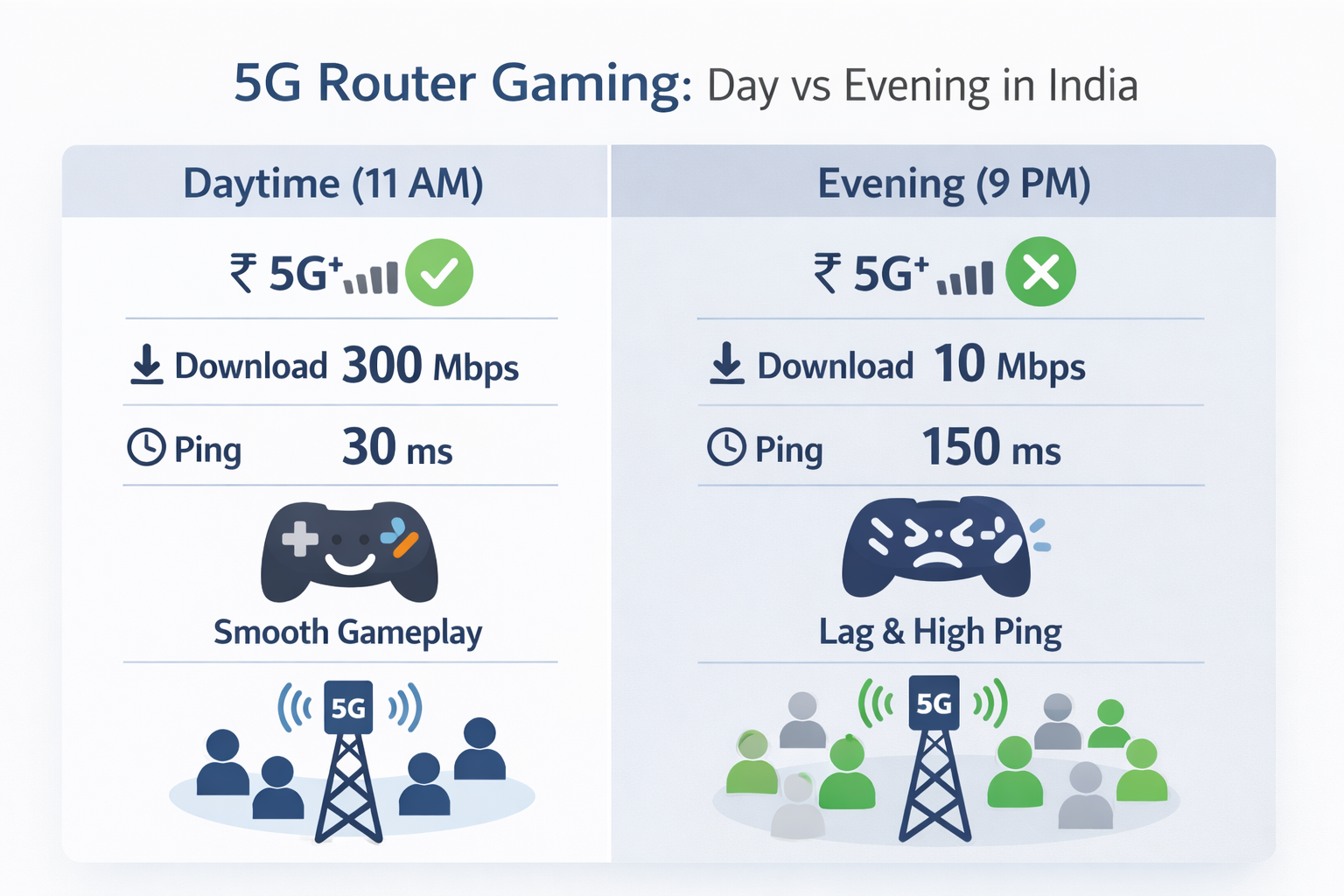
Real Performance: Daytime ping: 25–40 ms (playable). Evening ping: 80–200 ms (unplayable). Fiber stays stable at 10–20 ms 24/7.
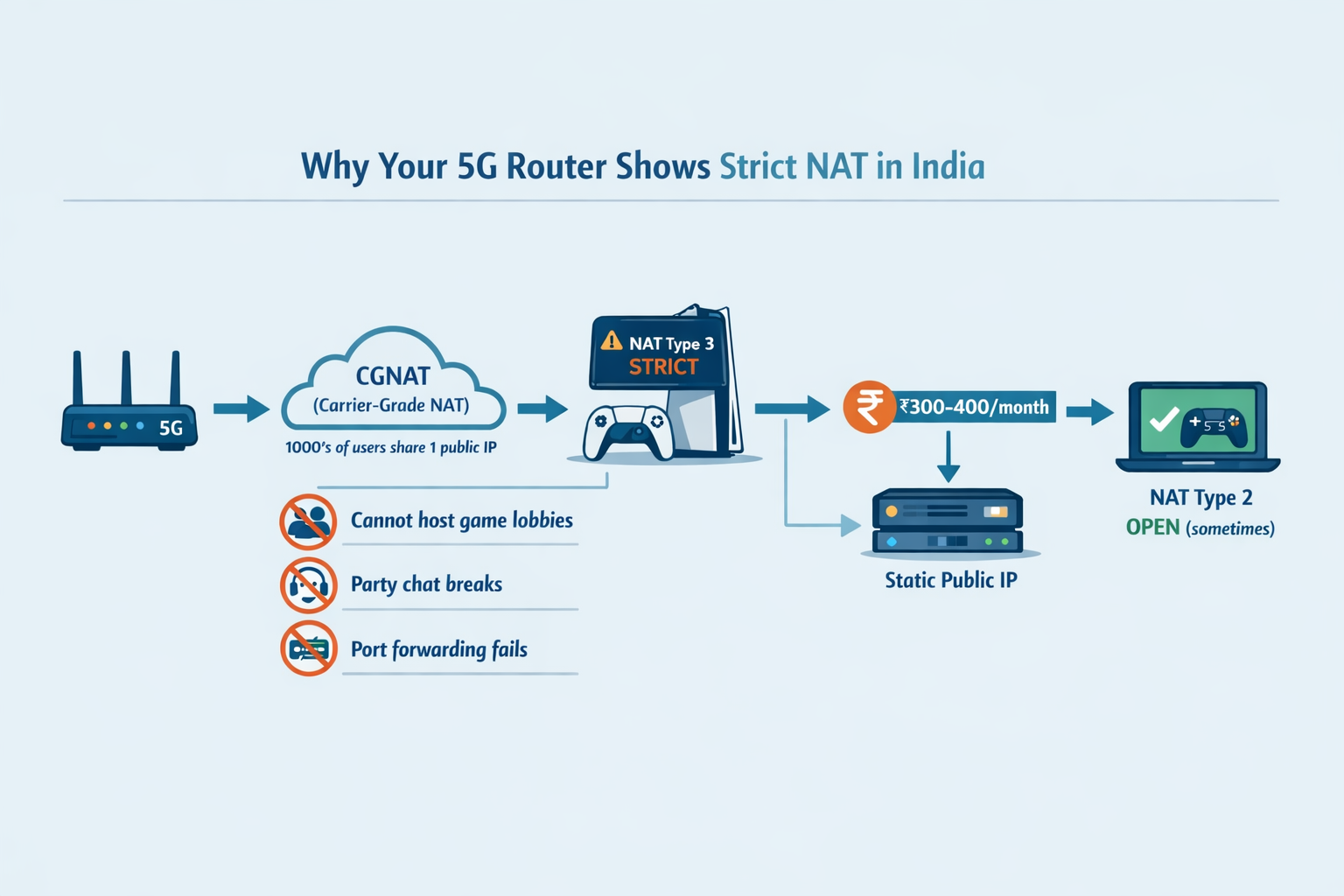
The CGNAT Problem: 5G routers cause Strict NAT Type 3 on PS5/Xbox. You can't host lobbies, party chat breaks, and port forwarding doesn't work without paying ₹300–400/month for public IP.
Peak Hour Reality: Between 7–11 PM, speeds drop 30–50% and ping spikes to 80–150 ms due to tower congestion. Evening-only gamers should avoid 5G entirely.
Best Use Cases: Temporary setups (students, PG), backup internet, tier-2/3 cities without fiber, and casual/mobile gaming during daytime.
A 5G router for gaming is one of the hottest topics in Indian gaming communities, but the reality on the ground is far more nuanced than flashy advertisements suggest. While telecom operators promise blazing 1 Gbps speeds and ‘perfect for gaming’ connectivity, the actual 5G gaming experience in India tells a different story: 80–150 ms ping spikes between 7-11 PM, strict NAT Type 3 on consoles, and speeds plummeting significantly during evening hours.
This isn't a sales piece pushing 5G routers. Instead, we're diving deep into the truth about using 5G for gaming in India based on real user experiences, technical testing, and ground realities from thousands of Indian gamers. According to recent data, peak hours (7 PM - 12 AM) can see 5G speeds drop 30-50% versus off-peak periods, with network congestion from 400 million users significantly impacting performance.
Consider this Reddit reality check: One Bangalore-based Valorant player on r/IndianGaming reported that his Jio 5G router delivered 35–45 ms ping during daytime but skyrocketed to 80–150 ms at 8 PM, forcing him to switch to Airtel Fiber, where he now enjoys stable 12–18 ms. Conversely, a Jaipur Battlegrounds Mobile player praised Airtel 5G for consistent 20–30 ms at 150 Mbps, saying it "feels better than cheap local broadband" for mobile gaming.
If you’re looking for the best 5G router for gaming India, start with our shortlist here: Best 5G SIM Routers in India (2026) guide
5G router for gaming performance: latency, jitter & peak hours
For a 5G router for gaming, the real metrics are ping stability, jitter, and peak-hour behaviour; not raw Mbps
5G router ping vs speed: Why 300 Mbps can still lag
Here's the fundamental misunderstanding that trips up most gamers: Mbps (megabits per second) measures throughput, while ms (milliseconds) measures latency. Think of it this way - Mbps is like the width of a highway (how many cars can travel), while ms is how fast each individual car reaches its destination. You can have an 8-lane highway (300 Mbps) but if every car takes 150 milliseconds to reach the endpoint, your gaming experience will be terrible. This is why 5G router latency gaming performance depends more on ping consistency than headline Mbps
According to Tata Play Fiber's analysis, 5G/Fixed Wireless delivers speeds of 50-300 Mbps with pings that can vary between 20 ms and 60 ms, depending on the tower load. In practical Indian scenarios, a 5G speed test might show 300 Mbps download, but Valorant simultaneously displays 80–150 ms ping with frequent spikes during evenings. This happens because gaming requires consistent, low-latency data transmission and not just high bandwidth.
Jitter (ping variation) and packet loss compound the problem. Jitter is the inconsistency in your ping. One moment it's 30 ms, the next it jumps to 120 ms. This creates rubber-banding effects where your character teleports across the screen. Packet loss means some of your inputs never reach the server, resulting in shots not registering or abilities failing to activate. 5G networks in India typically deliver 20-40ms latency versus 5-15ms for fiber, which works fine for most gaming, but competitive esports players in latency-sensitive titles like CSGO and Valorant may notice the difference.
Real Indian numbers – Fiber vs 5G
Connection & Scenario | Download Speed | Avg Ping to Mumbai Server | Jitter (Variation) | Evening (7–11 PM) Ping | Gaming Verdict |
|---|---|---|---|---|---|
Airtel/Jio Fiber (100–300 Mbps) | 100–300 Mbps | 10–20 ms | 5–10 ms | 15–25 ms | Excellent for ranked |
5G Router Off-Peak (Daytime) | 200–400 Mbps | 25–40 ms | 20–40 ms | — | OK for casual |
5G Router Peak (7–11 PM) | <100 Mbps | 80–200 ms | 50–200 ms | 80–200 ms | Avoid competitive |
4G Hotspot | 10–40 Mbps | 50–90 ms | 30–100 ms | 90–200 ms | Only mobile games |
These numbers come from aggregated testing across multiple Indian metros and tier-2 cities. The stark difference between off-peak and peak performance on 5G is the critical factor most marketing conveniently ignores. For a 5G router for gaming, peak hours are the real boss fight; latency and jitter can spike even when your speed test still looks fine.
Unlike fixed fiber connections that maintain consistent performance, 5G is a shared wireless medium where hundreds of users in your vicinity compete for the same tower resources. During prime time, when everyone is streaming Netflix, scrolling Instagram, and gaming, the tower gets overwhelmed.
For comparison, fiber broadband maintains steady performance because each connection has dedicated bandwidth. Even if your neighbors are also gaming, your fiber line isn't directly competing with theirs at the physical layer.
The CGNAT problem nobody talks about
If you’re using a 5G router for gaming on PS5/Xbox, CGNAT is often the hidden reason your NAT stays Strict
What is CGNAT (In plain English)
Imagine your whole building has only one doorbell and one nameplate, but 500 families live inside. When a delivery guy comes with a package, he only sees “Sunrise Apartments” on the gate. He has no flat number, so he has no idea which family should get the package and just leaves. That is what CGNAT feels like for gaming.
On a normal home internet or fiber connection, your house gets its own unique house number (public IP address. When friends or game servers want to connect to you, they know exactly where to send the traffic. With CGNAT (Carrier-Grade NAT), your ISP puts hundreds or thousands of customers behind one shared “building address” (shared public IP) to save limited IPv4 addresses. Your 5G router or AirFiber box only gets an internal/hidden flat number like 10.x.x.x or 100.64.x.x instead of a real public address. The ISP then tries to sort all incoming and outgoing traffic for everyone, but direct deliveries to your “flat” from the outside world no longer work properly.
This setup is very common on 5G routers, mobile hotspots, and AirFiber-style products in India, because mobile networks almost always use CGNAT by default. It’s cheaper and easier for the ISP, but it quietly breaks many things gamers care about. Most 5G router CGNAT gaming issues show up as Strict NAT on consoles, broken party chat, and lobbies you can’t host even after “correct” port forwarding.
How CGNAT breaks gaming
Now imagine you are trying to host a house party:
- The building has one main gate, with a very strict guard.
- Your friends reach the gate and say, “We’re here for Rahul in Flat 502.”
- The guard shrugs: “I have 500 Rahuls here and no flat list, so I can’t send you to the right one.
CGNAT wreaks havoc on gaming in multiple ways:
- Strict NAT Type 3 on PS5/Xbox: Your console can't establish direct peer-to-peer connections, limiting who you can play with and causing party chat issues
- Cannot host lobbies: Games like FIFA, COD, or Minecraft that require you to host sessions simply won't work properly; you can only join lobbies hosted by others
- P2P matchmaking failures: Games using peer-to-peer networking struggle to establish stable connections
- Voice chat problems: Party voice often lags, breaks up, or fails to connect entirely with certain friends
Port forwarding impossible: Normally, you can tell your home router: “If anyone at the gate asks for the ‘Gaming Room’ door (this port number), send them straight to my PS5/PC.” That’s called port forwarding. But with CGNAT there is a bigger ISP gate in front of your home gate. Even if you set port forwarding correctly on your 5G router, the packets never reach it, because they get stuck at the ISP's
"Why does my PS5 show strict NAT on 5G router?"
This question dominates Indian gaming forums. A typical scenario from a Mumbai gamer on r/IndianGaming in September 2025: "Got Jio AirFiber for my PS5. Speed test shows 200 Mbps but NAT Type shows as 3 (Strict). Can't join a friend's COD lobby, party chat keeps disconnecting. Spent hours trying port forwarding; nothing works. Is there a fix?"
The brutal truth: under CGNAT, you can't simply 'port forward' because the ISP-level NAT prevents your router from receiving incoming connections even if you configure everything correctly. When you have double NAT (5G router creates one NAT layer, then your home router creates another) plus CGNAT from the ISP, achieving Open NAT becomes nearly impossible without paying extra for specific solutions.
Is there any fix for this? (realistic options)
You do have options, but each comes with trade‑offs:
- Ask ISP for a public IP: Some ISPs will move you off CGNAT or give a static/dedicated IP if you pay extra (often ₹300–₹400/month). This is the cleanest way to fix Strict NAT and make port forwarding work again.
- Remove extra NAT at home: If you’re using a 5G router plus another Wi‑Fi router, put the second one in “Bridge/Access Point” mode or use DMZ so there’s only one router doing NAT. This doesn’t remove CGNAT, but it can reduce problems.
- Use VPN / dedicated IP as workaround: A gaming‑friendly VPN or dedicated IP service can sometimes bypass CGNAT, but it usually adds 10–20ms ping and has a monthly cost; okay for casual play, not ideal for hardcore FPS.
- Switch to fiber if gaming is your priority: If a good fiber connection is available in your area, moving to fiber with a real public IP is the only reliable long‑term fix for Open NAT and stable competitive gaming.
Option | What It Is | Works on 5G Router? | Cost in India | Pros | Cons |
|---|---|---|---|---|---|
Default 5G (CGNAT) | Shared public IP, private 10.x/100.x | Yes (default) | Included | Simple, plug & play | Strict NAT, no hosting |
Public Static IP | Unique IP per user | Rare on 5G, more on fiber | ₹300–400 / month | Open NAT, port forwarding | Extra cost, not all ISPs offer |
IPv6-only gaming | Using IPv6 direct to services | Limited support | Included | Avoids some NAT issues | Many games/ISPs not fully ready |
Gaming VPN with port fwd | VPN server gives public IP/ports | Works if router supports VPN | ₹500–1,000 / month | Can bypass CGNAT sometimes | Adds ping, complexity, subscription |
When 5G router for gaming actually works well (Honest use cases)
Backup Internet for gamers
This is where 5G routers genuinely shine. If you have fiber as your primary connection but live in an area with frequent power cuts or fiber cable disruptions, a 5G router makes an excellent backup. Many serious Indian gamers run a dual setup: Fiber for ranked gaming, a 5G router with a UPS for failover when fiber goes down.
The mini-UPS setup is particularly popular. Gamers on r/IndianGaming discuss using devices like Cuzor UPS systems that can power both their fiber ONT and 5G router during power cuts, preventing those dreaded AFK bans in competitive matches when electricity fails.
Temporary/hostel/PG setups
For students, young professionals, or anyone in temporary accommodation, 5G routers are a godsend. PG and hostel landlords rarely allow fiber installation with long-term contracts. A 5G router requires zero installation; just insert your SIM and you're online within minutes. It's also portable when you move locations.
If you’re setting up 5G as a backup internet or for a hostel/PG, this 5G SIM router buying guide for India (2026) with setup tips and recommended models will save you time
Tier-2/3 cities with no fiber but good 5G
Jaipur averages 181.68 Mbps while Mumbai records just 75.75 Mbps in some areas, with only 7 Indian cities exceeding 100 Mbps median speeds, as per the Ookla report. Interestingly, many tier-2 and tier-3 cities received 5G rollout before fiber infrastructure arrived. Towns across UP, Punjab, Rajasthan, and other states often have excellent 5G coverage but patchy fiber availability.
For gamers in these locations, a 5G router might actually outperform the local cable broadband options that max out at 40 Mbps with 60+ ms ping. The less congested 5G towers in smaller cities also mean better evening performance compared to metros.
Game types that are okay on 5G
Not all gaming is equally latency-sensitive:
- Mobile titles: BGMI, Free Fire, COD Mobile, and similar games are designed for mobile networks and tolerate 20–40 ms ping well
- Non-ranked casual matches: Playing unranked Valorant or Apex with friends doesn't require sub-20 ms ping
- Single-player online games: Titles like Elden Ring, Genshin Impact, or any game where you're not directly competing against other players in real-time
- Turn-based and strategy games: Civilization, card games, auto-chess—anything where milliseconds don't determine outcomes
- Co-op PvE: Monster Hunter, Warframe, or cooperative content where you're playing with friends against AI enemies
The common thread: these scenarios either don't demand ultra-low latency or they're tolerant of occasional spikes without ruining the experience.
If you just want to browse what’s currently available, you can explore FGTech’s LTE/5G routers category (SIM routers, outdoor CPEs, and industrial models) here
When to AVOID 5G routers for gaming
Competitive FPS / ranked play
If you're serious about climbing ranks in latency-sensitive titles like Valorant, CSGO, or Apex that need under 20 ms and low jitter, a 5G router will actively harm your performance. The 30–60 ms base latency with frequent spikes to 100+ ms during peak hours creates an unfair disadvantage. You'll lose gunfights where you actually shot first because your inputs reached the server 50 ms after your opponent's.
Professional and semi-professional players universally use fiber connections for this exact reason. The consistency matters more than peak speed; fiber's stable 12–18 ms beats 5G's variable 25–150 ms every single time.
Console multiplayer in India (PS5/Xbox)
What NAT types mean on PS5/Xbox and why Strict NAT breaks matchmaking. CGNAT combined with double NAT creates Strict NAT Type 3 on PlayStation and Xbox, resulting in broken party chat and hosting failures. Even if you manage to get games working, you'll face constant issues: can't hear certain friends in party chat, get kicked from lobbies randomly, unable to join specific game sessions. These aren't bugs you can patch, they're fundamental limitations of CGNAT.
Evening-only gamers (7–11 PM)
If your only free time to game is between 7 PM and 11 PM, which describes most working professionals and students, a 5G router for gaming is almost always a terrible choice. This is precisely when network congestion peaks and performance collapses. You'll spend more time frustrated at lag than actually enjoying your games.
Streamers/creator gamers
Content creators who game and stream simultaneously need 10–25 Mbps stable upload bandwidth. 5G upload speeds vary widely by tower load and spectrum; fiber is typically more consistent for creators as it provides symmetrical bandwidth (100 Mbps down = 100 Mbps up) that remains consistent.
Hardware factors that matter (chipset, antennas, cooling)
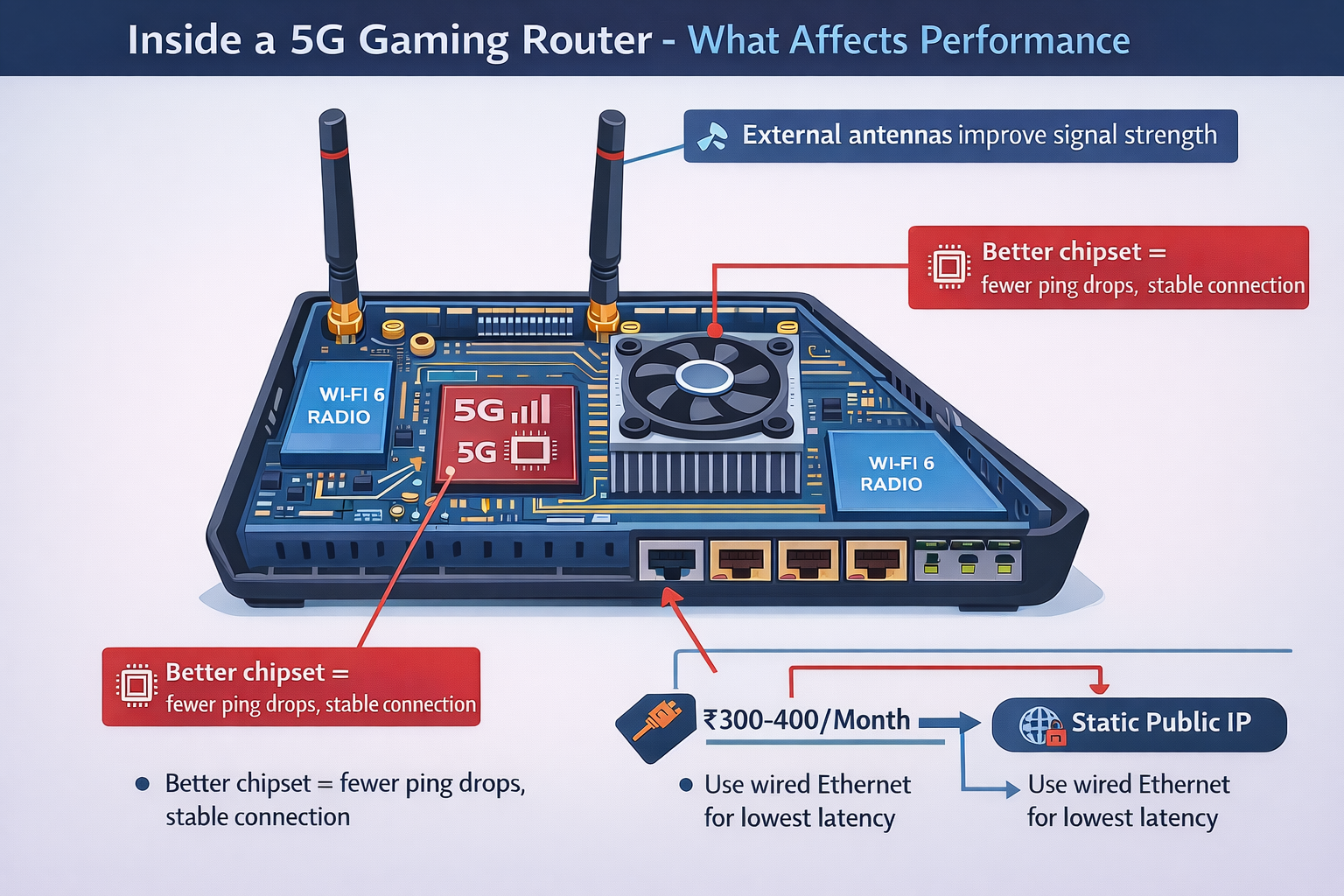
Choosing a 5G router for gaming isn’t just about ‘5G’; chipset, antennas, and thermal design decide stability
Chipset & 5G Mode (SA vs NSA)
The modem chipset inside your 5G router significantly affects stability and latency. Some high end modems support advanced carrier aggregation and generally provide better performance than cheaper alternatives. These industrial-grade modules handle cell switching more gracefully and maintain connections better under load.
Jio’s 5G rollout is based on Standalone (SA) architecture, while Airtel’s 5G has been largely Non‑Standalone (NSA) with ongoing work toward SA readiness. SA architecture theoretically offers lower latency (closer to 20 ms) because it doesn't rely on 4G core networks. However, in India, In India, 5G SA availability has been asymmetric - Jio has driven most SA availability, while other operators have relied more on NSA or are still building SA readiness Airtel has begun SA rollout in select circles but coverage remains limited.
Band Locking & External Antennas (Serious Users Only)
Advanced users sometimes lock their router to specific 5G bands or even specific cell towers to prevent mid-game band switching that causes ping spikes. However, most consumer 5G routers don't expose these controls, you need enthusiast-grade equipment or custom firmware.
External directional antennas can dramatically improve signal quality, potentially doubling throughput and cutting jitter. A good external antenna setup costs ₹2,000–5,000 but makes sense if you're stuck with 5G as your only option. Point it directly at the nearest tower for best results.
If you want model-specific picks, band support, and chipset notes, see our best 5G SIM routers in India (2026) – buyer’s guide + top picks
Overheating & Throttling
5G routers generate significant heat during continuous operation, and sustained gaming sessions (3+ hours) can cause thermal throttling where performance degrades. This problem is worse in Indian homes without AC.
Ensure adequate ventilation around your 5G router. Some users report placing small USB fans near their routers during extended gaming sessions to prevent thermal throttling. Watch for sudden ping increases or speed drops after 2-3 hours; often indicates heat-related throttling.
Indian ISP Realities – Jio vs Airtel & Tier-2/Tier-3 Context
If you’re buying a 5G router for gaming in India, the ISP matters almost as much as the router; routing quality, congestion, and CGNAT policies vary by network
ISP / Access Type | Typical Ping (India servers) | CGNAT | Note for Gamers |
|---|---|---|---|
Airtel Fiber | 10–20 ms | No* | Best overall for ranked FPS/MOBA, stable evenings |
JioFiber | 15–30 ms | Some plans | Good but routing to SEA/EU can be odd |
Jio AirFiber | 25–45 ms off-peak | Yes | Convenient, but strict NAT + peak congestion |
Airtel AirFiber | 20–40 ms off-peak | Yes | Slightly better routing, same CGNAT limits |
BSNL DSL/Fiber | 30–60 ms+ | No | Often unstable; 5G may actually be better in some towns |
According to recent comparative analysis, Jio's standalone (SA) architecture provides lower latency (below 20 ms in ideal conditions) which is theoretically better for gaming, but Airtel currently provides a superior gaming experience due to consistency and stable throughput despite slightly higher latency around 30-40 ms. The key difference: Jio users frequently report lag spikes and connection drops during peak hours due to heavier network congestion.
Case Studies – Real Indian Gamer Experiences
Bangalore Valorant Player
Initially tried the Jio 5G router for gaming, attracted by 300 Mbps speed tests. During the daytime, achieved a respectable 35-45 ms ping to Mumbai servers, perfectly playable for casual matches. However, ranked games at 8 PM became nightmares with ping spiking to 80–150 ms constantly. Rubber-banding and shot registration issues made the game unplayable competitively. After two frustrating months, switched to Airtel Fiber 100 Mbps plan. Now enjoys rock solid 12–18 ms ping with zero evening degradation. The choice was clear: consistent 100 Mbps fiber beats inconsistent 300 Mbps 5G for competitive gaming.
Mobile gaming enthusiast
Lives in a tier-2 city area where local fiber options maxed out at 40 Mbps with 50+ ms ping. Installed Airtel 5G router and immediately saw improvement: 20–30 ms ping at 150 Mbps throughput. For mobile gaming specifically, this works excellently. Battlegrounds Mobile, Free Fire, and COD Mobile all run smoothly even during evenings. Key factor: mobile games are optimized for cellular networks, and the tier-2 city has lower tower congestion than metros. In this specific use case, 5G genuinely outperforms the available fiber alternatives.
Setup optimization guide – If you still use a 5G router
Signal & placement
Router placement dramatically affects 5G performance. Place your 5G router near a window on the side of your home facing the nearest tower. Check your router's admin interface for RSRP (Reference Signal Received Power) and RSRQ (Reference Signal Received Quality) values. Aim for RSRP above -100 dBm and RSRQ above -12 dB for optimal performance.
Avoid placing the router near metal objects, refrigerators, or microwave ovens which interfere with 5G signals. If your router has external antennas, angle them perpendicular to each other (one vertical, one horizontal) for better MIMO performance.
Advanced users can explore band locking; forcing the router to stay on specific 5G bands that offer the best latency. This prevents the router from automatically switching to congested bands mid-game. However, this requires routers with custom firmware or administrative access that most consumer models don't provide.
Network & Device Setup
ALWAYS use LAN cable from router to PC/console. Wired Ethernet provides the lowest ping and most stable speeds, and should be used for primary gaming devices whenever possible. Even the best Wi-Fi adds 10–30 ms latency compared to a wired connection.
Turn off all unnecessary devices during gaming sessions. Your family member streaming 4K Netflix while you're in a ranked Valorant match will cause ping spikes. If your router supports QoS (Quality of Service), configure it to prioritize your gaming device's MAC address or gaming traffic on specific ports.
When Wi-Fi is necessary, use 5 GHz band exclusively and never 2.4 GHz for gaming. The 2.4 GHz band is congested with neighboring networks and adds significant latency. Modern routers should support 5 GHz; if yours doesn't, it's time to upgrade. Additionally, enable WPA3 encryption if available and disable legacy 802.11b/g protocols that can slow down your network.
Timing Strategy
This sounds ridiculous but it's reality: avoid ranked gaming between 7 PM and 11 PM on 5G routers. Your best performance windows are 9 AM–6 PM during weekdays and 11 PM–2 AM late night. Early morning hours (6 AM–9 AM) also work well before office hours begin and network congestion ramps up.
Verdict: 5G router for gaming vs fiber (India scorecard)
Category | Fiber Broadband | 5G Router / AirFiber | Winner |
|---|---|---|---|
Latency (ping) | 10–20 ms, very stable | 25–60 ms, spikes at peak | Fiber |
Evening performance | Stable | 80–200 ms, speed drops | Fiber |
Competitive ranked play | Excellent | Risky / frustrated | Fiber |
Console NAT / Hosting | Open NAT possible | Often strict NAT (CGNAT) | Fiber |
Setup time | Days–weeks | Same day / instant | 5G |
Availability Tier-2/3 | Patchy | Often better than fiber | 5G |
Portability | No | Yes (can move/relocate) | 5G |
Overall for Serious Gamers | ✅ | ⚠️ Backup/edge cases only | Fiber |
Bottom line: For Indian gamers in 2026, a 5G router for gaming serves best as a backup solution, temporary setup for hostel/PG situations, or primary connection in tier-2/3 cities lacking fiber infrastructure. For competitive FPS, ranked MOBA, console multiplayer, and evening-only gaming sessions, fiber broadband remains the undisputed champion despite taking longer to install.
The 5G routers for gaming promise isn't false; it's just incomplete. The technology works, but not for all use cases or all times of day. Understanding these limitations before purchase saves frustration and money.
FAQ – Real questions gamers ask in 2025–26
Is 5G router for gaming good in India?
It depends entirely on your gaming type, schedule, and location. For casual mobile gaming, non-ranked matches, or daytime play, 5G routers for gaming work reasonably well with 20-40 ms latency. For competitive gaming, especially between 7-11 PM, it struggle due to congestion, with ping spiking to 80-200 ms. If you play ranked FPS/MOBA or console multiplayer requiring open NAT, fiber is significantly better. 5G routers excel as backup internet or in tier-2/3 cities without fiber availability.
Can I use Jio 5G for Valorant competitive?
Jio 5G uses a standalone architecture with theoretically lower latency below 20 ms, but users frequently report lag spikes and connection drops during peak gaming hours due to network congestion. For daytime casual Valorant, it's playable with 35-45 ms ping. For evening ranked play (7-11 PM), expect frustrating performance with ping spiking to 80-150 ms. Pro and serious ranked players need fiber's consistent sub-20 ms latency. Jio 5G works for casual Valorant but not for climbing to Diamond+ ranks.
Why does my PS5 say strict NAT on 5G router for gaming?
Your 5G router is behind CGNAT (Carrier-Grade NAT), meaning your ISP shares one public IP among thousands of users. This creates NAT Type 3 (Strict) on PS5 which prevents proper peer-to-peer connections. Combined with your home router's NAT, you have "double NAT" plus ISP-level CGNAT; a triple NAT scenario. Standard port forwarding won't fix this. Solutions: Pay for public static IP from ISP (₹300-400/month, not available on all 5G plans), use gaming VPN with port forwarding (adds latency), or switch to fiber which typically doesn't use CGNAT. There's no easy fix for CGNAT-based connections.
5G router for gaming vs fiber – which is better?
Fiber wins for serious gaming in almost every category. Fiber offers 10-20 ms latency that stays consistent even during peak hours, while 5G delivers 20-60 ms with frequent spikes to 80-200 ms during evenings. Fiber provides Open NAT for console gaming; 5G typically gives Strict NAT due to CGNAT. Fiber maintains stable performance 24/7; 5G degrades 30-50% during 7-11 PM. 5G's only advantages: instant setup (no installation wait), portability, and availability in tier-2/3 areas without fiber. Choose 5G router for gaming only if fiber isn't available, you're in temporary accommodation, or need backup internet.
How to reduce ping on 5G router for gaming in India?
Position the router near the window facing the nearest tower for best signal strength (check RSRP/RSRQ values in the admin interface). ALWAYS use an Ethernet cable to a gaming device; Wi-Fi adds 10-30 ms. Disable all unused devices and background downloads during gaming. If router supports QoS, prioritize your gaming device. Try gaming during off-peak hours (9 AM-6 PM or 11 PM-2 AM) to avoid congestion. Consider external antennas if the signal is weak. Some advanced routers allow band locking to prevent mid-game switching. However, none of these fixes CGNAT or peak-hour congestion; those are ISP-level limitations.
What is a good ping on a 5G router for gaming?
Under 20 ms is excellent for competitive gaming, but rare on 5G. 20-40 ms is acceptable for most games and realistic for 5G during off-peak hours. 40-60 ms is playable for casual gaming but noticeable in competitive scenarios. Above 80 ms becomes frustrating with obvious lag, especially in FPS/MOBA games. 5G networks in India typically deliver 20-40ms latency versus 5-15ms for fiber, which works fine for most gaming but competitive esports players in latency-sensitive titles may notice the difference. Consistency matters more than absolute number; stable 35 ms beats variable 25-100 ms.
Does 5G home internet work for gaming at night?
Night gaming (7 PM-12 AM) is when 5G routers for gaming perform worst due to peak network congestion. Speeds can drop significantly during peak hours (7 PM - 12 AM) versus off-peak, with network congestion from 400 million users significantly impacting performance. Typical evening scenario: afternoon ping of 30-40 ms degrades to 80-150 ms by 9 PM. For casual mobile gaming it's tolerable; for competitive PC/console gaming it's game-breaking. If you can only play at night, 5G routers will disappoint. Late night (after 11 PM) improves as congestion reduces.
Is 5G Jio better than internet routers for gaming?
"Internet routers" typically refer to fiber connections. Fiber (JioFiber, Airtel Fiber) beats Jio 5G routers for gaming significantly. JioFiber delivers 15-30 ms consistent ping with Open NAT capability; Jio 5G router gives 25-45 ms off-peak but 80-200 ms during peak with mandatory Strict NAT (CGNAT). According to user reviews, Jio is unoptimized for gaming purposes with frequent blocking issues and unstable connectivity compared to fiber alternatives. If both JioFiber and Jio 5G are available, always choose JioFiber for gaming. Jio 5G router only makes sense when fiber isn't available.
Will a 5G router fix my lag if my Wi-Fi is bad?
Probably not. If your current Wi-Fi is causing lag, the issue is typically your router placement, interference, or using 2.4 GHz instead of 5 GHz band; not your internet connection. A 5G router still requires Wi-Fi to reach your devices unless you use an Ethernet cable. The 5G part only replaces the fiber/broadband connection to your router. If you're already on decent fiber (50+ Mbps with sub-30 ms ping), switching to 5G will likely worsen your gaming due to higher latency and congestion. Fix your Wi-Fi first: move the router centrally, use 5 GHz band, reduce interference, or, best option, connect via Ethernet cable.
Can a 5G router handle gaming and streaming together?
It depends on total bandwidth and time of day. During off-peak hours, 5G routers delivering 200-400 Mbps can theoretically handle one 1080p stream (5-10 Mbps) plus gaming (1-5 Mbps for actual gameplay, though downloads would use more). However, during peak hours (7-11 PM) when speeds drop by 30-50%, streaming and gaming simultaneously become problematic. Upload bandwidth is critical for streamers; Airtel 5G averages 23 Mbps upload versus Jio's 12.7 Mbps, both insufficient for reliable 1080p60 streaming plus gaming. If multiple family members stream Netflix while you game, expect severe lag. Fiber's symmetrical, consistent bandwidth handles this scenario far better.
Is Jio AirFiber good for gaming vs JioFiber?
JioFiber (fiber-to-home) is significantly better for gaming than Jio AirFiber (5G fixed wireless). JioFiber offers 15-30 ms consistent latency, no CGNAT on most plans, stable evening performance, and Open NAT for consoles. Jio AirFiber gives 25-45 ms off-peak but suffers 80-200 ms spikes during peak hours, mandatory CGNAT causing Strict NAT, and speed degradation in evenings. According to comparative reviews, JioFiber provides a superior gaming experience with better consistency. Jio AirFiber's only advantages are instant setup and availability where fiber isn't deployed. If both options exist at your address, choose JioFiber for gaming every time.
Which is better for gaming, Airtel 5G or Jio 5G?
Airtel currently provides a superior gaming experience due to consistency and stable throughput despite slightly higher latency around 30-40 ms compared to Jio's theoretical below-20 ms SA architecture. Jio users frequently report lag spikes and connection drops during peak hours due to heavier network congestion. Airtel 5G averages 23 Mbps upload bandwidth versus Jio's 12.7 Mbps, beneficial for streaming. Both suffer from CGNAT and evening congestion, so neither is ideal for competitive gaming, but Airtel users report fewer frustrations. In tier-2/3 cities, the difference matters less. For serious gaming, choose Airtel Fiber over both 5G options.
Do I really need external antennas for gaming on 5G?
Only if your 5G signal is weak (RSRP below -110 dBm or frequent disconnections). External antennas can double throughput and reduce jitter by improving signal quality, especially if you live far from towers or behind obstacles. They help stabilize the connection but DON'T fix CGNAT or peak-hour congestion; those are ISP limitations, not signal issues. If you already get 4-5 bars of signal strength, external antennas won't dramatically improve gaming. If you're at 1-2 bars with constant ping spikes, antennas might help. Test basic setup first; add antennas only if signal issues are clearly the problem.
Can VPN reduce my ping on 5G router for gaming?
Generally, no. VPNs add latency, typically 20-50 ms extra. However, in rare cases where your ISP has terrible routing to game servers, a gaming VPN with servers near those game servers might improve routing and reduce ping. This is uncommon in India for popular games. Gaming VPNs help more with bypassing CGNAT for Open NAT (by tunneling through a VPN server with proper port forwarding), but this still adds latency. Free VPNs are terrible for gaming. Paid gaming VPNs (WTFast, Exitlag) cost ₹500-1,000/month. Test without VPN first; only add VPN if you have specific routing or NAT issues, accepting the latency trade-off.
Why is my 5G speed test high but games still lag?
Speed tests measure bandwidth (Mbps); gaming primarily needs latency (ms) and stability. Your 300 Mbps download is irrelevant when gaming only uses 1-5 Mbps. The issue is likely high ping (80+ ms), jitter (ping variation), or packet loss; none of which speed tests reveal. Run dedicated ping tests using to see real latency and variation. Gaming during peak hours (7-11 PM) can show perfect speed test yet terrible gaming due to congestion affecting latency differently than throughput. This mismatch is why speed-focused marketing misleads gamers.
What's the best time to game on 5G in India?
Best: 9 AM - 6 PM weekdays (lowest congestion, 25-40 ms typical ping). Good: 11 PM - 2 AM late night, 6 AM - 9 AM early morning (reduced congestion). Worst: 7 PM - 11 PM (peak congestion, 80-200 ms ping spikes, 30-50% speed drops). Weekends have extended peak hours (6 PM - 12 AM). If you're serious about competitive 5G router for gaming, structure your schedule around these windows; play ranked matches midday, save casual gaming for evenings. It's inconvenient but necessary given 5G's congestion-sensitivity.
Can I host a Minecraft/CS server on 5G?
Extremely difficult and unreliable due to CGNAT. You can't port forward normally because you're behind ISP's shared IP address. Workarounds exist but are complex: (1) Pay for public static IP if ISP offers it (₹300-400/month), (2) Use VPN with port forwarding capabilities (adds latency), (3) Use Ngrok or similar tunneling service (adds complexity and latency), (4) Use cloud hosting instead (AWS/Google/DigitalOcean) and play on that server. None of these are simple "open ports and share IP" like fiber. For serious server hosting, fiber without CGNAT is essential. 5G makes you a client, not a reliable host.
Is a mini-UPS needed for the router if I game on 5G?
Highly recommended in India due to frequent power cuts. During power outage, your 5G router dies immediately, causing AFK ban in ranked matches. Mini-UPS (₹1,500-3,000) provides 2-4 hours backup, enough to finish matches and gracefully disconnect. Bonus: if you keep fiber as backup, UPS can power both fiber ONT and 5G router for a dual failover setup. Many Indian gamers swear by mini-UPS systems like Cuzor specifically to avoid bans. If you're casual, it's optional; if you're grinding ranked where bans cost LP/RR, it's essential.
Is a 4G hotspot enough for BGMI compared to 5G router?
BGMI and most mobile games work acceptably on a stable 4G hotspot with 40-60 ms ping. Jio and Airtel 4G typically deliver 10-40 Mbps with 50-90 ms latency, sufficient for BGMI, Free Fire, COD Mobile. 5G router for gaming offers lower latency (25-40 ms) and much higher speed (200+ Mbps), but mobile games don't need 200 Mbps; they rarely exceed 5 Mbps usage. The real difference: 5G router provides a stable home setup with better Wi-Fi coverage vs phone hotspot battery drain and heat. For mobile gaming only, 4G hotspot suffices; upgrade to 5G router for gaming if you also play PC/console games or need whole-home connectivity.
How do I test if 5G is good enough before buying a 5G router for gaming?
Use your phone's 5G connection as temporary test: (1) Place phone near where router would go, (2) Run speed tests at different times (morning, afternoon, evening 8-9 PM), (3) Enable personal hotspot and connect PC/console via it, (4) Play your actual games during different time windows, (5) Check ping in-game and note any evening spikes. Phone's 5G modem is usually weaker than a dedicated router, so the router would perform slightly better, but if phone hotspot shows 100+ ms ping at 8 PM, router will too. This gives a realistic preview of 5G network quality at your location. Test for 3-7 days, covering different times before investing in the router.
Continue the series
- 5G Router guide : Best 5G SIM Routers in India (2026): Buyer’s Guide + Picks
- Use case #1 : 5G Router for Live Streaming: The Honest Truth & Best Kits (2026)
- Browse devices: LTE/5G Routers (SIM routers, outdoor CPEs, and more)