Blog

5G Router for Live Streaming: Real Performance India 2026

5G router for live streaming in India showing upload speed indicators, camera icons, and outdoor sports streaming setup with FGTech branding

TL;DR: Quick Takeaways

  • The Verdict: Yes, 5G router for live streaming are viable for outdoor events, grassroots sports, and mobile streaming, but they are not a direct replacement for fiber in fixed studios or for mission-critical broadcasts without backup.
  • Real-World Speed: Expect 15–40 Mbps sustained upload in India. Airtel 5G typically delivers better upload speeds, while Jio 5G offers wider coverage availability.
  • Data Consumption: A standard 1080p stream consumes 4–5 GB per hour. Be aware that most "unlimited" 5G plans have FUP limits (75–150 GB) before speeds are throttled.
  • Top Use Case: Grassroots sports broadcasting (like Khelbox/QuickLive) where portability and cost (₹20K–60K setups) outweigh the need for expensive satellite trucks.
  • Golden Rule: Never rely on a single SIM for paid events. Network congestion is real (especially 7–11 PM). Always use redundancy—either a dual-SIM router, a backup 4G router, or bonding software

If you're organizing school sports events, streaming outdoor tournaments, or building a mobile content creation setup, you've probably wondered whether cellular internet can replace traditional broadband for live broadcasting.

The short answer: Yes, but with important caveats. Using a 5G router for live streaming hastransformed grassroots sports streaming and outdoor content creation across India, enabling setups that cost ₹20,000-75,000 instead of the ₹5-8 lakh traditional broadcast infrastructure. However, they're not fiber replacements for fixed studios or mission-critical broadcasts.

This guide examines real-world 5G streaming performance in Indian conditions, where it genuinely works, and when you should look elsewhere. For detailed router comparisons, see our comprehensive 5G SIM router buying guide or browse 5G routers for live streaming

In this article

Why internet quality matters more than cameras for live streaming

Most first-time streamers focus on camera quality, but your internet connection, specifically upload bandwidth, determines whether viewers see a smooth stream or endless buffering.

Upload vs. Download: Understanding the Bottleneck

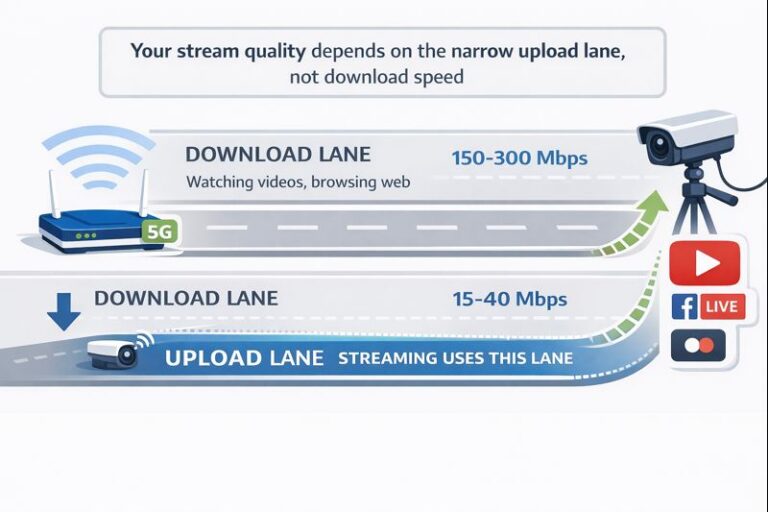
Download speed brings data into your device (watching YouTube, browsing), while upload speed sends your stream out to viewers. A 5G connection might deliver 200-300 Mbps download, but only 15-50 Mbps upload, and it's that upload number that controls your streaming quality.

Upload speed requirements for different qualities :-

Quality

Minimum Upload

Recommended Upload

Data Usage/Hour

Best For

720p 30fps

3-4 Mbps

5-6 Mbps

1.5-2 GB

School events, basic coverage

1080p 30fps

5-6 Mbps

8-10 Mbps

3-4 GB

Standard sports streaming

1080p 60fps

8-10 Mbps

12-15 Mbps

5-6 GB

High-motion sports, premium quality

Critical insight: Stability matters more than peak speed. A sustained 8 Mbps upload throughout your event beats a connection that tests at 50 Mbps but fluctuates between 2-20 Mbps. Latency, jitter, and packet loss also affect stream quality, but upload bandwidth remains the primary constraint.

This applies equally whether you're streaming from a phone, DSLR, or CCTV/IP camera setup - all share the same upload pipe. For IP camera and CCTV live streaming, the upload bottleneck often becomes more apparent since multiple camera feeds compete for bandwidth.

5G router upload vs download speed comparison showing narrow upload lane for live streaming in India

Can you reliably live stream using a 5G or LTE router?

Yes - a 5G router for live streaming works well for outdoor events, grassroots sports, and 1-3 hour streams with good coverage..
No - not as a fiber replacement in fixed studios or mission-critical 6+ hour broadcasts.

What "reliable" means in this context:

Your stream completes without major drops, viewers see stable 720p or 1080p quality, and minor quality fluctuations are acceptable. This is sufficient for most school tournaments, local sports leagues, and outdoor content creation.

Where 5G/LTE routers fit best:

  • Outdoor and IRL streaming: A 5G router for live streaming enables street creators, coaching sessions, temple events - anywhere without fixed broadband access.

  • Temporary venues: School annual days, college fests, hotel conferences where venue WiFi is unreliable

  • Multi-venue sports leagues: Reusable kit across different grounds (box cricket, Basketball, local football)

  • Backup internet: Fiber primary with 5G failover dramatically improves resilience

  • Remote locations: Village grounds, rural tournaments, semi-urban academies where fiber doesn't exist

Where expectations break

Single-SIM streaming during metro peak hours (7-11 PM) faces congestion that can drop speeds by 30-50%. Very long events without redundancy become risky. If your venue has fiber and you're running a fixed setup, use fiber as primary and keep 5G as backup.

The economics are compelling: Grassroots sports broadcasters now achieve 100,000-150,000 views per tournament using ₹50-75K setups that would have required ₹5-8 lakh traditional infrastructure just a few years ago.


5G vs LTE for live streaming: What actually changes?

Understanding real-world differences between 4G/LTE and 5G helps you make informed equipment choices for your streaming setup.

Latency consistency

4G typically delivers 50-150 ms latency, while 5G achieves 12-40 ms. For one-way sports streaming and event coverage, both are acceptable, viewers won't notice the difference. Latency matters more for interactive applications, such as live classes or two-way video calls, where 5G provides a noticeable improvement.

Upload speed reality (4G vs 5G in India)

Typical 4G/LTE upload: 10-25 Mbps sustained, sufficient when using a 4G router for single-camera 720p or 1080p streaming
Typical 5G upload: 15-40 Mbps sustained (Airtel averages 22.6 Mbps, Jio 15.1 Mbps per mid-2025 data) providing headroom for multi-camera setups or higher bitrate

Real-world variance between carriers matters significantly. Airtel consistently delivers better upload speeds (critical for streaming), while Jio offers wider 5G coverage. Always test both at your specific venue, since tower placement and user load vary dramatically by location.

Critical distinction: Sustained upload speed during your actual stream matters, not peak speedtest results. A router showing 100 Mbps in a 5-second speedtest might only maintain 40-50 Mbps during a 90-minute continuous stream.

Network congestion in Indian cities

Metro areas experience 30-50% speed drops during peak evening hours (7-11 PM). IPL match days and festivals bring additional degradation. Rather than viewing this as a limitation, schedule critical streams during off-peak hours (10 AM - 5 PM) when tower congestion is minimal.

Carrying SIMs from multiple operators (Airtel + Jio) provides valuable redundancy. When one carrier faces congestion, the other often maintains usable speeds.

Urban vs Semi-Urban & Rural Performance

  • Metro cities: Excellent coverage but heavy congestion, especially evenings

  • Tier-2 and semi-urban: Often more stable due to fewer users per tower; Jaipur and Indore frequently outperform Delhi and Mumbai during peak hours

  • Rural areas: 4G LTE with a good external antenna often proves more reliable than patchy 5G coverage

Geography affects performance more than the 4G vs 5G designation. Always test at your specific venue before committing to equipment.

Peak speed vs sustained upload

Think of speedtests as sprints and streaming as marathons. Always test with a 30-60 minute actual stream at your venue and time slot before the real event.

Comparison table of 4G LTE, 5G, and fiber internet for live streaming showing upload speeds, latency, and best use cases 4G LTE (10-25 Mbps upload) suits single 720p-1080p streams. 5G (15-40 Mbps upload) handles multi-camera 1080p. Fiber (50-1000 Mbps upload) for studio 4K. Choose based on mobility needs and venue availability.

When a 5G router for live streaming makes sense

Outdoor & IRL streaming

Street creators, coaching sessions, temple events, and outdoor performances gain mobility impossible with fixed broadband. A router paired with a portable power bank creates a complete uplink kit you can carry anywhere.

Temporary venues & pop-up events

School annual days, college fests, hotel conferences, and community gatherings rarely have reliable internet infrastructure. Venue WiFi is often overloaded or simply unavailable. A dedicated 5G/LTE router provides consistent bandwidth you control, and the same kit works across multiple venues throughout the year.

Backup internet for live events

Even if your primary venue has fiber, adding 5G backup dramatically improves resilience. Manual failover (keeping a second SIM ready) requires 2-5 minutes to switch but prevents total stream failure. Automatic failover systems switch seamlessly but require more sophisticated routers.

Remote locations without fiber

Village sports grounds, rural tournament venues, and semi-urban sports academies often lack broadband infrastructure entirely. 5G/LTE transforms "offline" venues into streaming-capable locations, opening opportunities that simply didn't exist five years ago.

Grassroots & community sports broadcasting (CCTV/IP camera focus)

This is where using a 5G router for live streaming have created the most dramatic impact. Box cricket, school tournaments, local sports tournaments and leagues now broadcast regularly using setups that cost ₹20,000-75,000 instead of traditional ₹5-8 lakh broadcast infrastructure.

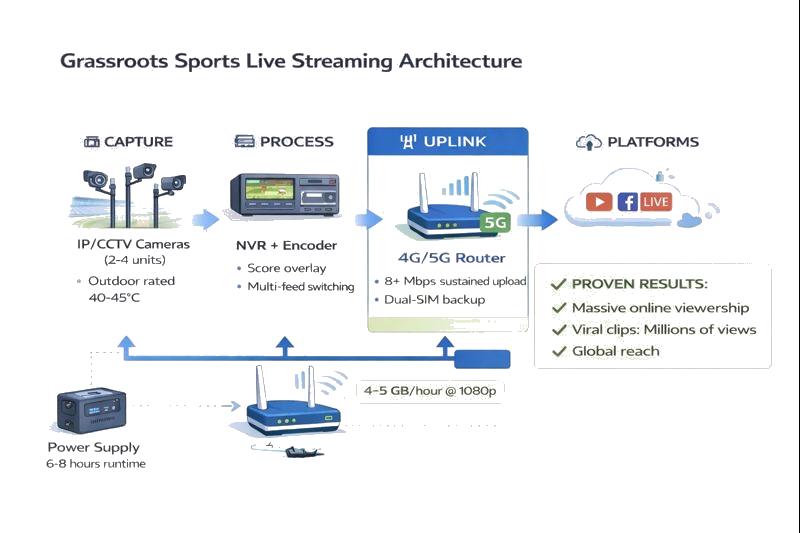
Typical grassroots streaming architecture:

  • IP or CCTV cameras positioned around the playing field

  • NVR (Network Video Recorder) or encoder with scoring overlay capability

  • 4G/5G SIM router for uplink (MikroTik models popular for reliability)

  • Portable power solution or venue power

Economics: Setup costs ₹20-75K depending on camera count and redundancy level. Data usage runs approximately 4-5 GB per hour for 1080p streaming. Results include 10x visibility, more sponsors.

The workflow enables rapid highlight creation. No complex video editing software required. Platforms like Cricheroes even automate highlight generation for a small fee per match, creating player-specific clips (all fours, sixes, wickets etc) automatically.

For multi-camera setups and rural venues, explore with external antenna support.

Grassroots sports live streaming architecture using IP/CCTV cameras, NVR encoder, 5G router and portable power in India

When you should NOT use a 5G router for live streaming

Building trust requires honesty about limitations. Here's when a 5G router for live streaming is the wrong choice.

Fixed studios with fiber access

If fiber exists at your venue, don't rely on a 5G router for live streaming as your primary connection. Fiber provides symmetric upload speeds, no Fair Usage Policy limits, and lower latency than cellular. Keep 5G as backup for redundancy, but don't replace working fiber with cellular for fixed locations.

Long, uninterrupted broadcasts in congested metros

Four to six-hour evening events in dense urban areas strain single-SIM setups. Tower loading during peak hours (7-11 PM) causes unpredictable speed drops. IPL match days and festivals compound the problem.

Single-SIM configurations become fragile for long events. If you must stream extended events during peak hours in metros, implement dual-SIM failover or bonding solutions.

Heavy monthly streaming hours & data economics

Calculate your monthly usage: 1080p streaming consumes approximately 2-3 GB per hour. If you stream 40 hours monthly, that's 80-120 GB per month.

Most consumer 5G plans have FUP limits ranging from 75-150 GB before throttling (varies by operator and plan tier). Business fiber often costs less for high-volume streaming while providing unlimited bandwidth.

Mission critical broadcasts without redundancy

Paid events, sponsor commitments, and high-stakes broadcasts demand enterprise-grade reliability. Single SIM plus single router doesn't meet professional standards.

For mission-critical streaming, you need multiple uplink paths: fiber primary, bonded cellular backup, and 5G/LTE tertiary backup. Single-point-of-failure setups risk revenue loss and reputation damage.

5G Router for Live Streaming with CCTV: Real-World Sports Setup

Case study from a grassroots sports streaming platform demonstrates practical 5G/LTE implementation.

Origin story

The motivation to document local cricket came from witnessing grassroots sports matches disappear without any visual record. School tournaments, hobby leagues played by 25-45 year age groups, and regular box cricket matches bring communities together but leave no trace behind.

Khelbox started as a box cricket venue in Rohtak, addressing the need for quality playing facilities. They quickly realized there was no affordable way to stream these matches and professional broadcasting cost ₹5-8 lakh per event in 2015, making it economically impossible for community sports.

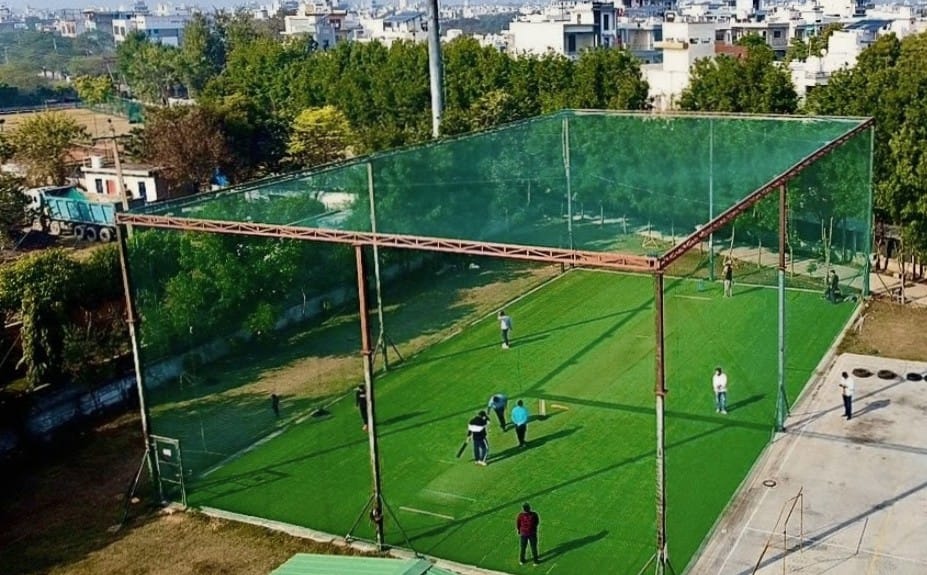
Khelbox Box cricket ground

This gap led to developing QuickLive, a streaming platform built specifically for accessible sports broadcasting. From competitive tournaments to casual matches played by working professionals. QuickLive now serves as the streaming infrastructure for multiple clients, including GPL (Gully Premier League), a separate competitive Tennis ball cricket league

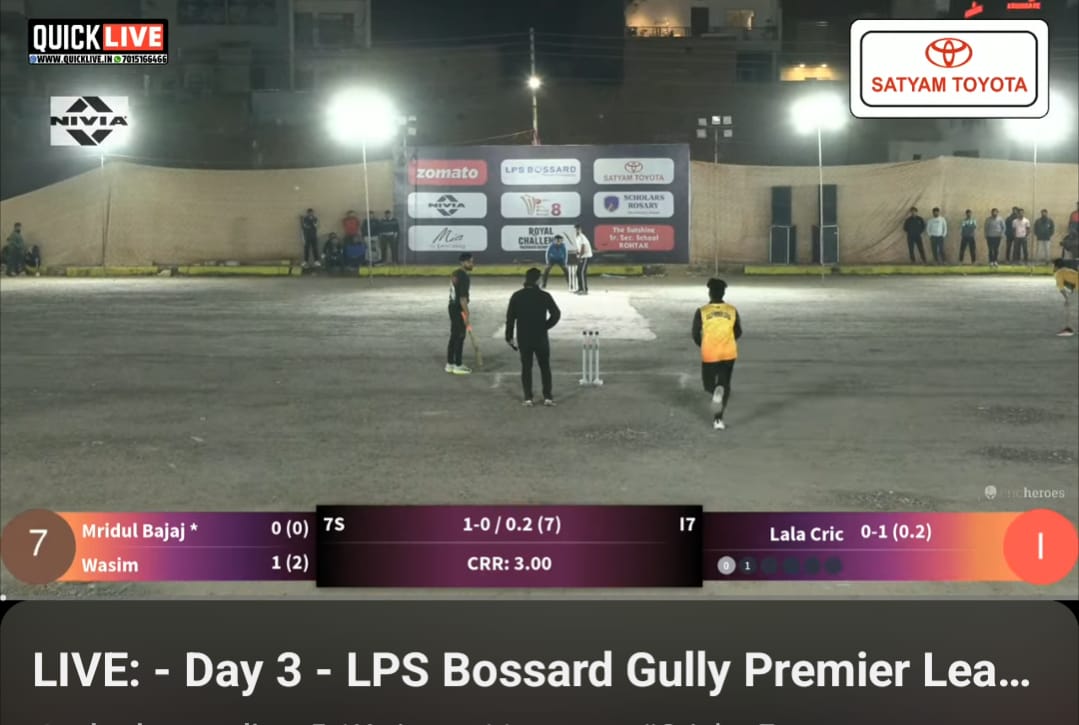
GPL Season 9, which recently concluded with QuickLive as the streaming partner, regularly attracted 16,000+ concurrent viewers on live streams with one stream reaching 166,000 views attracting viewers from India, Pakistan, US, parts of Europe - demonstrating the commercial viability of grassroots sports broadcasting.

Gully Premier League Live Stream by Quicklive in Rohtak

Equipment evolution

Early attempts used phones and action cameras, which overheated in Indian conditions. DSLRs proved impractical for unattended outdoor installations. The solution: CCTV and IP cameras designed for continuous outdoor operation.

When choosing a 5G router for live streaming, ensure it's rated for 0-50°C operating temperature. Most consumer routers thermal throttle above 45°C. Consider passive cooling or shade for outdoor summer installations.

Network setup

Router: MikroTik SIM-based models, chosen for heat stability and smart failover
Carriers: Airtel 5G as primary, Jio as backup; carrying 2-3 SIMs from different operators
Target: Sustained 8 Mbps upload minimum
Bonding: Speedify software combines multiple connections for redundancy
Failover: Home server on leased line sends "Stream resuming" placeholder image if field connection drops, keeping the YouTube stream alive
Power: EcoFlow portable power stations

Target sustained upload: 8 Mbps minimum for stable 1080p. Speedify bonding software combines multiple connections for redundancy. Smart failover routes through a home server on leased line when field connectivity drops, sending a "Stream resuming" placeholder that keeps YouTube streams alive rather than ending them

Data usage

Approximately 4-5 GB per hour at 1080p resolution. The team is developing H.265 codec implementation that would reduce usage to 700-800 MB per hour---roughly half current consumption.

Results

QuickLive's streaming infrastructure demonstrates that grassroots sports broadcasting is commercially viable. GPL Season 9, streamed by QuickLive, regularly achieved a significant number of viewers. Short-form content delivers exponentially higher engagement: typical clips reach 20,000-50,000 views, while viral moments exceed 2-5 million views. Global audience distribution spans India, Pakistan, and the United States as top three countries. Professional teams like Mumbai Indians have reposted grassroots content.

What had to be managed

Network variability required testing both Airtel and Jio at each venue before events. Heat management demanded selecting CCTV cameras rated for 40-45°C outdoor operation. Connectivity drops needed smart failover configuration. Technical development proved challenging---building the FFmpeg encoder took one month with two developers quitting in frustration during the process.

Recommended streaming kits for India (2026)

Choosing the right 5G router for live streaming depends on your budget, venue type, and reliability needs. Here are three proven kit configurations:

Budget starter kit (₹20,000 - ₹40,000)

For: Solo creators, small school events, single-camera outdoor streaming

Component

Recommendation

Price Range

Why

Router

MikroTik LtAP mini LTE kit

₹8,000-₹12,000

Affordable 4G, dual-SIM capable

IP Camera

TP-Link VIGI C540-4G

₹12,000-₹15,000

Built-in 4G SIM slot, works standalone or with router, RTMP streaming ready

Encoder

OBS Studio (free on laptop)

₹0

Standard, widely compatible

Power (optional)

EcoFlow River

₹20,000-₹25,000

3-5 hr runtime; depending on the setup

Total: ₹20,000-₹27,000 (without power) OR ₹45,000-₹52,000 (with EcoFlow River 2)

Performance: 720p-1080p single stream, 2-3 hour events, 8-12 GB data per event

Note: VIGI C540-4G can work without a router for ultra-basic single-camera streaming (just insert SIM card and configure RTMP), but adding LtAP mini router provides better reliability and flexibility.
RTMP streaming typically tolerates 100-300ms latency. Both 4G and 5G work fine. Interactive applications (live calls, gaming) need <50ms where 5G provides an advantage.

Budget Option A: VIGI C540-4G standalone - Insert SIM, stream directly.
Budget Option B: Router + Standard IP camera - More flexible, better reliability.

Grassroots sports kit (₹40,000 - ₹1,46,000)

For: Local leagues, box cricket, school tournaments (Khelbox/QuickLive style)

Component

Recommendation

Price Range

Why

Primary Router

MikroTik SXT LTE6 kit

₹15,000-₹20,000

Reliable 4G LTE, outdoor-capable, proven stability

Backup Router

MikroTik LtAP mini LTE kit

₹8,000-₹12,000

Secondary SIM/operator redundancy

IP Cameras (2-4)

TP-Link VIGI C540 / C540V / C540S

₹12,000-₹24,000

Field-tested for Indian sports coverage

NVR/Encoder

Multi-feed + overlay support

₹5,000-₹10,000

Power

EcoFlow Delta 2 (1024Wh) or venue power

₹60,000-₹70,000 (optional)

6-8 hr runtime

Bonding (optional)

Speedify subscription

₹1500-₹2000/month

Combine Airtel + Jio SIMs

Total: ₹40,000-₹66,000 (core kit without power) OR ₹1,20,000-₹1,46,000 (with EcoFlow power backup)

Performance: 1080p 30fps multi-camera, 4-5 GB per hour, score overlay capability, portable across venues

Semi-pro redundant setup (₹1,90,000 - ₹4,25,000)

For: Paid events, sponsor commitments, semi-professional broadcasts

Component

Recommendation

Price Range

Why

Primary Router

Four Faith FNB600 5G Outdoor CPE

₹40,000-₹50,000

Industrial IP68 weatherproof 5G, mission-critical reliability

Backup Router

MikroTik SXT LTE6 kit

₹15,000-₹20,000

Automatic failover, robust 4G LTE backup

IP Cameras (4-6)

TP-Link VIGI C540 / C540V / C540S

₹40,000-₹80,000

Professional-grade zoom, remote control

Encoder

Professional encoder with bonding capability

₹80,000-₹1,20,000

Built-in bonding, broadcast-grade

Power

Dual EcoFlow Delta or generator backup

₹90,000 - ₹1,60,000

Redundant 8+ hour operation

External Antennas

Directional MIMO (2x)

₹5,000-₹15,000

10-15 dB signal gain

Bonding (optional)

Speedify subscription

₹1500-₹2000/month

Combine Airtel + Jio SIMs

Total: ₹2,50,000-₹4,45,000 (complete redundant setup)
Performance: 1080p 60fps or entry 4K, bonded upload, near-zero downtime, 8-12 hour continuous streaming
 

Watch our hands-on unboxing of the Four-Faith FNB600 5G Router

What NOT to buy (common mistakes)

Consumer 4G dongles/MiFi (JioFi, etc.)

Overheat within 30-60 minutes during continuous streaming

Action cameras for fixed installations

Overheat in Indian summers (verified through real testing)

Budget "5G routers" under ₹5,000

Often fake 5G labeling, unreliable failover

Single-SIM setup for paid events

Network drops equal lost revenue and reputation damage

Browse complete 5G router options and camera options or read our deep-dive 5G SIM Router Buying Guide 2026 for critical insights and how to choose the right model for your specific streaming needs.

Setup Considerations

Router placement & signal quality

When setting up your 5G router for live streaming, place it high, near windows, away from concrete and metal obstructions. For outdoor grounds, use small weatherproof boxes positioned at optimal signal points. Minimum requirement: 3-4 signal bars or RSRP (Reference Signal Received Power) greater than -100 dBm.

External antennas (when to consider)

Consider external antennas when indoor signal is weak (1-2 bars) but outdoor signal exists. Typical benefit: 8-15 dB gain, transforming unusable indoor signal into streaming-quality connection.

Most valuable for basements, thick RCC construction, or venues distant from cell towers.

SIM plan priorities

Calculate monthly needs: Expected streaming hours × 2-3 GB per hour for 1080p. Choose plans with sufficient high-speed data before FUP throttling. Prioritize upload speed stability over download speed when comparing carriers.

Always test both Airtel and Jio at your specific venue during your actual streaming time slot. Performance varies dramatically by location and time.

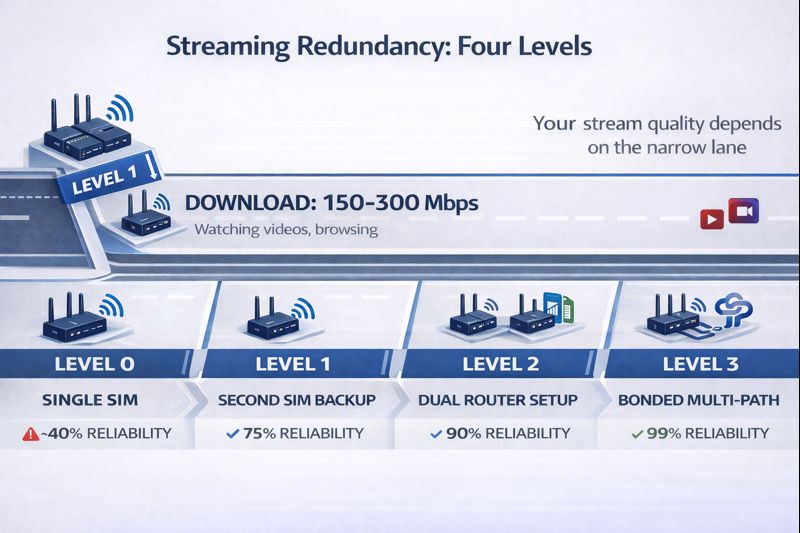
Redundancy mindset

Basic redundancy: Second SIM from different operator
Intermediate redundancy: Dual-SIM router or second router ready
Advanced redundancy: Bonding software/hardware combining multiple connections

Even basic redundancy - carrying an extra SIM you can swap manually - dramatically improves stream completion rates.

Four levels of streaming redundancy for 5G routers: single SIM, backup SIM, dual router, and bonded multi-path setup

Final Decision: Is a 5G Router for Live Streaming Right for You?

Deciding whether to use a 5G router for live streaming depends on your specific scenario, venue availability, and reliability requirements.

Solo creators & small teams

Profile: Mobile/IRL/outdoor streaming, 3-10 hours per month, flexible scheduling
Recommendation: 5G/LTE router as primary with basic backup (second SIM)
Why it works: Mobility advantage, low monthly costs, ability to schedule during off-peak hours

Schools, colleges, local leagues

Profile: Periodic events, CCTV/IP camera setups, moderate stakes, reusable kit across multiple venues
Recommendation: 4G/5G router primary with simple backup (second SIM or router)
Why it works: Economics, portable infrastructure, sufficient reliability for non-paid events

Semi-pro & pro Broadcasters

Profile: Paid events, sponsor commitments, high viewer expectations, long broadcast hours
Recommendation: 5G as one path in multi-path architecture (fiber primary, bonding backup, 5G tertiary)
Why it works: Professional reliability requires redundancy; 5G provides valuable mobility and backup but shouldn't be single point of failure

Infographic #9 Placeholder:


Conclusion

Using a 5G router for live streaming has genuinely democratized live broadcasting in India. Outdoor events, grassroots sports, multi-venue leagues, and remote locations now broadcast regularly using budget setups instead of ₹5-8 lakh traditional infrastructure.

Real implementations prove a 5G router for live streaming delivers genuine results: 10x views, viral short-form content reaching millions, global audience engagement across India, Pakistan, and the US. Professional teams repost amateur content. Schools document tournaments that would have been forgotten. Village grounds broadcast matches worldwide.

The technology works where it makes sense: portable setups, temporary venues, locations without fiber, and backup for critical broadcasts. It doesn't replace fiber in fixed studios or single-handedly provide enterprise reliability for mission-critical paid events.

Choose based on your specific scenario. Solo creators and schools benefit from 5G as primary uplink with basic redundancy. Semi-professional broadcasters need multi-path architectures where 5G provides valuable mobility and backup but not single-point-of-failure responsibility.

Ready to build your streaming setup? Browse our complete selection of 5G and LTE routers to find the right model for your coverage needs, budget, and redundancy requirements. Whether you're streaming grassroots sports, outdoor events, or need reliable backup internet, choosing the right 5G router for live streaming provides the foundation for stable streaming.


Frequently asked questions

How much data does live streaming with a 5G router actually consume?

A 5G router for live streaming typically consumes approximately 4-5 GB per hour for 1080p streaming at standard bitrates (4,000-6,000 Kbps). This is based on real grassroots sports streaming implementations in India.

Using H.265 codec (if your hardware supports it) can reduce this to 700-800 MB per hour, roughly half the data consumption. However, H.265 encoding requires more processing power and not all platforms support it equally.

Practical example: A 2-hour school sports match consumes 8-10 GB. With most Indian 5G "unlimited" plans offering 75 GB of high-speed data before FUP limits, you could stream approximately 7-8 full matches per month before hitting throttling.

Which is better for live streaming in India — Jio 5G or Airtel 5G?

Real-world testing shows distinct characteristics:

Airtel 5G: Better upload speeds (critical for streaming), more consistent performance, fewer peak-hour drops
Jio 5G: Wider coverage (more locations with 5G), lower upload speeds in many testing locations

Practical recommendation: When selecting a 5G router for live streaming, carry SIMs from both operators and test at your specific venue before the event. Upload speed matters more than download for streaming, so prioritize whichever carrier gives you consistent 8+ Mbps upload at your location and time slot.

Technical note: Most Indian 5G currently runs on 4G infrastructure (NSA mode) except Jio's standalone 5G locations, which affects real-world performance.

Can I use regular CCTV/IP cameras for live streaming, or do I need special cameras?

Standard IP/CCTV cameras work well for live streaming if they meet these criteria:

  • Support RTSP/RTMP protocols for streaming integration
  • Rated for outdoor temperatures (40-45°C Indian summers)
  • Provide stable video feed without overheating during long events

Avoid: Consumer phones, action cameras (GoPro, Insta360), and DSLRs for unattended outdoor installations—all overheat during long matches in Indian conditions. This was confirmed through extensive real-world testing by grassroots sports broadcasters.

Field-tested models: TP-Link VIGI series outdoor cameras have proven reliable across tournaments in Indian heat conditions.

What upload speed do I actually need for different streaming qualities?

These are sustained speeds required for the full stream duration, not peak speedtest results:

Quality

Minimum Upload

Recommended Upload

Use Case

720p 30fps

3-4 Mbps

5-6 Mbps

School events, basic coverage

1080p 30fps

5-6 Mbps

8-10 Mbps

Grassroots sports, standard quality

1080p 60fps

8-10 Mbps

12-15 Mbps

High-motion sports, premium

Multiple cameras

10-15 Mbps

15-20 Mbps

Multi-angle coverage

Critical understanding: A router showing 100 Mbps in a 5-second speedtest might only deliver 40-50 Mbps sustained during a 90-minute stream. Always test with actual streaming, not just speedtests.

What happens if my 5G connection drops mid-stream?

Using a 5G router for live streaming without redundancy means your stream will buffer or disconnect if the connection drops. Professional implementations use:

Basic redundancy (₹500-1,000/month):

  • Carry 2-3 SIM cards from different operators
  • Manually switch if primary connection fails (2-5 minute interruption)

Automatic failover (₹10,000-30,000 equipment):

  • Dual-SIM 5G routers (MikroTik, Teltonika) switch automatically between carriers
  • Bonding software like Speedify combines multiple connections simultaneously
  • Remote server setup sends "Stream resuming soon" placeholder if field connection drops, keeping YouTube stream alive
Will 5G streaming work in rural/semi-urban areas, or only in cities?

A 5G router for live streaming often works better in Tier-2 cities and semi-urban areas than metros.

Why:

  • Less tower congestion (fewer users per cell) equals more stable sustained speeds
  • Jaipur, Indore, Chandigarh performance often exceeds Delhi and Mumbai during evening peak hours
  • Users per tower ratio matters more than absolute tower density

Rural reality: 4G LTE with good external antenna often more reliable than patchy 5G coverage. If rural venue has 2-bar 4G signal, adding ₹5,000-15,000 external antenna can transform it into stable streaming capability.

Coverage check before committing:

  1. Visit venue with router 1 week before event
  2. Test at same time and day as actual event (peak hours matter significantly)
  3. Check signal strength: 3-4 bars minimum or RSRP > -100 dBm
  4. Do 30-minute actual test stream, not just speedtest

6 thoughts on “5G Router for Live Streaming: Real Performance India 2026
  1. Stuartfax says:

    Поиск работы для женщин часто сопровождается сомнениями, особенно если был перерыв в карьере или есть необходимость совмещать работу с личной жизнью. Важно сначала определить свои приоритеты: уровень дохода, график, формат работы и возможности развития. Резюме стоит строить уверенно, делая акцент на навыках и результатах, а не оправдываясь за паузы — они сегодня воспринимаются нормально. Нашла работу по данной ссылке

  2. Davidmig says:

    Центр гинекологии — это место, к которому большинство женщин относится с особым вниманием и, нередко, с внутренним напряжением. На первый взгляд кажется, что выбор такого центра — стандартная медицинская задача, но на практике он часто оказывается сложнее, чем ожидалось.
    Одна из основных трудностей — выбор подходящего центра. Предложений много, но за внешне одинаковыми услугами может скрываться разный уровень специалистов, оборудования и подхода к пациентам. Без рекомендаций или личного опыта бывает сложно понять, где действительно оказывают качественную медицинскую помощь, а где всё ограничивается формальным приёмом. Если наберётся много полезных ответов, можно будет собрать сводку о том как выбрать врач уролог

  3. 98wn says:

    So, I stumbled upon 98wn a while ago. Not gonna lie, it’s pretty basic but it did offer few decent games that I haven’t seen elsewhere. Worth checking to grab some unique experiences at 98wn.

  4. 66winapp says:

    Alright, so I checked out 66winapp. It’s pretty decent, especially if you’re looking for a quick and easy betting experience. Nothing mind-blowing but it works! Gotta say, I’m somewhat impressed. Check it out yourself at 66winapp.

  5. Okay, so I stumbled upon ggbetreview and gotta say, it’s pretty decent for getting the lowdown. Layout is tidy, easy to navigate, and they seem to know their stuff. Definitely worth a look before you dive headfirst into any bets. Check it out here: ggbetreview

Leave a Reply

Your email address will not be published. Required fields are marked *