
 HD Cameras and Webcam
 Projectors and Speakers
 VOIP Phones and Gateway
 Access Control
 LTE and 5G Devices
 Smart Sensors And Automation
 Fiber and SFP Modules
 Firewall & Cloud Controllers
 Network Adapters and Accessories
 Network Switches
 PoE Switches
 Point To Point Wireless Radio
 Routers
 Wireless Access Points
 IP Cameras
 Memory Cards
 NVR
NVR Smart WiFi Cameras
 Storage Devices
 Desktop & Laptop RAMs
 Internal and External Hard Drives
 NAS Storage & Enclosures
 SSD and NVMe Drives
 USB Flash Drives


5G SIM Router Buyer’s Guide India 2026: Top Picks & Tips

TL;DR - Quick Takeaways
If you're in a hurry, here's what you need to know:
- 5G SIM routers use cellular networks (like your phone) to create Wi-Fi - no fiber installation needed
- Indian 5G reality (2026): 290M+ subscribers, available in 779/783 districts, real-world speeds 200-300 Mbps (vs 4G's 50-100 Mbps)
- Best for: Homes without fiber, backup internet, remote locations, small businesses
- Key decision: Choose 5G if you have coverage in your area; 4G LTE is still excellent for areas without 5G
If you're looking for reliable internet without depending on fixed broadband, a 5G SIM router might be exactly what you need. These devices accept standard SIM cards and create Wi-Fi networks using cellular data, making them ideal for homes, offices, and remote locations across India.
Whether you're setting up backup internet, need connectivity in areas without fiber, or want a flexible solution for your small business, this guide will help you make an informed decision. You can explore the full range of 5G routers available at FGTech Store to see current options and pricing.
This buyer's guide covers everything from understanding what a 5G SIM router does to comparing top models, understanding pricing tiers, and getting your device set up correctly.
In this article :
- What is a 5G SIM Router?
- 5G SIM Router vs Dongle vs Hotspot
- 5G in India: Market Momentum (2024-2026)
- Real-World 5G Speeds: What to Expect
- Features Checklist 2026
- Setup & Installation Guide
- Top 5G SIM Routers: Recommendations by value
- FAQs
- Conclusion
What is a 5G SIM router (and who should buy one)?
A 5G SIM router is a networking device that accepts a standard mobile SIM card and converts cellular data into a Wi-Fi network. Unlike traditional broadband routers that connect to fiber or cable lines, a sim router relies entirely on mobile network connectivity - similar to how your smartphone accesses the internet, but designed to serve multiple devices simultaneously with better range and stability.
How SIM-Based routers differ from traditional routers
Traditional broadband routers require physical infrastructure - a fiber optic cable, DSL line, or cable connection. A sim card wifi router needs nothing more than mobile network coverage. Insert your SIM, power on the device, and you have internet access.
Who should consider a 5G SIM router?
- Home users without fiber access
- Backup internet for critical connectivity
- Remote and rural locations: Construction sites, farmhouses, temporary offices, and rural properties
- Small businesses and retail outlets: Small shops, kiosks, and branch offices
- Temporary setups: Event organizers, film crews, and temporary installations
Understanding 4G vs 5G compatibility
Most modern SIM routers support both 4G LTE and 5G networks, automatically selecting the best available connection. This backward compatibility matters in India, where 5G coverage is excellent in metros but 4G remains dominant in many tier-2 and tier-3 cities.
4G LTE (including LTE-Advanced) can deliver 50-150 Mbps in good conditions, more than sufficient for HD streaming, video calls, and general browsing.
5G networks in India are delivering 200-500 Mbps in cities with good coverage, with potential for even higher speeds. The upgrade matters most for bandwidth-heavy activities like 4K streaming, large file transfers, and connecting many devices simultaneously.
5G SIM Router vs 5G Dongle vs Mobile Hotspot (quick comparison)
Feature | 5G SIM Router | 5G Dongle | Mobile Hotspot (Phone) |
|---|---|---|---|
Stability | Excellent. Designed for 24/7 operation | Good for portable use | Fair. Drains battery, not meant for continuous use |
Speed | Highest - dedicated modem hardware | Good - depends on USB connection | Variable - limited by phone hardware |
Wi-Fi Range | Best - powerful antennas, covers 1000-2000 sq ft | Limited - small form factor | Limited - designed for few devices nearby |
Connected Devices | 32-64+ devices simultaneously | 8-16 devices typically | 5-10 devices maximum |
External Antennas | Yes - most models support external antennas for signal boost | Rarely available | No |
Power Source | Mains electricity (continuous) | USB power from computer | Battery (needs frequent charging) |
Portability | Low - AC-powered | High - pocket-sized | High - always with you |
Best For | Home/office primary internet | Travel and temporary needs | Emergency backup, casual use |
5G in India: Market Momentum
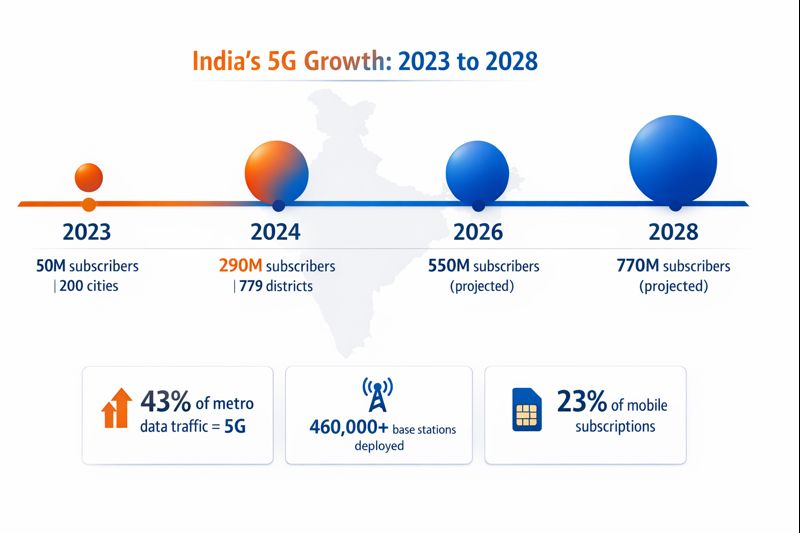
India's 5G rollout has moved from experimental to mainstream. Subscribers reached 400 million by end of 2025 and is projected to reach 770 million by 2028, representing 33% of all mobile subscriptions—up from near zero in early 2023. Infrastructure deployment covers 99.9% of India's 783 districts with over 515,000 base stations nationwide, reaching 85% population coverage. In metro cities, 5G already handles 43% of mobile data traffic, more than doubling from 20% in 2023.
Why this matters for router buyers
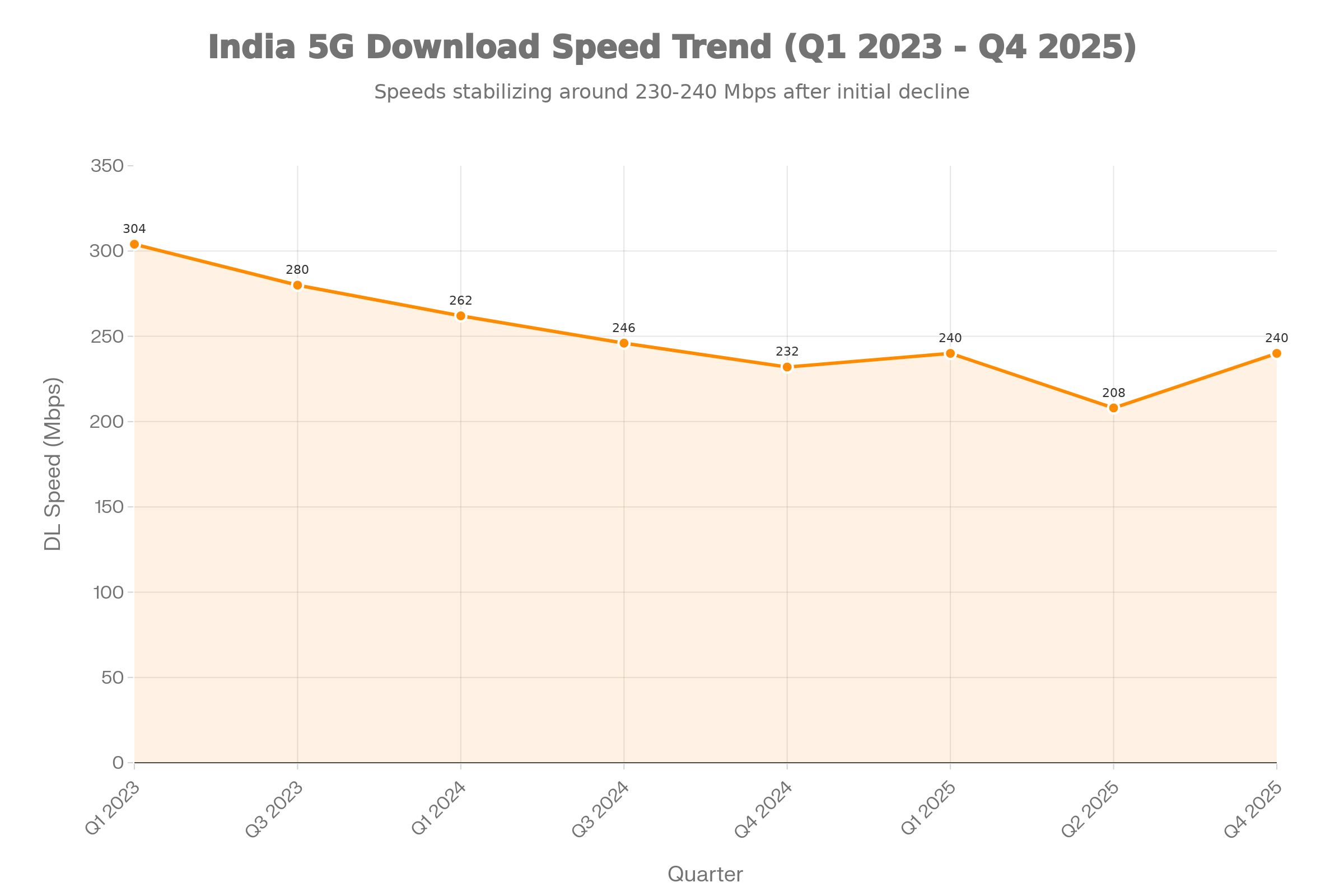
This isn't bleeding-edge adoption anymore. Coverage is extensive in urban areas, tier-1 and tier-2 cities, and the ecosystem has stabilized with speeds holding steady around 230-240 Mbps through late 2025. The question isn't "will 5G work?" but "do I have coverage?" Check your operator's coverage map and expected speeds in your area before purchasing.
Real-world 5G speeds: What to expect in India
Theory vs Reality
ITU-IMT 2020 Specifications for 5G:
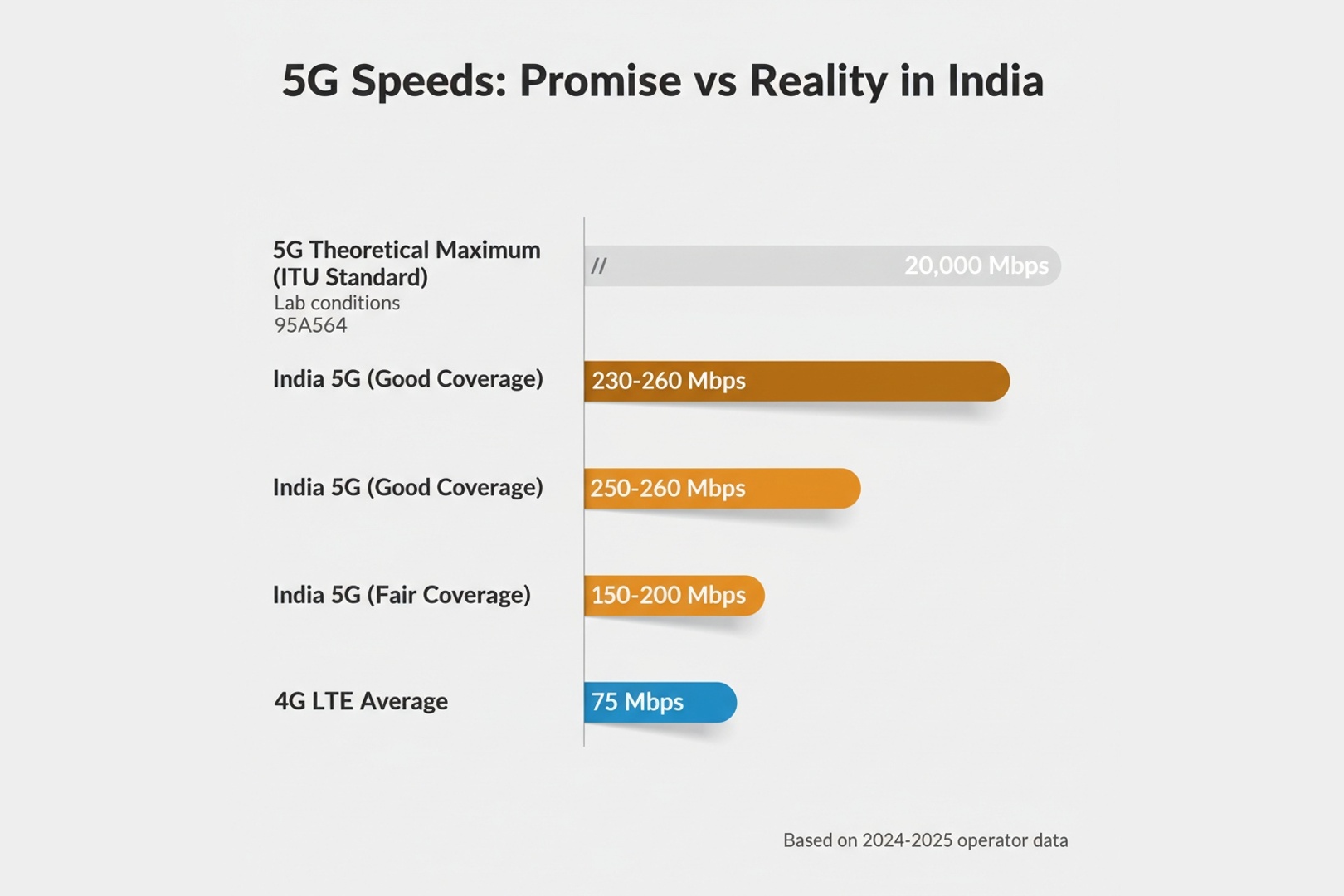
- Peak download: 20 Gbps theoretical maximum
- Peak upload: 10 Gbps theoretical maximum
- Ultra-Reliable Low Latency (URLLC): Target latency under 1 millisecond
- Real-world air latency: 8-12 ms typical
Current operator performance (Q4 2025): TRAI tests (Kolkata)
- Jio: 250.84 Mbps average (5G/4G combined)
- Airtel: 151.23 Mbps average (5G/4G combined)
Why speeds vary
📍 Location matters: City speeds vary dramatically—Jaipur averages 181.68 Mbps while Mumbai records just 75.75 Mbps in some areas. Only 7 Indian cities exceeded 100 Mbps median speeds in H2 2024.
⏰ Time matters: Peak hours (7 PM - 12 AM) can see speeds drop 30-50% versus off-peak. Network congestion from 400 million users impacts performance during high-usage periods..
📡 Technology matters: Jio uses SA (standalone) 5G architecture; Airtel deployed NSA (non-standalone) but is transitioning to 5G-Advanced with dual-mode networks. SA offers better long-term performance and lower latency
📊 Coverage quality: Good coverage areas deliver 200-260 Mbps; fair coverage areas see 150-200 Mbps—both vastly exceeding 4G's 15-50 Mbps average..
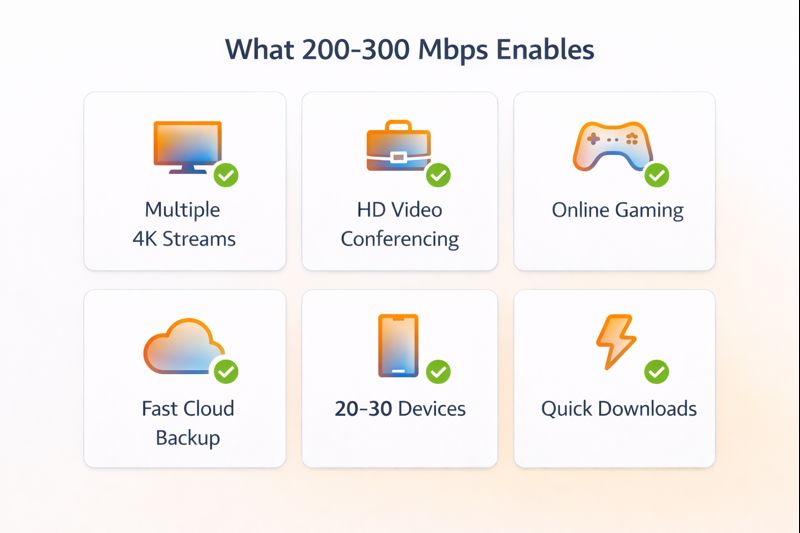
Bottom line: Even with stabilized speeds of 230-240 Mbps nationally (down from 304 Mbps peaks in early 2023), 5G routers still vastly exceed most household needs. Set realistic expectations based on your location, not marketing hype or theoretical maximums.
Features Checklist (2026): What Matters Most
When comparing 5G SIM routers, these features directly impact your experience:
5G and 4G Band Support
Indian operators use specific frequency bands for 4G and 5G. More supported bands mean better compatibility and performance across locations and carriers.
Key 5G bands in India (2026):
- n78 (3.5 GHz): Primary 5G band for Jio and Airtel in most cities
- n77 (3.3-3.8 GHz): Used by Vi and some Airtel deployments
- n258 (mmWave): Limited deployment in India; nice to have but not essential
Important 4G LTE bands:
- Band 3, 5, 8, 40, 41: Widely used across operators
- More bands supported = better fallback when 5G is unavailable
Unless you're a network engineer, don't worry about memorizing bands. Check the product listing mentions "supports major Indian 5G/4G bands" or lists compatibility with your specific operator.
Wi-Fi Standards and Dual-Band Support
Wi-Fi 6 is the minimum standard to look for in 2026. It offers:
- Better performance with many connected devices
- Improved range and penetration through walls
- Lower latency for gaming and video calls
- Better power efficiency for connected devices
Dual-band is essential: 2.4GHz for range and compatibility with older devices; 5GHz for speed and less interference.
Ethernet Ports and Wired Connectivity
Don't overlook wired connections:
- Gigabit Ethernet (1000 Mbps) is standard in 2026; avoid 100 Mbps ports
- Minimum 2 ports: One for connecting a PC, NAS, or smart TV; one spare
- 4 ports ideal for small offices and smart homes
- Link aggregation: Premium feature letting you combine ports for 2+ Gbps speeds
Some advanced routers include WAN/LAN configurable ports, letting you connect a second ISP (like traditional broadband) for automatic failover.
External Antenna Ports
If you live in a weak signal area, external antenna support becomes critical:
- 2×2 MIMO (Multi Input Multi Output): Two antenna ports (one for transmit, one to receive)
- 4×4 MIMO: Four antenna ports for maximum throughput and signal stability
- Connector types: Check whether antennas are included or sold separately
- Antenna location: External antennas should be mountable outside or in windows for best signal
In urban areas with strong 5G, internal antennas work fine. In rural or signal-challenged locations, external antennas can transform a barely usable connection into perfectly stable internet.
Device Management and Security
Modern sim card wifi routers should offer:
- Mobile app management: View data usage, connected devices, signal strength
- Web interface: Full configuration access for advanced settings
- Parental controls: Content filtering and time limits for kids' devices
- Guest network: Separate Wi-Fi for visitors without main network access
- Firewall: SPI firewall minimum; DoS protection preferred
- Automatic firmware updates: Security patches without manual intervention
Additional Features to Consider
- Bridge mode: Lets you use the SIM router as just a modem, connecting to your existing Wi-Fi router. Useful if you already have a high-end mesh system.
- QoS (Quality of Service): Prioritizes traffic for video calls and gaming over downloads.
- VoIP support: Some routers support voice calls through the SIM (VoLTE/VoNR) - useful for backup phone service.
- SMS support: Receive and send SMS messages through the device, useful for alerts and OTPs.
- Battery backup: Built-in battery keeps internet running during power cuts (rare feature, usually premium devices).
Setup & Installation Guide (Fast, Practical)
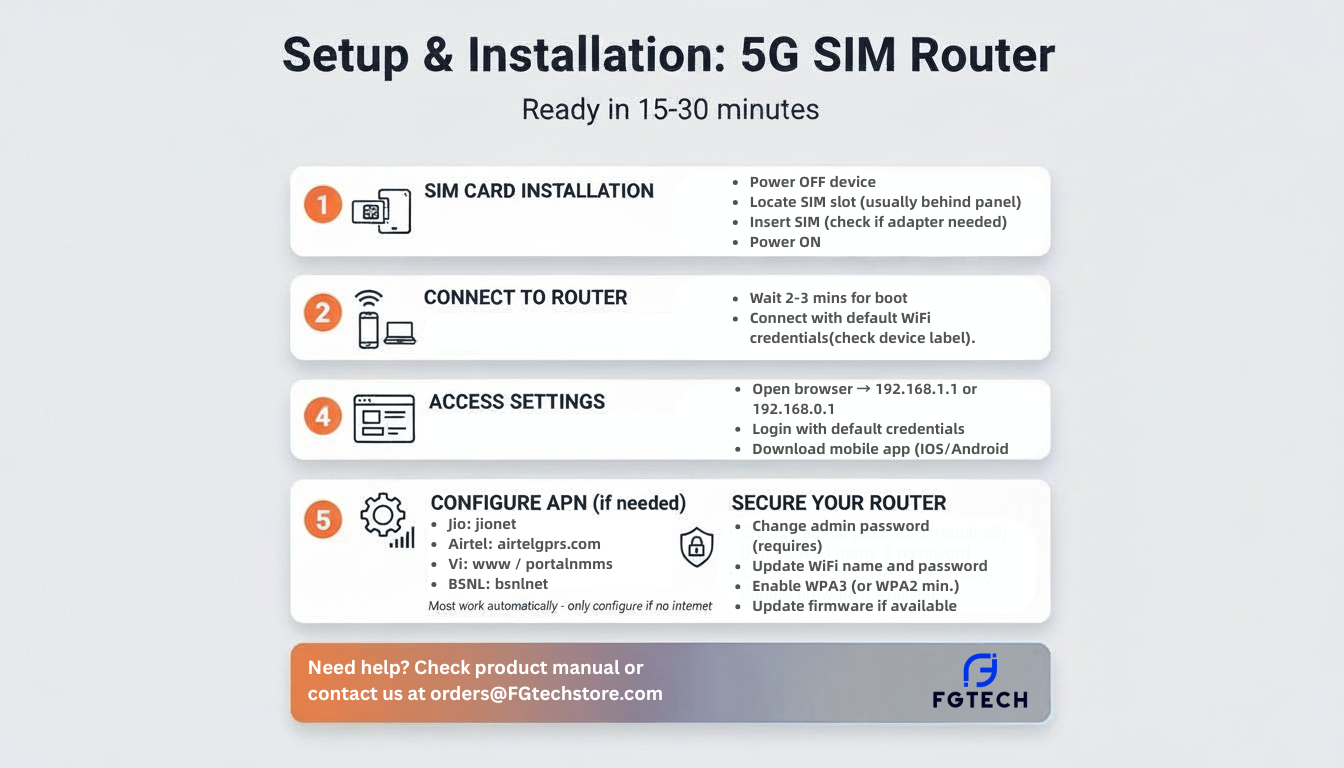
Getting your 5G SIM router operational is straightforward:
Optimizing Signal and Placement
Router placement matters:
- Position near a window or external wall for better cellular signal
- Elevate the device (shelf or wall-mount) for better Wi-Fi coverage
- Avoid placing near thick concrete walls or metal objects that block cellular signals
- Keep away from other electronic devices that cause interference
Check signal strength:
- Most routers display signal bars or RSRP/RSRQ values
- Aim for 3-4 bars minimum
- If signal is weak, try different locations or windows
- Consider external antennas if consistently showing 1-2 bars
Testing Speeds
Test speeds using fast.com or speedtest.net. Cellular speeds vary by time of day; expect max 200-250 Mbps real-world speeds from a rated 300 Mbps connection.
When to Use External Antennas
Consider external antennas if:
- Signal consistently shows 1-2 bars
- Speeds are significantly below expected
- Connection drops frequently
- You're in a rural or semi-urban area
External antennas typically improve signal by 5-10 dB, which can double your effective speeds in weak signal conditions. Position them outside or in an unobstructed window, pointed toward the nearest cell tower if known.
Top SIM Router Recommendations for Indian buyers
Best Overall Value:
TP-Link MR600
Why this stands out: The MR600 hits the sweet spot between performance and price. With 4G+ Cat6 supporting up to 300 Mbps through carrier aggregation, it delivers near-5G speeds on 4G networks. You get AC1200 dual-band Wi-Fi, 4 Gigabit LAN ports, and support for external antennas, all at a mid-range price.
Best for: Families with 5-10 devices, small offices, users in areas without 5G coverage who still want excellent performance.
Check current price and specs
Best Budget Option:
TP-Link MR200
Why this works: It offers dual-band Wi-Fi (AC750), 4 LAN ports, and external antenna support, enough for HD streaming, video calls, and basic home internet needs.
Best for: Budget-conscious buyers, backup internet, small apartments with good signal.
Check current price and specs
Best for Weak Signal Areas:
MikroTik LHGG LTE6 Kit (2024)
Why signal matters: In remote or weak signal locations, antenna quality matters more than router specs. The LHGG LTE6 Kit combines 4G LTE Cat6 with an integrated 17 dBi high-gain grid antenna in a weatherproof housing. It's designed to be mounted outdoors where signal is strongest, then distribute connectivity via Ethernet.
Best for: Rural locations, farmhouses, construction sites, anywhere with 1-2 signal bars indoors.
Real-world impact: Can pull usable signal from towers 5-10 km away in clear line of sight.
Check current price and specs
Best for 5G Future-Prpoofing:
MikroTik Chateau 5G R17 ax
Why choose 5G now: If you're in a metro or tier-1 city with confirmed 5G coverage, the Chateau 5G delivers true 5G speeds (up to 1 Gbps) combined with Wi-Fi 6 (AX1800) and 5 Gigabit Ethernet ports. RouterOS offers advanced features for power users who need VLANs, VPN, and granular control.
Best for: Tech enthusiasts, small businesses in 5G coverage areas, users future-proofing for 3-5 years.
Note: RouterOS has a learning curve which is great for technical users, potentially overwhelming for beginners.
Check current price and specs
Before You Buy: Check these essentials:
- Signal strength: Walk around with your phone, and if you see 1-2 bars consistently, prioritize external antenna support or outdoor kits
- Operator bands: Verify the router supports your operator's frequencies (especially important for 5G)
Browse our complete selection of LTE/5G routers for current availability and pricing
Conclusion + Next Steps
Choosing the right 5G SIM router comes down to understanding your specific needs: coverage availability in your location, the number of devices you'll connect, whether you need advanced features like external antennas or dual SIM support, and your budget constraints.
Quick decision framework:
- Strong 5G coverage + high speed needs: Invest in a proper 5G router for maximum performance
- Weak/no 5G coverage: A 4G sim router remains practical and cost-effective; wait for 5G expansion
- Remote location with signal challenges: Prioritize external antenna support over maximum specs
- Business/critical use: Look for dual SIM, advanced management, and enterprise-grade reliability
Ready to Get Started?
Choosing the right 5G SIM router comes down to four things: 5G coverage at your location, how many devices you’ll connect, whether you need features like external antennas/dual‑SIM, and your budget. If you have strong 5G coverage, a good router can replace entry‑level broadband for most households; if coverage is weak, a solid 4G router is still the smarter buy until your area improves.
Ready to shortlist models? Browse FGTech Store’s complete selection of shop 4G LTE and 5G routers to compare current pricing, specs, and warranty options before you purchase.
FAQs: 5G SIM Routers in India (2026)
Is a 5G SIM router worth it in India?
Yes, if you have 5G coverage in your area. You'll get 200-500 Mbps on 5G versus 50-150 Mbps on 4G, which matters for households with multiple users streaming 4K, gaming, and working simultaneously. 5G also handles network congestion better during peak hours. For metros and tier-1 cities, it's worth the investment. In smaller towns without full 5G deployment, a 4G SIM router remains practical and cost-effective.
Can I use a normal SIM card in a SIM router?
Yes, standard nano-SIMs from Jio, Airtel, Vi, or BSNL work without restrictions.
4G SIM router vs 5G SIM router: what should I buy?
Choose 5G if you live in a metro/tier-1 city with coverage, need speeds above 150 Mbps, want to future-proof for 3-5 years, or regularly connect 15+ devices.
Choose 4G if 5G isn't available, your budget is tight (4G routers cost 30-50% less), you need only 50-100 Mbps for streaming and browsing, or you're setting up temporary connectivity.
Will a 5G SIM router replace Wi-Fi?
A 5G SIM router is Wi-Fi - A 5G SIM router creates Wi-Fi using cellular data instead of fiber/cable. Can it replace broadband? Yes, for most users. 5G networks in Indian cities deliver speeds comparable to entry-level fiber, with quick setup and no installation wait. Fiber still wins on latency (important for competitive gaming) and cost-per-GB at very high usage. A 5G SIM works well for most homes, backup for critical users, or as a sole option where fiber isn't available
What's the difference between a SIM router and a dongle?
SIM routers are fixed devices for home/office use, supporting 30-60+ devices with strong Wi-Fi range and 24/7 operation. Dongles are portable, USB-powered devices for 8-15 devices with limited range.
Do I need a special data plan for a SIM router?
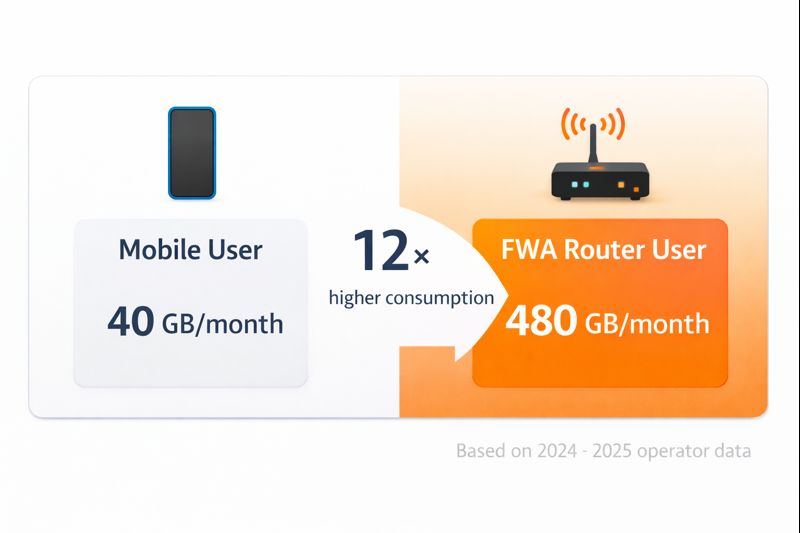
Not necessarily. Regular mobile plans work in routers, but check two things: data limits and operator restrictions. Most mobile plans have daily data limits (2-4 GB/day typical) that may not suffice for home internet use. Operators like Jio, Airtel, and Vi offer dedicated data plans for routers with higher limits or truly unlimited data. These plans usually cost ₹500-₹1,500/month depending on speed and data caps. Some operators also offer "FWA" (Fixed Wireless Access) plans specifically designed for routers with prioritized traffic and better speeds.
Can I use a 5G SIM router for gaming?
Yes, with acceptable latency. 5G networks in India typically deliver 20-40ms latency versus 5-15ms for fiber. This works fine for most gaming, but competitive esports players in latency-sensitive titles (CSGO, Valorant) may notice the difference. Benefits: fast game downloads and portability. Use a wired Ethernet connection from router to console/PC for best results. Casual and moderate gamers will have smooth gameplay.
How many devices can connect to a 5G SIM router?
Most 5G SIM routers support 32-64 simultaneous connections; premium models handle 128+. Practical capacity depends on usage: light browsing allows more devices, while 4K streaming reduces capacity. Typical households (10-15 devices) work comfortably on mid-range routers. Small offices (20-30 devices) need routers rated for 40+ connections. Always check product specifications for exact limits.
What happens if 5G coverage isn't available?
Modern 5G SIM routers automatically fall back to 4G LTE when 5G isn't available, then reconnect to 5G when coverage returns. This happens seamlessly. You'll simply notice speeds drop from 200-500 Mbps to 50-150 Mbps, still sufficient for HD streaming. This backward compatibility makes 5G routers practical even in areas with partial coverage. Look for routers supporting EN-DC (dual connectivity), which combines 4G and 5G signals for better speeds.
Can I use two operators with one router?
Some premium routers offer dual SIM slots for using two operators simultaneously. Benefits include load balancing (distributing traffic for higher combined speeds), automatic failover if one network fails, and cost optimization (cheaper SIM for downloads, faster for urgent traffic). Budget and mid-range routers have single SIM slots. If network redundancy matters for business or critical work-from-home, dual SIM is worth the premium.
How secure are 5G SIM routers?
Modern sim card wifi routers include WPA3 encryption, SPI firewall, NAT, and guest network isolation, which is as secure as traditional routers. Enable strong passwords, firewall, firmware updates, and disable WPS. Change default admin credentials immediately. The cellular connection is encrypted by your operator. For businesses, look for routers supporting VPN, VLAN segmentation, and advanced firewall rules. Security matches traditional broadband when properly configured.