
 HD Cameras and Webcam
 Projectors and Speakers
 VOIP Phones and Gateway
 Access Control
 LTE and 5G Devices
 Smart Sensors And Automation
 Fiber and SFP Modules
 Firewall & Cloud Controllers
 Network Adapters and Accessories
 Network Switches
 PoE Switches
 Point To Point Wireless Radio
 Routers
 Wireless Access Points
 IP Cameras
 Memory Cards
 NVR
NVR Smart WiFi Cameras
 Storage Devices
 Desktop & Laptop RAMs
 Internal and External Hard Drives
 Storage Accessories and Enclosures
 SSD and NVMe Drives
 USB Flash Drives


How much data does a security camera use per day and per month

A single 1080p security camera uses roughly 1 to 4 GB of internet data per month if it records to a local NVR and you only view it a few times a day remotely. The same camera writes about 21 GB per day to the NVR's hard drive on continuous recording with H.264 at 15 fps, but that stays on your local network and doesn't count against your broadband or SIM plan.
If you're cloud-recording at sub-stream quality (640x360, 256 Kbps), expect about 2.7 GB per day or 81 GB per month uploaded per camera. Cloud-recording at full main-stream quality uses the same data as the storage number, roughly 21 GB per day per camera, which will hit most data caps fast.
The reason different people will tell you different numbers - some say 60 MB per day, others say 13 GB- is that they're answering different questions without saying so.
This guide breaks down every path your camera data takes, so you can figure out exactly what hits your hard drive, what hits your internet plan, and what to budget for.
On this page:
Where does your camera data go?
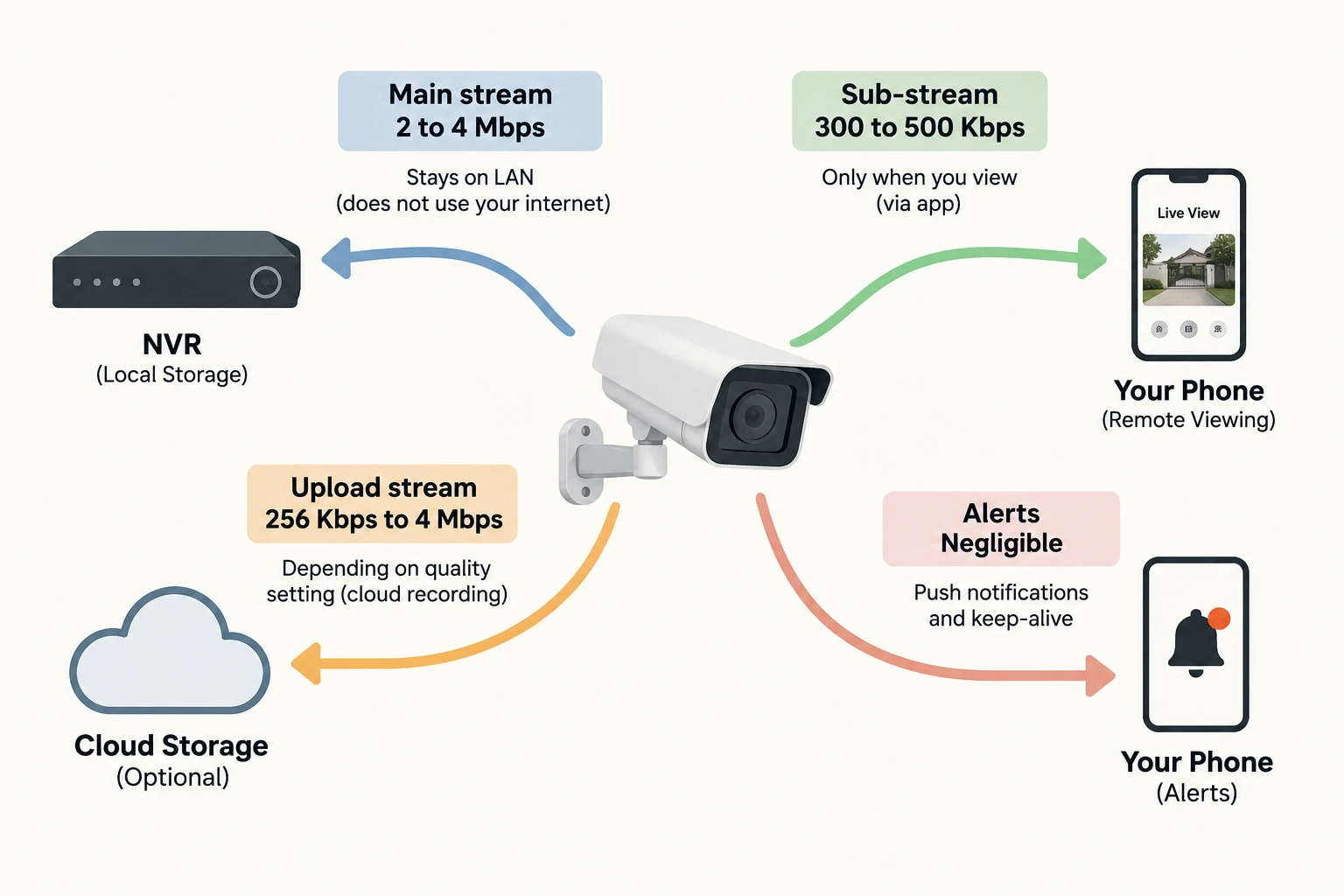
A security camera doesn't just ‘use data’, but it sends data to different places, at different bitrates, and only some of those paths touch your internet connection.
Camera to NVR over LAN cable. This is the main stream, typically 2 to 4 Mbps for a 1080p camera on H.264. It runs continuously (or on motion trigger) and gets written to the NVR's hard drive. This traffic stays entirely on your local network. It doesn't use a single byte of your broadband or SIM data. This is the big number, the one that determines your hard drive size, but it's not the number that affects your internet bill.
NVR to your phone when you open the app. When you tap "live view", the NVR streams the sub-stream to your phone through the manufacturer's remote-access/P2P system. Sub-streams typically run at 300 to 500 Kbps at 640x360 resolution. This only runs while you're actively watching, so this path is entirely usage-dependent.
Camera or NVR to cloud storage. If you've enabled cloud recording, footage uploads continuously or on motion events. The upload quality depends on your cloud service settings. At sub-stream quality (640x360, around 256 Kbps), one camera uploads roughly 2.7 GB per day. At main-stream quality, it's the full storage number.
Alerts and keep-alive. Push notifications with a thumbnail image and the P2P heartbeat that keeps your NVR reachable from outside your network. Negligible, a few megabytes per month combined.
The formula
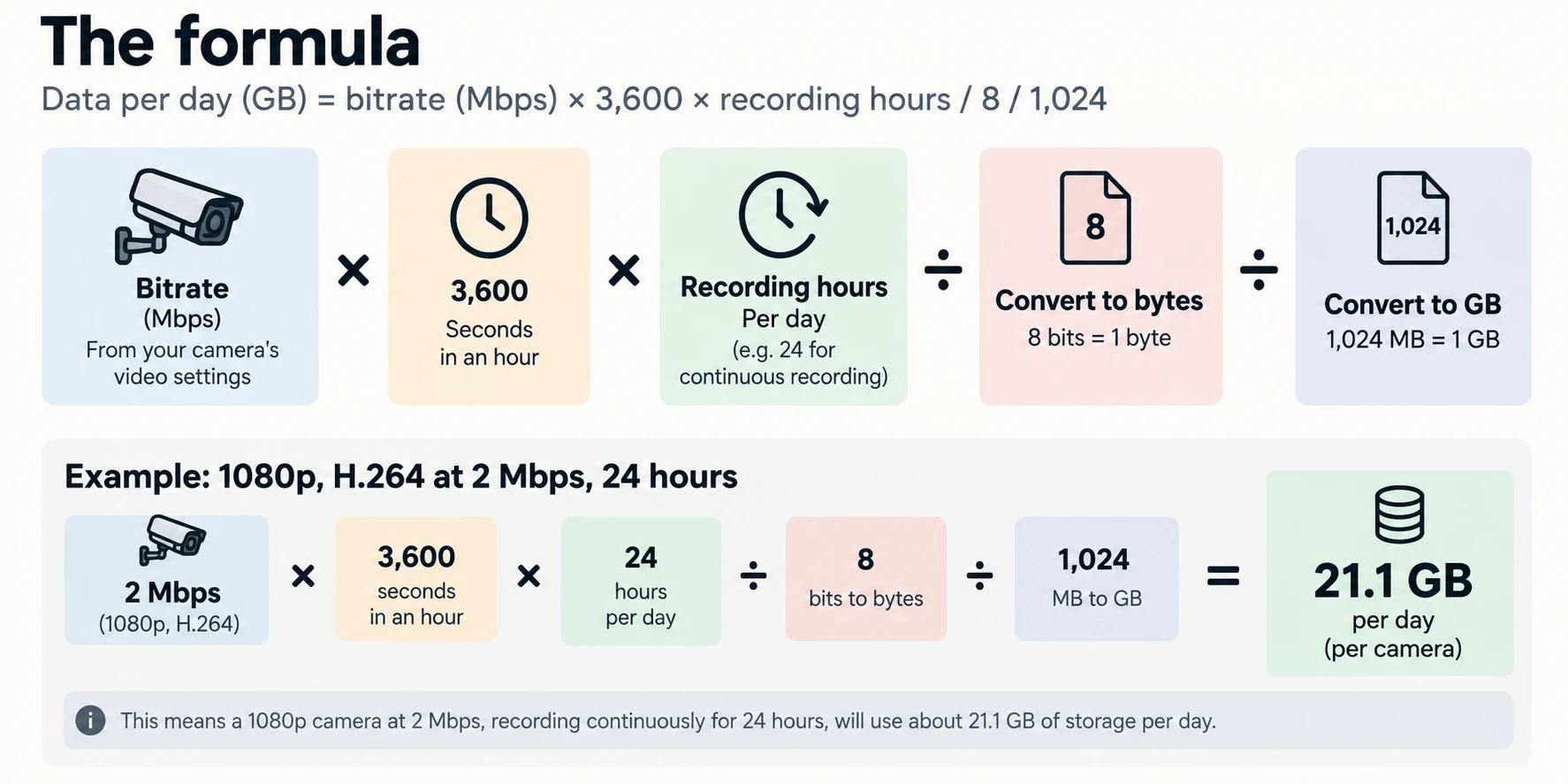
Data per day (GB) = bitrate (Mbps) x 3,600 x recording hours / 8 / 1,024
You can find your camera's actual bitrate in its web interface under video stream settings. Reference bitrates from manufacturer documentation and industry bandwidth calculators:
| Resolution | FPS | H.264 | H.265 |
|---|---|---|---|
| 720p | 15 | ~1 Mbps | ~0.5 Mbps |
| 1080p (2 MP) | 15 | ~2 Mbps | ~1 Mbps |
| 1080p (2 MP) | 25 | ~4 Mbps | ~2.2 Mbps |
| 4 MP (QHD) | 25 | ~8 Mbps | ~4.4 Mbps |
| 4K (8 MP) | 25 | ~16 Mbps | ~8.8 Mbps |
These are per-camera numbers. Multiply by your camera count for total system load.
Internet data consumption: remote viewing, cloud, and alerts
This is what actually counts against your broadband FUP or SIM data plan.
| Activity | Bitrate | Data per hour | Typical monthly usage |
|---|---|---|---|
| Remote viewing via app (sub-stream, 640x360) | 300 to 500 Kbps | 130 to 220 MB | 1 to 4 GB (checking a few times daily, ~5 min each) |
| Remote viewing via app (main stream, 1080p) | 2 to 4 Mbps | 0.9 to 1.8 GB | 27 to 54 GB (1 hour daily) |
| Cloud recording, sub-stream quality (640x480, 256 Kbps) | ~256 Kbps | ~115 MB | ~81 GB continuous, ~27 GB motion-only |
| Cloud recording, main-stream quality (1080p H.264 15fps) | ~2 Mbps | ~900 MB | ~633 GB continuous |
| Alerts and P2P keepalive | Negligible | — | A few MB |
If your setup is camera → Ethernet → NVR (local storage) → remote viewing only when needed, your internet consumption per camera is roughly 1 to 4 GB per month. The moment you turn on continuous cloud recording at main-stream quality, it jumps to 600+ GB per month per camera.
For SIM router setups without broadband, pair your cameras with a local NVR and keep the SIM data for remote viewing only. For router options tested for this use case, see our best SIM router for CCTV cameras in India guide.
Will your broadband plan handle it?
For a local NVR setup (most home and shop installations in India): your internet usage is just the remote viewing, roughly 1 to 4 GB per camera per month. Any broadband plan handles this without noticing.
For cloud recording at sub-stream quality: about 81 GB per camera per month continuous. Four cameras would mean ~324 GB. Within a Jio Fiber or Airtel Xstream FUP of 3.3 TB, but you'd want to check your upload speed; cloud services need sustained upload bandwidth.
For cloud recording at mainstream quality: 633 GB per camera per month. Four cameras is 2.5 TB. Still within the 3.3 TB FUP on paper, but you'd be using most of your cap on cameras alone. BSNL entry-level plans with a 50 GB FUP would be exhausted in under two days.
For 4G SIM setups: budget for remote viewing only (1 to 5 GB per month) and record locally. Continuous cloud upload over cellular would cost more in data charges per month than the camera hardware itself.
Three ways to cut data usage without losing coverage
Switch to H.265 if your camera and NVR both support it. Cuts storage and bandwidth nearly in half with no visible quality loss, although the actual savings depend on the camera, scene, and settings. Most cameras sold in India since 2022 support it, but many ship with H.264 as the default. Check your camera's video configuration and switch manually. If both devices support H.265+, enable that for an additiona 50 to 75% saving on static scenes.
Use motion-triggered recording instead of continuous. A shop entrance with moderate foot traffic might see 6 to 8 hours of actual movement across a 24-hour day. Motion-triggered recording captures only those hours, cutting storage from ~633 GB to ~211 GB per camera per month at 1080p H.264.
Drop the frame rate to 15 fps. Most cameras default to 25 or 30 fps. For security purposes, 15 fps captures human movement clearly enough to identify faces and read number plates. Halving the frame rate roughly halves the bitrate and storage requirements, although the savings depend on the codec, bitrate settings and amount of motion.