
 HD Cameras and Webcam
 Projectors and Speakers
 VOIP Phones and Gateway
 Access Control
 LTE and 5G Devices
 Smart Sensors And Automation
 Fiber and SFP Modules
 Firewall & Cloud Controllers
 Network Adapters and Accessories
 Network Switches
 PoE Switches
 Point To Point Wireless Radio
 Routers
 Wireless Access Points
 IP Cameras
 Memory Cards
 NVR
NVR Smart WiFi Cameras
 Storage Devices
 Desktop & Laptop RAMs
 Internal and External Hard Drives
 Storage Accessories and Enclosures
 SSD and NVMe Drives
 USB Flash Drives


Best wifi router for CCTV cameras in India 2026

Best Wi-Fi routers for CCTV cameras in India are the TP-Link Archer AX73 for homes with 3+ wireless cameras, the Archer AX12 for smaller 2-3 camera setups on a budget, and the Archer C6 if you just need one or two cameras running without spending much.
- Best overall - TP-Link Archer AX73 (AX5400) - WiFi 6, 4x4 on 5 GHz, OFDMA, 6 antennas, 4 Gigabit LAN ports, 1.5 GHz triple-core processor - handles multiple always-on camera streams without airtime congestion in a 3BHK or larger home.
- Mid-range WiFi 6 - TP-Link Archer AX12 (AX1500) - WiFi 6, 2x2 on 5 GHz, OFDMA, 4 antennas, 3 Gigabit LAN ports - still gets you OFDMA for concurrent camera streams, just with less range and fewer spatial streams than the AX73.
- Budget WiFi 5 - TP-Link Archer C6 (AC1200) - WiFi 5, MU-MIMO, 5 antennas, 4 Gigabit LAN ports - enough raw bandwidth for 1-2 cameras but no OFDMA, so streams queue up instead of transmitting simultaneously.
Table of contents
Best options
TP-Link Archer AX73 (AX5400) - best overall for wireless CCTV
The AX73 isn't the pick because of its speed number. A 1080p camera on H.265 compression pulls just 2-4 Mbps per stream (per Reolink's bandwidth calculator), so even a much cheaper router has enough raw throughput. The reason the AX73 works well for CCTV is how it handles multiple cameras streaming at the same time.
OFDMA splits the WiFi channel into smaller sub-channels and assigns them to different devices simultaneously. Without it (on any WiFi 5 router), cameras take turns transmitting one at a time. With four or five cameras all recording continuously, that queuing creates small gaps that show up as dropped frames during motion events. OFDMA removes that bottleneck.
The 4x4 antenna configuration on 5 GHz gives the router four spatial streams, so it can serve more cameras before performance degrades. Six external antennas with beamforming help maintain signal to cameras mounted in fixed positions on walls and ceilings, often a room or two away from the router. The 1.5 GHz triple-core processor with 512 MB RAM handles the routing overhead of concurrent streams alongside normal household traffic.
Dong Knows Tech noted performance fluctuations on the 160 MHz channel width. This doesn't affect CCTV since camera streams are low-bandwidth enough to run fine on 80 MHz, which you can set in router settings.
Best for: 3+ wireless cameras in a 3BHK or larger, mixed setups with cameras plus regular household devices.
Not for: Fully wired PoE setups, or 1-2 cameras in a small flat where it's overkill.
TP-Link Archer AX12 (AX1500) - WiFi 6 without the premium
The AX12 gives you the two WiFi 6 features that actually matter for CCTV - OFDMA and MU-MIMO - at a significantly lower price than the AX73.
The tradeoff is capacity. A 2x2 antenna configuration on 5 GHz means two spatial streams instead of four, so the router has less headroom when serving multiple cameras alongside phones and laptops. For 2-3 cameras in a 2-3 BHK where nothing is mounted more than one wall away from the router, this is perfectly adequate. You're still getting OFDMA splitting airtime across cameras, still getting beamforming, and still getting the efficiency gains WiFi 6 brings to always-on devices.
It has 3 Gigabit LAN ports (one fewer than both the AX73 and C6). If you need to hardwire an NVR, a PC, and a smart TV, you're already out of ports without adding a switch.
Best for: 2-3 wireless cameras in a 2-3 BHK, buyers who want OFDMA without paying AX73 prices.
Not for: 4+ cameras, large homes, setups needing more than 3 wired connections.
TP-Link Archer C6 (AC1200) - budget pick on WiFi 5
The C6 works for a small camera setup, but you need to understand what you're giving up. No OFDMA means cameras transmit one at a time in a round-robin. With one or two 1080p cameras, this is fast enough that you won't notice. With three or more, especially during motion events when multiple cameras spike their bitrate simultaneously, you can get buffering.
MU-MIMO helps on the downlink (router to device), but camera uploads - which is the direction that matters for recording - still queue. The Qualcomm Atheros 750 MHz processor with 128 MB RAM is visibly weaker than either WiFi 6 option, though for 1-2 camera streams it manages fine.
What it does have: 4 Gigabit LAN ports, five antennas (four external plus one internal), stable mature firmware, and a price that makes it easy to justify for a single-camera shop entrance or a small flat.
Best for: 1-2 cameras in a 1-2 BHK, tight budgets, cameras within one room of the router.
Not for: 3+ cameras, concrete wall penetration, anyone planning to expand later.
How to decide which router is right for your CCTV setup?
A CCTV camera, even a 4K security camera rarely uses more than 15-20 Mbps, and a 1080p camera comfortably stays under 4 Mbps. So bandwidth is not the primary criteria when selecting a router for CCTVs.
What actually matters is the router’s ability to be up and running 24/7 without interruptions. A single dropped connection, for even a few seconds, can mean a gap in your recording - which defeats the entire purpose of the camera.
So here’s what you really look for -
- A stable, wide-reaching 2.4 GHz Wi-Fi, since most home CCTV cameras rely on 2.4 GHz far more than 5 GHz
- Enough LAN ports for any wired cameras, NVR, or PoE switch
- Beamforming, which focuses the signal toward connected devices instead of broadcasting evenly in all directions - useful for cameras placed at the gate, terrace, or far corner of the house
- MU-MIMO / OFDMA, which lets the router talk to many devices at once without them queuing up and competing for the same "turn"
Wireless vs. wired systems at a glance
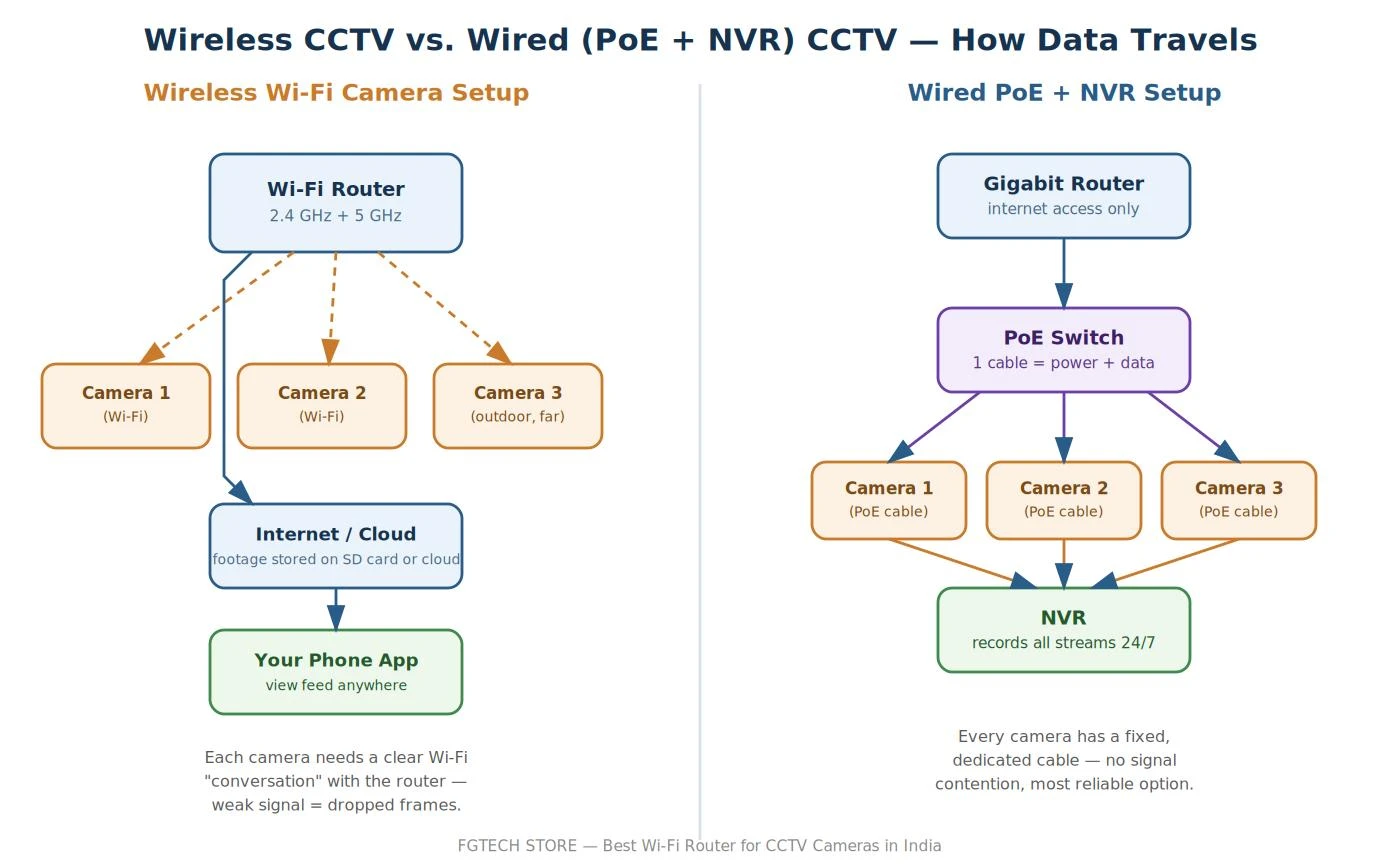
For wireless CCTV setups
For wireless cameras, prioritize 2.4 GHz range and device capacity over top-end 5 GHz speed. A router with beamforming will noticeably help outdoor or far-placed cameras stay connected instead of dropping in and out. If you have more than 2-3 cameras at real distance from the router (separate floor, gate, backyard), consider a mesh system rather than a single router - a single router straining to cover a large area is like one person trying to shout across an entire building; a mesh system is like stationing a few people at intervals to relay the message clearly.
For wired CCTV systems
Wired is generally more reliable for CCTV, full stop - no interference, no dropped frames, no fighting for bandwidth with your phone or laptop. For a wired setup, the router's wifi specs barely matter; what matters is a router (or separate PoE switch) with enough LAN ports.
PoE (Power over Ethernet) is worth understanding with an analogy: normally a camera needs one cable for data and a separate power adapter plugged into a wall socket near it - often impossible for a camera on an outside wall or gate pillar. PoE is like a garden hose that carries both water and fertilizer through a single pipe - one Ethernet cable carries both the power and the data to the camera. This removes the need for a power point near every camera, which is a huge practical win once you're installing three or more cameras.
NVR-based systems
If you're running an NVR (Network Video Recorder) with four or more cameras, prioritize gigabit LAN ports on your router or switch over flashy wifi speeds - the NVR itself usually connects by wire, and it needs a steady, uninterrupted stream from every camera to record without lag or gaps. Think of the NVR as a librarian who needs a continuous, orderly stream of books coming in; if the stream keeps stopping and restarting, the recording has holes in it. This depends on your local wired network capacity - the router's advertised Wi-Fi speed is irrelevant here.
Running both CCTV and regular wifi devices?
If your cameras and your everyday devices (phones, laptops, TV) share the same network, your camera feed is competing for bandwidth with your Netflix binge. If your router supports it, put the cameras on a separate network or VLAN. Think of it as giving the cameras their own private lane on the highway instead of merging into rush-hour traffic - this both isolates camera traffic for security and keeps it from being disrupted by everyday browsing and streaming.