HD Cameras and Webcam
 Projectors and Speakers
 VOIP Phones and Gateway
 Access Control
 5G routers and 4G LTE Devices
 Smart Sensors And Automation
 Fiber and SFP Modules
 Firewall & Cloud Controllers
 Network Adapters and Accessories
 Network Switches
 PoE Switches
 Point To Point Wireless Radio
 Routers
 Wireless Access Points
 IP Cameras
 Memory Cards
 NVR
NVR Smart WiFi Cameras
 Storage Devices
 Desktop & Laptop RAMs
 Internal and External Hard Drives
 Storage Accessories and Enclosures
 SSD and NVMe Drives
 USB Flash Drives


Archer BE600 vs Archer BE550: is the 10G port and extra coverage worth it?

The TP-Link Archer BE600 adds a faster 10G port, external adjustable antennas, and higher total throughput, while the Archer BE550 uses a compact internal antenna design with multiple 2.5G ports at a lower price point
The Archer BE600 and Archer BE550 are both tri-band Wi-Fi 7 routers, but they are aimed at slightly different network setups. The BE600 adds a 10 Gbps WAN/LAN port, a higher combined bandwidth of 9,700 Mbps and six external antennas. The BE550 keeps things simpler with five 2.5 Gbps Ethernet ports and a compact internal-antenna design.
For most homes with 1 Gigabit or 2.5 Gbps broadband plan, the BE550 already provides plenty of network capacity. The BE600 becomes useful when you have multi-gigabit wired devices, a fast NAS, or broadband plan above 2.5 Gbps.
The 10G port is the biggest hardware differentiator
The BE600 has one 10 Gbps WAN/LAN port, alongside one 2.5 Gbps WAN/LAN port and three 2.5 Gbps LAN ports. This gives you considerably more headroom for a multi-gigabit network. The BE550 instead has five 2.5 Gbps Ethernet ports - one WAN and four LAN - which is enough for most current home broadband connections and plenty of local network devices. So when does the 10G port actually matter?
The BE600 makes more sense if you have a broadband plan above 2.5 Gbps, or when the 10G port will be used for something inside your network. A good example is a NAS with a 10G Ethernet interface. Large file transfers between a workstation and NAS can make use of a faster wired connection even when your internet connection itself is nowhere near 10 Gbps.
How do BE600 and BE550 deliver on the rated wifi speeds
The BE600 is rated BE9700 - which means it promises a maximum Wi-Fi speed of 9,700 Mbps or 9.7 Gbps across all three frequency bands combined. The BE550 is rated at BE9300 - which means a maximum wifi speed of 9,300Mbps across all three bands . This difference of roughly 400Mbps may sound significant, but most of it comes from the 2.4 GHz band.
The BE600 is rated at 1032 Mbps on 2.4 GHz, compared with 574 Mbps on the BE550. On the two faster bands, the specifications are almost identical: around 2.88 Gbps on 5 GHz and 5.76 Gbps on 6 GHz. For devices using 5 GHz or 6 GHz, therefore, you should not expect the BE600 to suddenly be twice as fast as the BE550.
The difference on 2.4 GHz is more useful for the overall capacity of the network, particularly when you have a large number of older Wi-Fi devices, smart-home products and other equipment that remains on 2.4 GHz.
The internal antenna setup on BE550 vs external antenna on BE600 - is one more effective than the other?
The BE600 has six external antennas with beamforming, while the BE550 uses six internally positioned antennas. TP-Link describes both routers as having optimized antenna arrangements designed to provide broad coverage.
The BE600's external antennas do give you more control over the physical orientation of the antennas. That can be useful in a larger home or where the router cannot be placed perfectly centrally. But the official coverage ratings do not actually show the BE600 as having a larger rated home than the BE550. Interestingly, if you compare the two routers on the TP Link US website, it shows the BE550 is suited for 4 bedroom houses, while the BE600 is for 3 bedroom houses. So the external antennas may give the BE600 a modest coverage edge, but in a 2-4 bedroom house, both cover the space when placed centrally.
Which is better suited for Indian homes?
For a typical apartment or 2BHK/3BHK with a 1 Gbps broadband connection, the BE550 is already more than capable. If you have a 2.5 Gbps connection, the decision is still not automatic. The BE550 can handle that connection through its 2.5 Gbps WAN port. You would look at the BE600 if you also want the 10G port for future upgrades or for a fast local network.
For a larger independent house, the BE600's external antennas may make its physical design more convenient, but I would still look at the actual layout of the house before treating it as a coverage upgrade. If there are several concrete walls or multiple floors, an EasyMesh setup may be more useful than either router operating alone.
For a home or small office with a 10G NAS, 10G workstation, 10G switch or broadband service above 2.5 Gbps, the BE600 has a much clearer purpose.
Best for / Not for
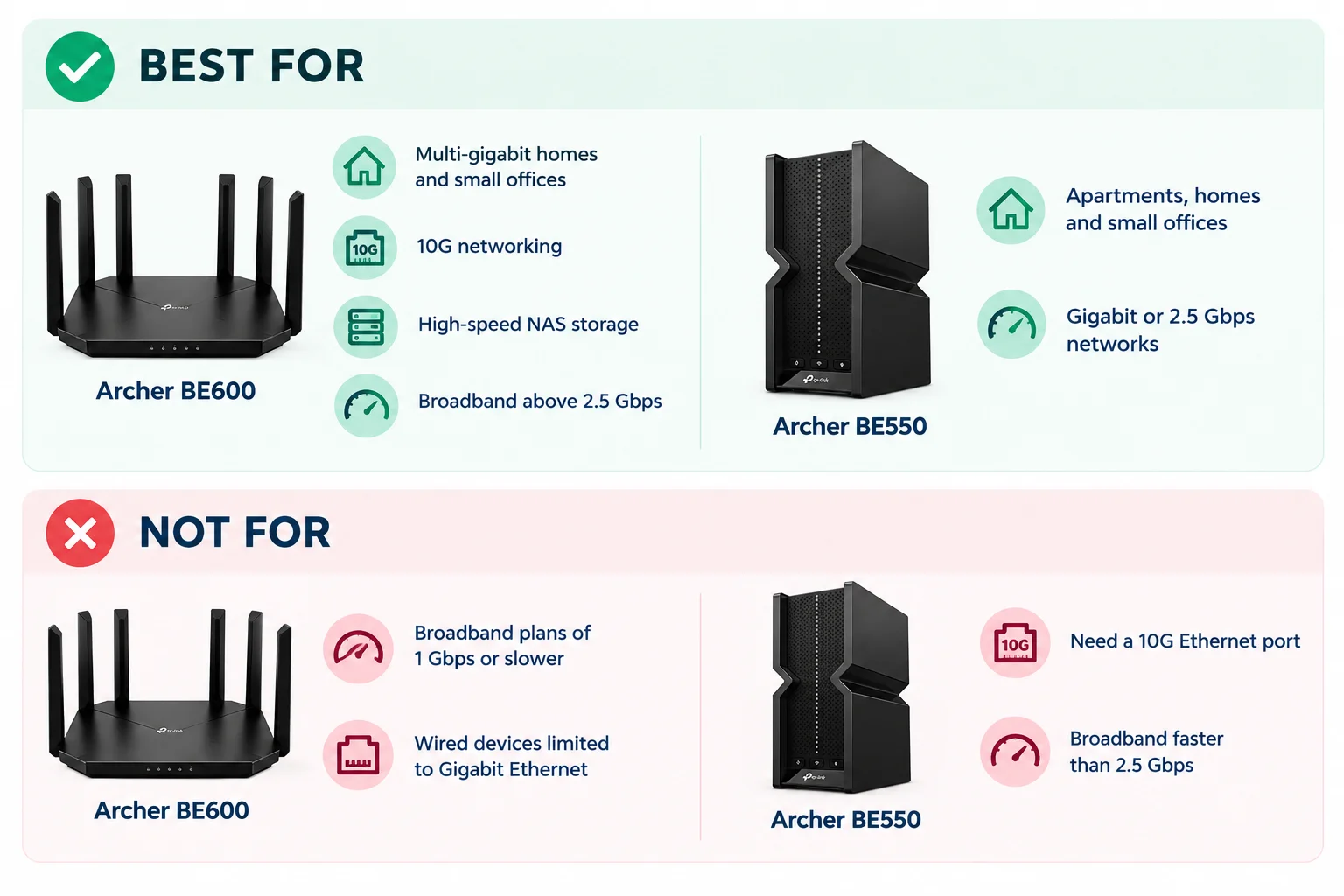
Best for: The BE600 makes more sense for multi-gigabit homes and small offices with 10G networking, high-speed NAS storage or broadband above 2.5 Gbps. The BE550 is well suited to apartments, homes and small offices running Gigabit or 2.5 Gbps networks.
Not for: The BE600 is not for broadband plans of 1 Gbps or slower and if your wired devices are limited to Gigabit Ethernet. The BE550 is not the obvious choice if you specifically need a 10G Ethernet port or if you are building a network around broadband faster than 2.5 Gbps.