
 HD Cameras and Webcam
 Projectors and Speakers
 VOIP Phones and Gateway
 Access Control
 5G routers and 4G LTE Devices
 Smart Sensors And Automation
 Fiber and SFP Modules
 Firewall & Cloud Controllers
 Network Adapters and Accessories
 Network Switches
 PoE Switches
 Point To Point Wireless Radio
 Routers
 Wireless Access Points
 IP Cameras
 Memory Cards
 NVR
NVR Smart WiFi Cameras
 Storage Devices
 Desktop & Laptop RAMs
 Internal and External Hard Drives
 Storage Accessories and Enclosures
 SSD and NVMe Drives
 USB Flash Drives


How concrete walls affect the performance of a Tri-Band Wi-Fi router?

Concrete and brick construction severely weakens the 5 GHz and 6 GHz signals that tri-band routers depend on for their fastest speeds. Even a premium tri-band router will struggle to push a reliable high-speed signal past one or two concrete walls in a typical 2BHK - 3BHK.
The reason comes down to basic physics - higher-frequency bands carry more data but travel shorter distances and penetrate solid materials poorly. The 2.4 GHz band passes through walls more easily but is slower and, in dense Indian apartment buildings, heavily congested from dozens of overlapping neighbouring networks. The 5 GHz and 6 GHz bands, the ones that give a tri-band router its real performance edge, are exactly the ones concrete kills first.
Table of contents
Why is the RCC construction especially tough on wifi?
Most Indian buildings use RCC (reinforced cement concrete) for structural columns, beams, and floor slabs, with brick or block masonry filling in the walls between them. This mix creates two very different levels of signal loss:
- Brick or block partition walls (the walls between rooms) cause moderate signal loss — noticeable, but a tri-band router can often push through one of these.
- RCC columns, beams, and floor slabs cause much heavier loss. The steel reinforcement bars inside RCC act almost like a mesh cage around the concrete, reflecting and absorbing radio waves far more aggressively. This is why Wi-Fi from a router on the ground floor of an independent house often struggles to reach the floor above.
So a shared wall that happens to run along an RCC column or a load-bearing beam will block far more signal than a similar-looking brick partition.
How much signal do we actually lose?
As a rough guide, based on how radio waves attenuate through common building materials:
| Obstruction between router and device | 2.4 GHz signal loss | 5 GHz / 6 GHz signal loss |
|---|---|---|
| 1 brick/block partition wall | Mild | Moderate |
| 1 RCC wall, column, or floor slab | Moderate | Severe |
| 2 walls (any mix) | Significant | Very severe, often unusable |
| 3+ walls, or 1 floor slab + 1 wall | Dead zone likely | Dead zone almost certain |
This pattern holds regardless of how good the router is. Every additional concrete or RCC barrier roughly compounds the loss, and the higher-frequency bands lose the most, the fastest.
This is also why a tri-band router's third band (the extra 5 GHz or 6 GHz radio) is often reserved for backhaul in mesh systems rather than for talking to your phone across the house. It simply doesn't have the range to survive that many walls.
India's 6 GHz band is now legal, here's why this matters for your router
In January 2026, India's Department of Telecommunications formally de-licensed the lower part of the 6 GHz band (5925–6425 MHz) for indoor Wi-Fi use, clearing the way for Wi-Fi 6E and Wi-Fi 7 devices to legally use their 6 GHz radios indoors for the first time.
For anyone with a tri-band router that includes a 6 GHz radio, this is a meaningful shift, since this band was effectively dormant in India until this year. This also means the 6 GHz band is even more sensitive to walls than 5 GHz. It's excellent for very fast, low-latency connections to devices in the same room or the next room over with no concrete in between, and it's increasingly used as a dedicated, congestion-free backhaul channel between mesh nodes. It's not a band that will rescue a dead zone two rooms and a wall away — if anything, it needs more help getting through concrete than 5 GHz does, not less.
A few simple fixes to try
A surprising amount of "weak wifi" is actually a placement problem. Here’s what you can rule out first -
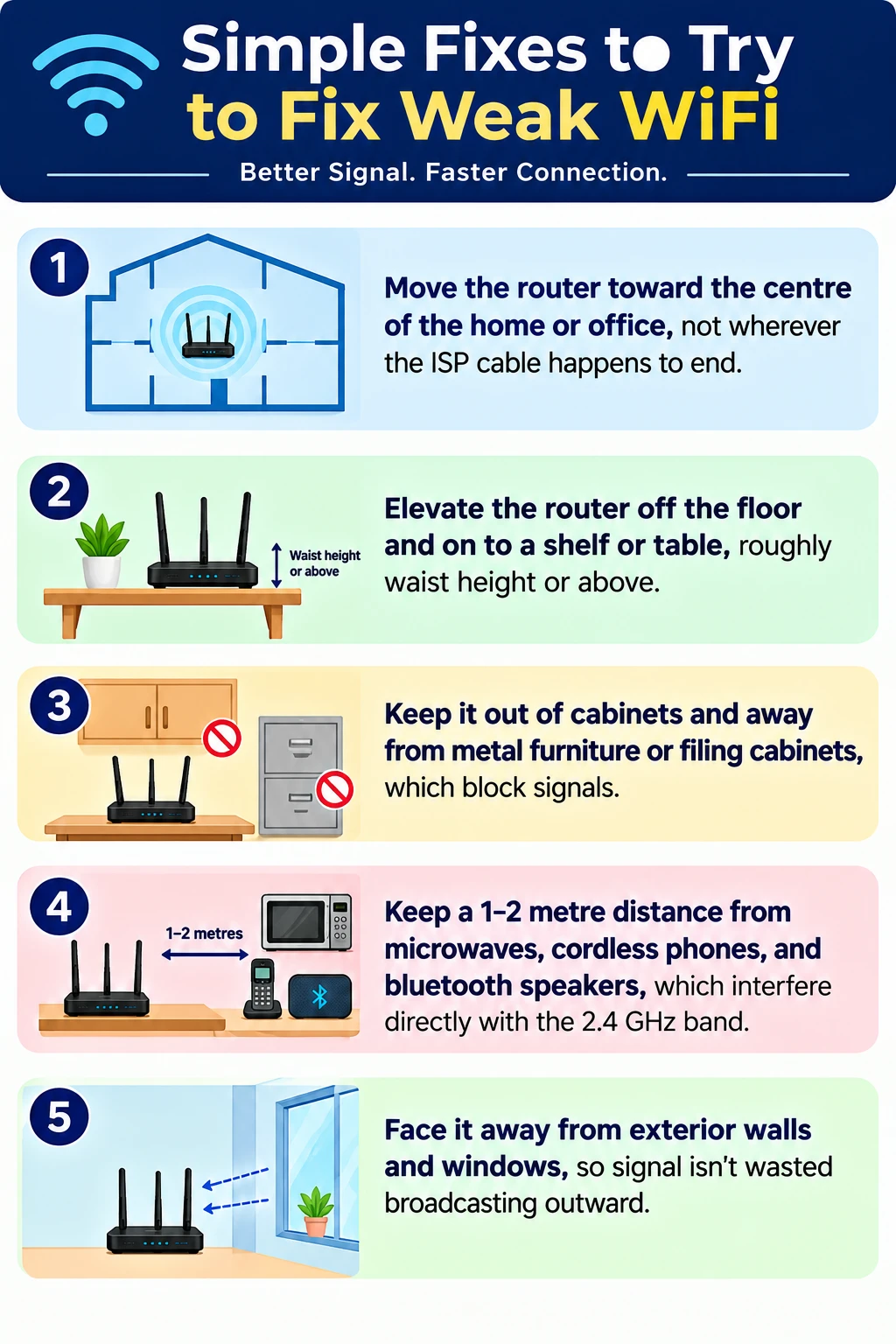
These changes cost nothing and often resolve a weak-signal complaint in a single room without any new equipment.