
 HD Cameras and Webcam
 Projectors and Speakers
 VOIP Phones and Gateway
 Access Control
 LTE and 5G Devices
 Smart Sensors And Automation
 Fiber and SFP Modules
 Firewall & Cloud Controllers
 Network Adapters and Accessories
 Network Switches
 PoE Switches
 Point To Point Wireless Radio
 Routers
 Wireless Access Points
 IP Cameras
 Memory Cards
 NVR
NVR Smart WiFi Cameras
 Storage Devices
 Desktop & Laptop RAMs
 Internal and External Hard Drives
 NAS Storage & Enclosures
 SSD and NVMe Drives
 USB Flash Drives


How to Choose the right CCTV Camera in India (2026 Buying Guide)

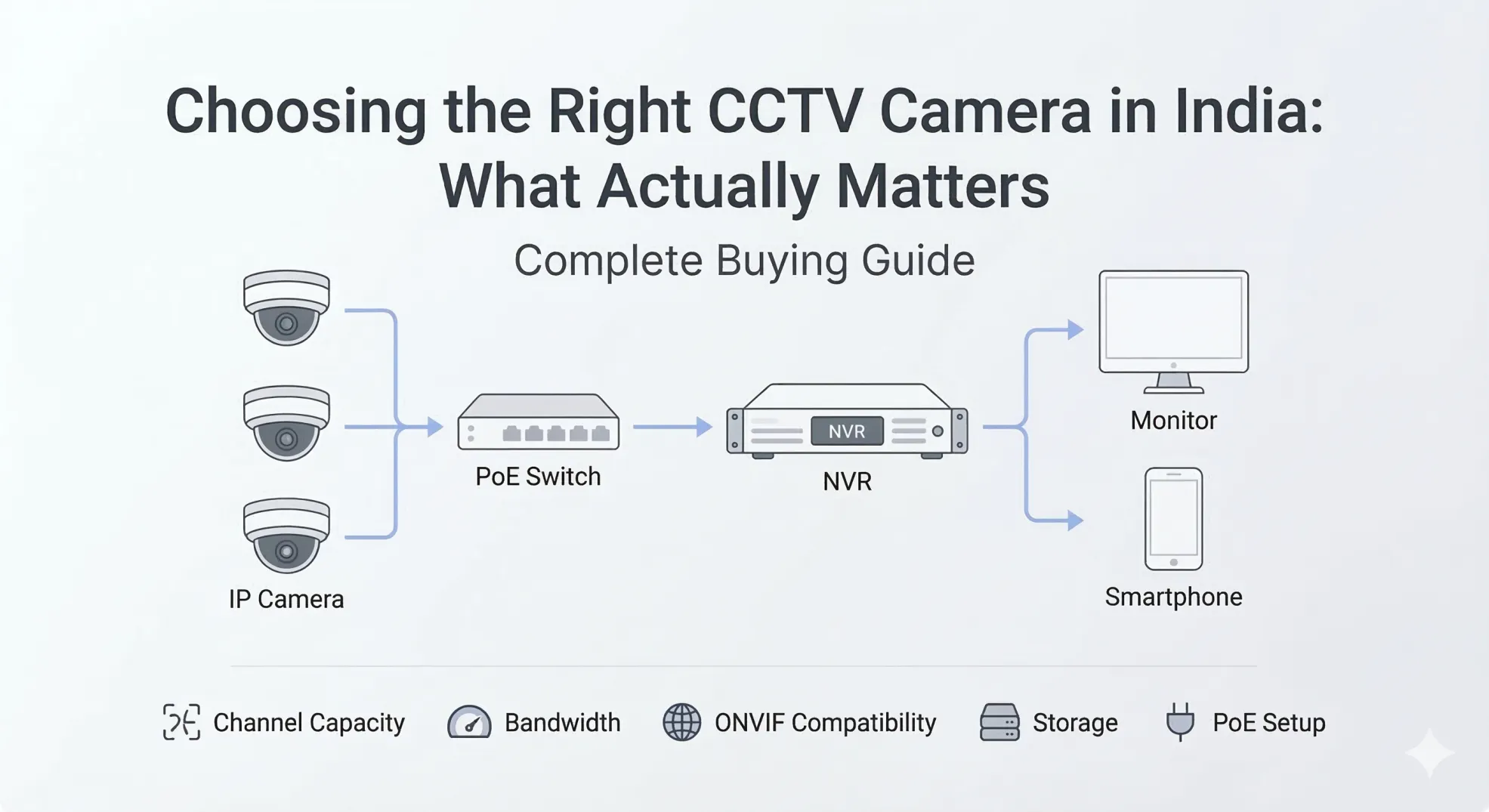
How to choose the right CCTV camera?
Pick a camera based on where you're installing it (indoor or outdoor), match resolution to your identification needs (1080p minimum, 2K or 4K if you need to read faces or plates from a distance), confirm the model has STQC certification before you pay, and choose between a wired NVR system or a Wi-Fi camera based on how many cameras you need and whether you rent or own the space.
How to choose CCTV Camera: Our evaluation method
This guide is based on publicly available spec sheets from camera brands; STQC certification requirements published by MeitY at stqc.gov.in; field installation patterns observed across home and small-business setups in India, and current market pricing.
Step 1: Decide your use case first
Before comparing models, answer three questions: Is the camera going indoors or outdoors? How large is the area you need to cover? And how many cameras will you need total?
Indoor cameras are typically compact, ceiling- or desk-mounted, and don't need weatherproofing. They're common in living rooms, shop counters, and office floors. Outdoor cameras need to handle rain, dust, and temperature swings, which means you need a weatherproof rating (more on that below).
The scale of your setup matters too. A single Wi-Fi camera for a home entrance is a very different purchase from an 8-camera wired system for a warehouse. Single-camera buyers can go wireless. Multi-camera setups (3 or more) almost always work better with a wired NVR system because you avoid Wi-Fi bandwidth issues.
Step 2: How to choose the right CCTV Camera type for your location?
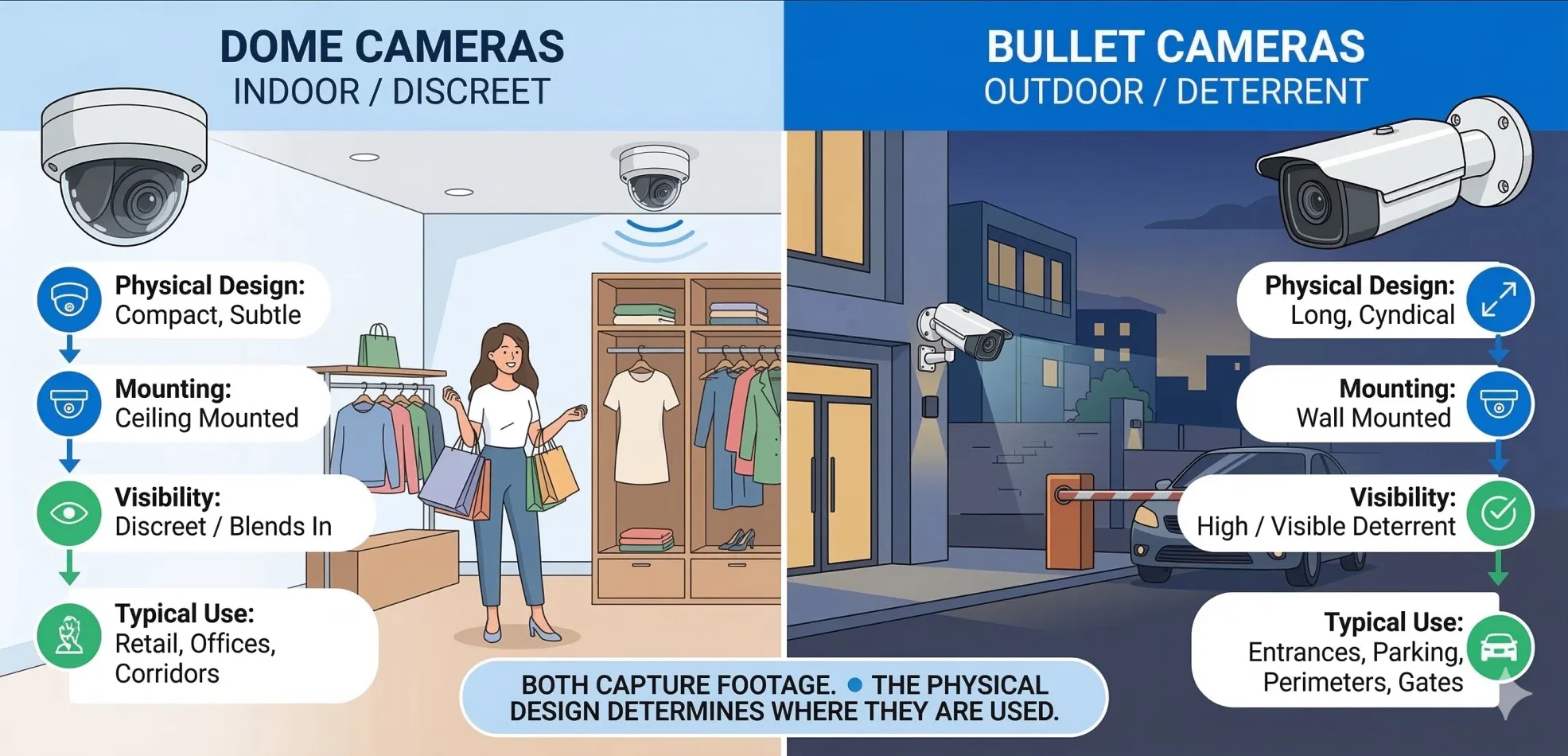
Dome cameras
Dome cameras are ceiling-mounted, discreet, and hard for intruders to tell which direction the lens points. They work well indoors: retail shops, office lobbies, restaurant dining areas. Some vandal-resistant dome models with IP66 ratings also work outdoors.
Best for: Indoor retail, offices, and lobbies where you want surveillance without an intimidating look.
Not for: Long driveways or large outdoor areas where you need directional range.
Bullet cameras
Bullet cameras are cylindrical, wall-mounted, and designed for longer viewing distances. They're the standard choice for outdoor installations: main gates, parking lots, building perimeters. Their visible shape also works as a deterrent.
Best for: Outdoor entrances, parking areas, perimeter walls, anywhere you want visible security.
Not for: Indoor ceilings where a discreet dome would blend better.
PTZ cameras (Pan-Tilt-Zoom)
PTZ cameras can rotate horizontally, tilt vertically, and zoom in optically. One PTZ camera can cover a large area that might otherwise need 3-4 fixed cameras. They're motorised and usually controlled via software or a mobile app.
Best for: Large warehouses, campuses, factory floors, where one camera needs to scan a wide area.
Not for: Small homes or shops, overkill and significantly more expensive (typically ₹15,000+).
360° / Pan-Tilt Wi-Fi cameras
These are compact indoor cameras that rotate to cover an entire room. They connect over Wi-Fi and are controlled via a phone app. Most offer 1080p or 2K resolution with two-way audio.
Best for: Home interiors, baby monitoring, pet monitoring small shop counters, and rented apartments where wiring is impractical.
Not for: Outdoor use or setups needing more than 2-3 cameras (Wi-Fi congestion becomes a problem).
Step 3: Camera Resolution: Is 1080p Enough or do you need 2K or 4K?
Resolution determines whether your footage is useful or just a blurry recording. Here's a practical breakdown:
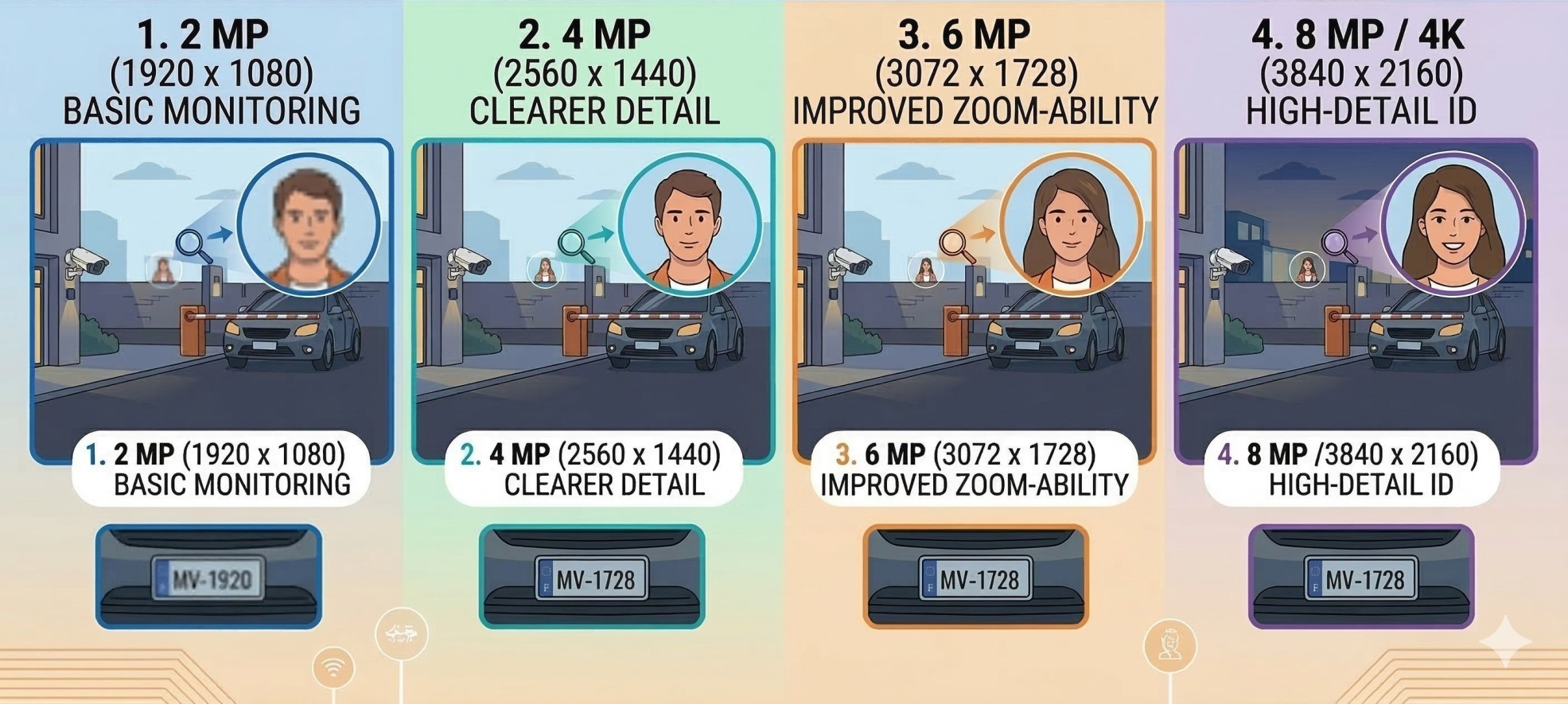
1080p (2MP): The baseline. Good enough for general monitoring; seeing that someone walked past, identifying broad movements. Adequate for small indoor rooms and well-lit areas.
2K / 3MP-4MP: The sweet spot for most Indian homes and shops in 2026. You get noticeably sharper faces and can digitally zoom into footage without losing too much detail. Most mid-range cameras from CP Plus and Qubo now ship at 2K.
4K (8MP): Useful when you need to capture licence plates, read signage, or identify faces from 10+ metres. Requires more storage and bandwidth. Practical for office entrances, commercial parking lots, or high-value inventory areas.
What this means for storage: A single 2MP camera recording 24/7 fills about 1TB in roughly 22-30 days with H.264 compression. H.265+ compression (available on most 2026 NVRs) nearly doubles that to 45-60 days on the same drive. If you go 4K, expect storage needs to roughly double compared to 2MP.
Step 4: Field of View: How much area does one CCTV camera cover?
Field of view (FOV) is measured in degrees and tells you how wide the camera can see. A wider angle covers more space but captures less detail at the edges. A narrower angle gives sharper detail but covers a smaller area.
Wide angle (100°-130°): Covers most of a room or a wide entrance in one shot. Common on indoor Wi-Fi cameras. May introduce slight fisheye distortion at edges.
Standard angle (60°-90°): Good balance of coverage and detail. Common on bullet cameras with 4mm lenses. Works well for corridors, driveways, and gates.
Narrow angle (30°-60°): High detail, small area. Useful for monitoring a specific zone: a cash counter, a door, a licence-plate reading point. Typically uses 8mm-12mm lenses.
Practical rule: A 2.8mm lens gives roughly 110° FOV. A 4mm lens gives around 90°. A 12mm lens narrows to about 30°. When planning a multi-camera setup, map your property and check whether one wide-angle camera covers an entrance or whether you need two standard-angle cameras to eliminate blind spots.
Step 5: How does Night Vision work in CCTV Cameras?
Almost all CCTV cameras in 2026 offer infrared (IR) night vision as standard. IR illuminates the scene with invisible infrared light and records in black-and-white. This is adequate for most home setups.
Colour night vision is a step up. These cameras use larger sensors and built-in spotlights (white LEDs) to record in full colour even in low light. This matters when you need to identify clothing colours, vehicle colours, or specific visual details after dark. It's available on most 2K and 4K cameras
When colour night vision is worth the premium: Outdoor cameras facing a street or parking lot, shops that are closed at night, and any location where black-and-white footage wouldn't give you enough identifying detail.
Step 6: What does IP66, IP67 Weatherproof rating mean for CCTV Cameras?
The IP rating tells you how well a camera's enclosure resists dust and water. It's a two-digit code defined by the International Electrotechnical Commission (IEC 60529):
- The first digit (0-6) rates protection against solid objects. A rating of 6 means completely dust-tight.
- The second digit (0-8) rates protection against water. A rating of 6 means the camera withstands powerful water jets from any direction. A rating of 7 means it can survive temporary submersion up to 1 metre.
IP66 is the standard for outdoor CCTV cameras in India and handles heavy monsoon rain, dust storms, and high humidity. For cameras mounted in fully exposed locations with no overhead cover, IP66 is the minimum you should accept.
IP67 adds submersion resistance; useful if the camera is mounted low near the ground in flood-prone areas or gets directly hit by pooling water.
Indoor cameras typically don't carry an IP rating, and you don't need one unless the camera is in a kitchen, bathroom, or dusty warehouse.
Step 7: Should you buy a Wired (DVR/NVR) or Wireless (Wi-Fi) CCTV system?
Right answer depends on the number of cameras and the type of property.
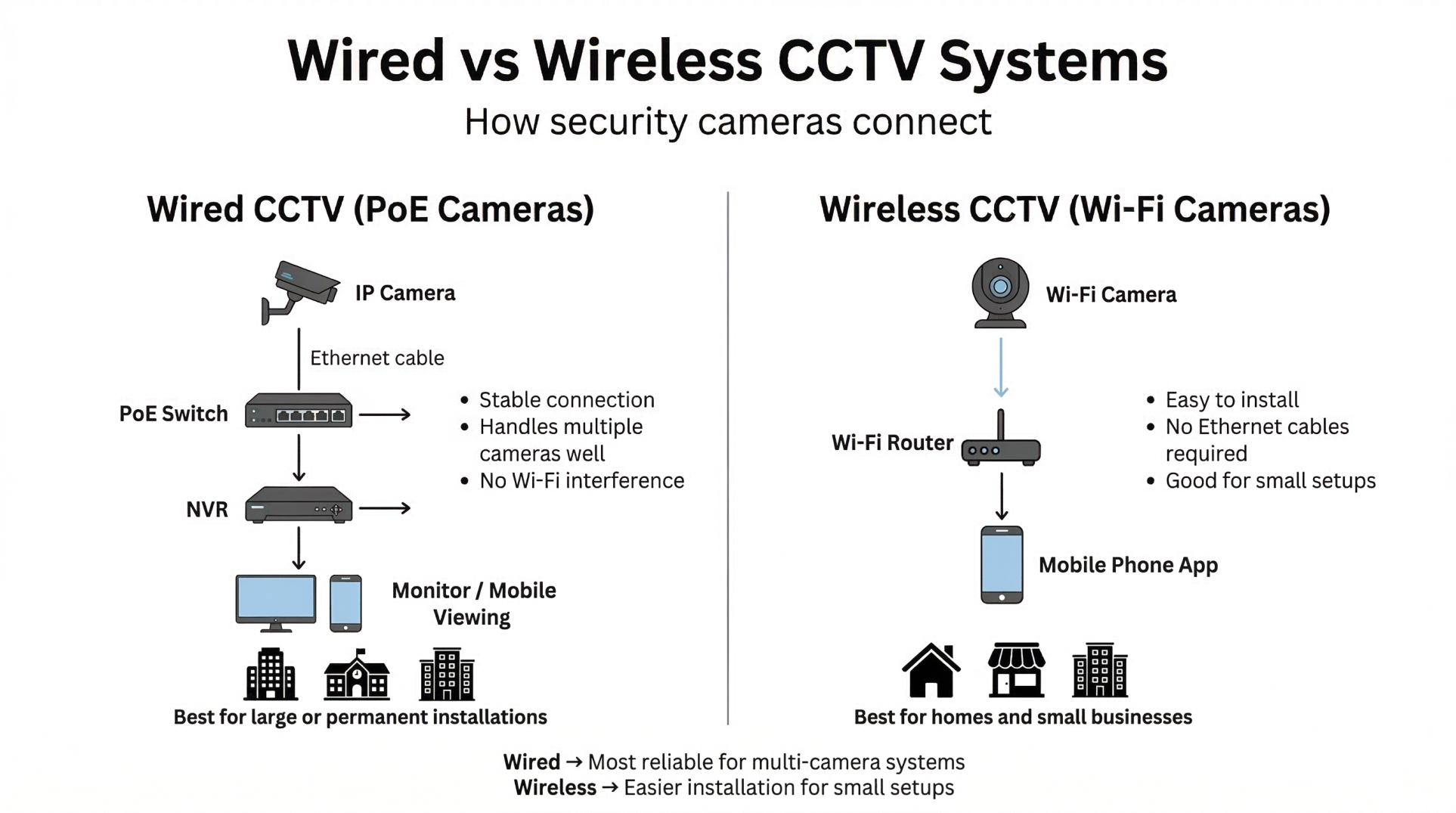
DVR Systems (Analog Cameras + Coaxial Cable)
DVR systems use analog cameras connected via coaxial cable. The DVR unit converts the analog signal to digital for storage. Coaxial cable can run up to 300-500 metres, but it doesn't carry power, so you'll need separate power lines to each camera. Audio is limited. Resolution typically maxes out at 2MP-5MP.
Best for: Budget-conscious retrofits where coaxial cable is already installed. Basic setups that don't need AI analytics.
Not for: New installations in 2026. NVR systems have largely overtaken DVRs in value.
NVR Systems (IP Cameras + Ethernet/PoE)
NVR systems use IP cameras connected via Ethernet cable. With PoE (Power over Ethernet), a single cable carries both power and data to each camera, reducing cabling complexity. IP cameras process video on-camera and stream digital data to the NVR for storage. They support higher resolutions (up to 4K and beyond), built-in audio, and AI features like person detection.
Best for: New multi-camera installations (3+ cameras) in offices, shops, warehouses, and homes where you want future-proof quality and AI features.
Not for: Renters who can't run cables, or single-camera home setups where a Wi-Fi camera is simpler.
Wi-Fi Cameras
Wi-Fi cameras connect to your home router and store footage on a microSD card or cloud. No cables needed (except power). Easy to install, easy to move.
Best for: Rented apartments, single-room monitoring, baby cams, small shops with 1-2 cameras.
Not for: Setups with 4+ cameras (Wi-Fi congestion causes lag and dropped feeds), or properties with weak router coverage.
Step 8: What is STQC Certification and why does it matter in 2026?
This is the single biggest change in the Indian CCTV market this year.
From April 1, 2026, the Government of India (via MeitY) has made it mandatory for every internet-connected CCTV camera sold in India to comply with BIS Essential Requirements (ER) - a set of cybersecurity and technical standards notified under the Compulsory Registration Order, and to be certified by STQC (Standardisation Testing and Quality Certification) before it can be legally sold in India. In plain terms: every camera must clear BIS-ER compliance first, then receive STQC certification to prove it. Without both, the camera cannot be sold in India.
What triggered this: Security agencies raised concerns that some internet-connected cameras, particularly those with Chinese-origin chipsets, could allow unauthorised remote access to camera feeds. The BIS Essential Requirements mandate cameras to meet cybersecurity standards including secure firmware, encrypted communication, authentication controls, and disclosure of country of origin for key components like the system-on-chip (SoC) and firmware.
The full STQC testing and certification procedure for CCTV cameras is publicly available.
Which brands are affected: Dahua, Hikvision and TP-Link (Tapo) have not received STQC certification as of April 2026. These brands cannot sell new cameras in India under the current rules. Over 500 CCTV models from compliant manufacturers (mostly Indian brands) have been cleared.
STQC Certified CCTV Camera brands in India
- Prama : Indian brand with a growing range of AI-enabled cameras. Compliant and focused on commercial and institutional surveillance.
- CP Plus : India's largest domestic CCTV brand. Fully BIS-ER compliant and STQC-certified. Widest service network across tier-2 and tier-3 cities. Good range from budget 1080p to 4K AI cameras.
- Sparsh : Indian manufacturer with STQC-certified IP cameras. Strong in government and enterprise projects.
- Matrix : Offers end-to-end surveillance solutions (cameras + NVRs + VMS). Well-regarded for enterprise and mid-scale commercial setups
- Honeywell: Honeywell is one of only three international brands on this list, alongside Vicon and Equus
- Vicon: known for high-precision, industrial-grade optical motion capture
- Equus: offers advanced, technology-driven surveillance solutions for public spaces, and government projects
Your action item: Before buying any CCTV camera in 2026, ask the dealer: "Can you show me the STQC certification for this model?" If the answer is no, do not buy it.
What happens to existing cameras: If you already have a Dahua, TP-Link, or uncertified Hikvision camera installed, it will continue to work. The rules target new sales, not installed systems. However, replacement parts and firmware updates for non-certified brands will become harder to source over time.
We maintain a regularly updated list of STQC-certified CCTV camera brands and models in India : check it before you shop.
Step 9: Which storage type to use for CCTV - Local, Cloud, or both?
Local (microSD / DVR / NVR hard drive): One time cost. Your footage stays on your premises. Risk: physical theft or hard-drive failure destroys your recordings.
Cloud: Remote backup. Accessible from anywhere. Risk: monthly subscription fees (typically ₹100-₹500/month depending on provider and retention period). Also requires a stable internet.
Hybrid (recommended): Record full-resolution footage locally on the NVR hard drive, and push motion-triggered event clips to the cloud for backup. This is the most practical approach for most Indian users; you get the security of remote backup without paying for 24/7 cloud recording.
If you're going with local NVR storage, the hard drive you pick matters. We cover that in detail in our guide on the best hard drives for CCTV and surveillance systems.
Step 10: What other CCTV Camera features to look for?
Worth it:
- AI person/vehicle detection: Reduces false alerts from rain, animals, or swaying branches. Available on most 2K+ cameras.
- Two-way audio: Useful at shop counters, doorbell setups, baby monitoring, and dog monitoring. Not essential for perimeter surveillance.
- Mobile app with push alerts: Non-negotiable in 2026. Ensure the brand's app (available on Android and iOS) has good user reviews.
Marketing fluff in most cases:
- "AI facial recognition" at the ₹3,000-₹8,000 price point: at this budget, the feature exists in name but rarely works reliably in real conditions.
"Starlight" or "Ultra Low Light" on budget cameras: the sensor size at low price points doesn't support meaningful starlight performance. This claim has value only on ₹10,000+ cameras with larger sensors.
Step 11: ONVIF Compatibility
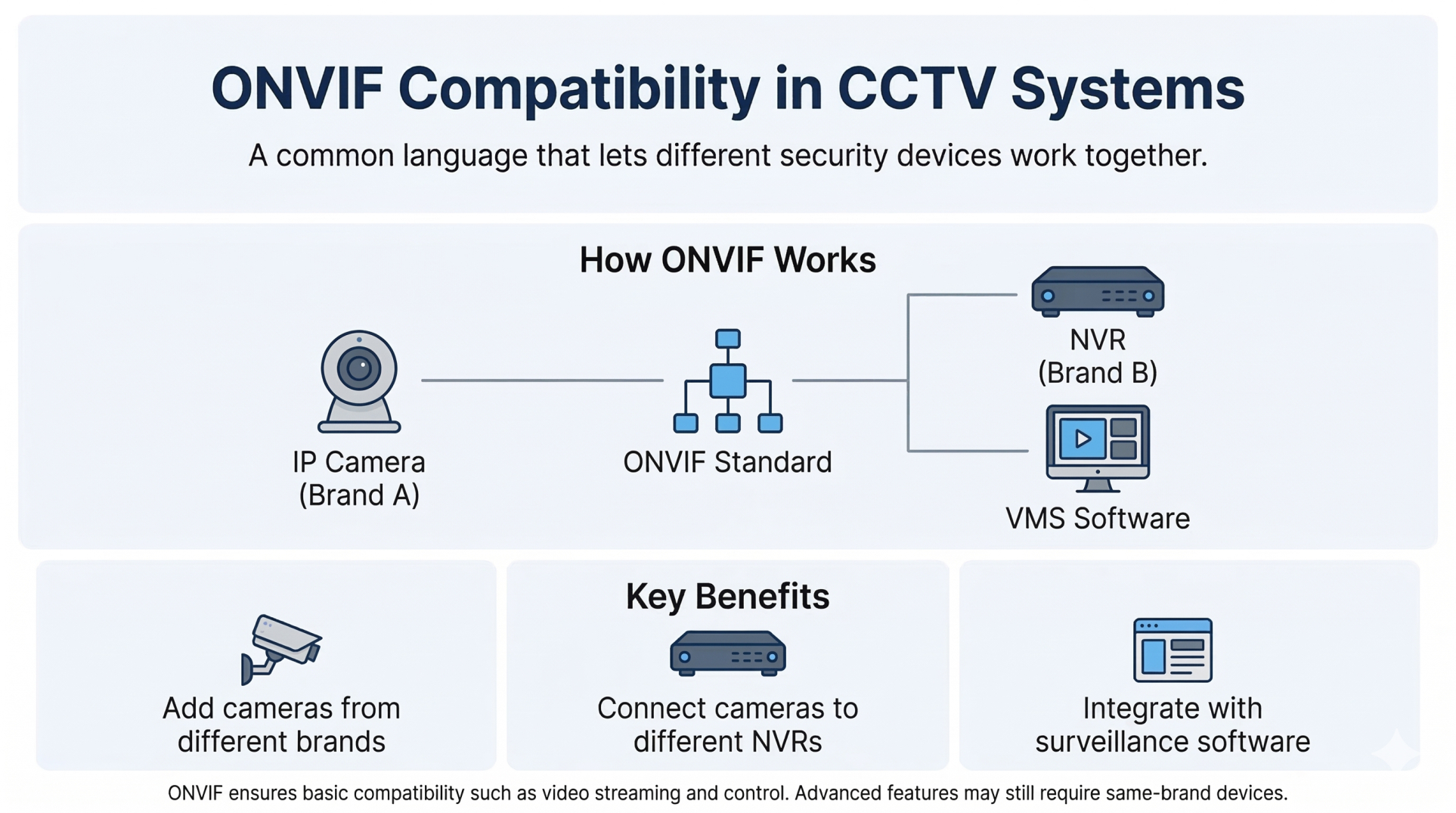
ONVIF (Open Network Video Interface Forum) is an industry standard that allows CCTV devices from different brands to communicate and work together on the same network. For example, a CCTV system might include an IP camera from one brand, an NVR from another, and third-party video management software. If all of them support ONVIF, they can connect and function together without compatibility issues.
ONVIF support is important when upgrading an existing system, connecting cameras to different NVR brands, or integrating third-party surveillance software.
However, ONVIF mainly ensures basic compatibility, such as video streaming and camera control. Advanced features like AI detection or smart tracking may still work best when the camera and recorder are from the same brand.
Step 12: How much does a CCTV Camera cost in India?
Budget | What you get | Best for |
|---|---|---|
₹1,500–₹4,000 | 1080p or 2K Wi-Fi indoor camera (Qubo, CP Plus E-series, Godrej) | Single-room home monitoring |
₹4,000–₹10,000 | 2K outdoor bullet/dome with IR night vision, IP66 (CP Plus, HiFocus, Godrej) | Home entrance, shop exterior |
₹15,000–₹30,000 | 4-camera NVR kit (2K or 4K) with PoE, 1TB HDD (CP Plus, HiFocus, Prama) | Small office, shop, or home perimeter |
₹30,000+ | 8+ camera system with AI analytics, colour night vision, 4K (CP Plus, Matrix, Sparsh, certified Hikvision) | Warehouse, campus, commercial complex |
Frequently asked questions in choosing CCTV Camera
Ready to buy? Browse our full range of CCTV cameras and surveillance systems with verified pricing and STQC-certified models.
Is 2K good enough for a CCTV camera, or do I need 4K?
For most Indian homes and small shops, 2K (3-4MP) is the practical sweet spot in 2026. It gives you enough pixel density to identify faces at 5-8 metres in playback. 4K is worth the premium only when you need to read licence plates, capture fine detail from longer distances (10+ metres), or digitally zoom into footage without losing clarity. Keep in mind that 4K roughly doubles your storage needs compared to 2K.
Which is better: DVR or NVR?
For new installations in 2026, NVR with PoE IP cameras is the better choice for most buyers. NVR supports higher resolution, carries power and data on a single Ethernet cable, and enables AI features like person detection. DVR still makes sense if you're upgrading an older system with existing coaxial wiring and want to save on recabling costs.
Can CCTV work without an NVR?
Yes. Standalone Wi-Fi cameras record directly to a microSD card or cloud storage without any NVR. This works for 1-2 camera setups. For 3+ cameras, an NVR provides centralised recording, easier playback, and better reliability than relying on individual SD cards.
How do I check if a CCTV camera is STQC certified?
Ask the dealer to show you the STQC certificate for the specific camera model. You can also check the STQC website (stqc.gov.in) for the certified product list. As of April 2026, over 500 models have been certified, primarily from Indian and select international manufacturers.
How many cameras do I need for a 3BHK home?
Typically 3-5 cameras: one at the main entrance, one covering the backyard or balcony, and one inside the hall. If the home has a separate parking area or stairwell, add one camera per zone. Start with the entry points and expand based on blind spots.