
 HD Cameras and Webcam
 Projectors and Speakers
 VOIP Phones and Gateway
 Access Control
 5G routers and 4G LTE Devices
 Smart Sensors And Automation
 Fiber and SFP Modules
 Firewall & Cloud Controllers
 Network Adapters and Accessories
 Network Switches
 PoE Switches
 Point To Point Wireless Radio
 Routers
 Wireless Access Points
 IP Cameras
 Memory Cards
 NVR
NVR Smart WiFi Cameras
 Storage Devices
 Desktop & Laptop RAMs
 Internal and External Hard Drives
 Storage Accessories and Enclosures
 SSD and NVMe Drives
 USB Flash Drives


TP-Link Archer BE400 vs Archer BE550: Which TP-Link router should you buy?

Choose the TP-Link Archer BE550 if you want full Wi-Fi 7 performance with a dedicated 6 GHz band and all multi-gigabit ports, or buy the TP-Link Archer BE400 only if you are on a strict budget and lack 6 GHz-compatible devices
The Archer BE550 is the better router. It adds the 6 GHz band with 320 MHz channels, five 2.5G ports, and significantly higher combined bandwidth (9,200 Mbps versus 6,500 Mbps). The BE400 saves money by dropping 6 GHz entirely and using mostly Gigabit LAN ports, but that tradeoff limits its Wi-Fi 7 potential.
Understanding streams and channel width on BE400 and BE550
Two things decide how fast a Wi-Fi connection can be - how many streams it uses and how wide the channel is. Think of it as a road, where streams are the number of lanes and channel width is how wide each lane is. Total speed is roughly lanes × width.
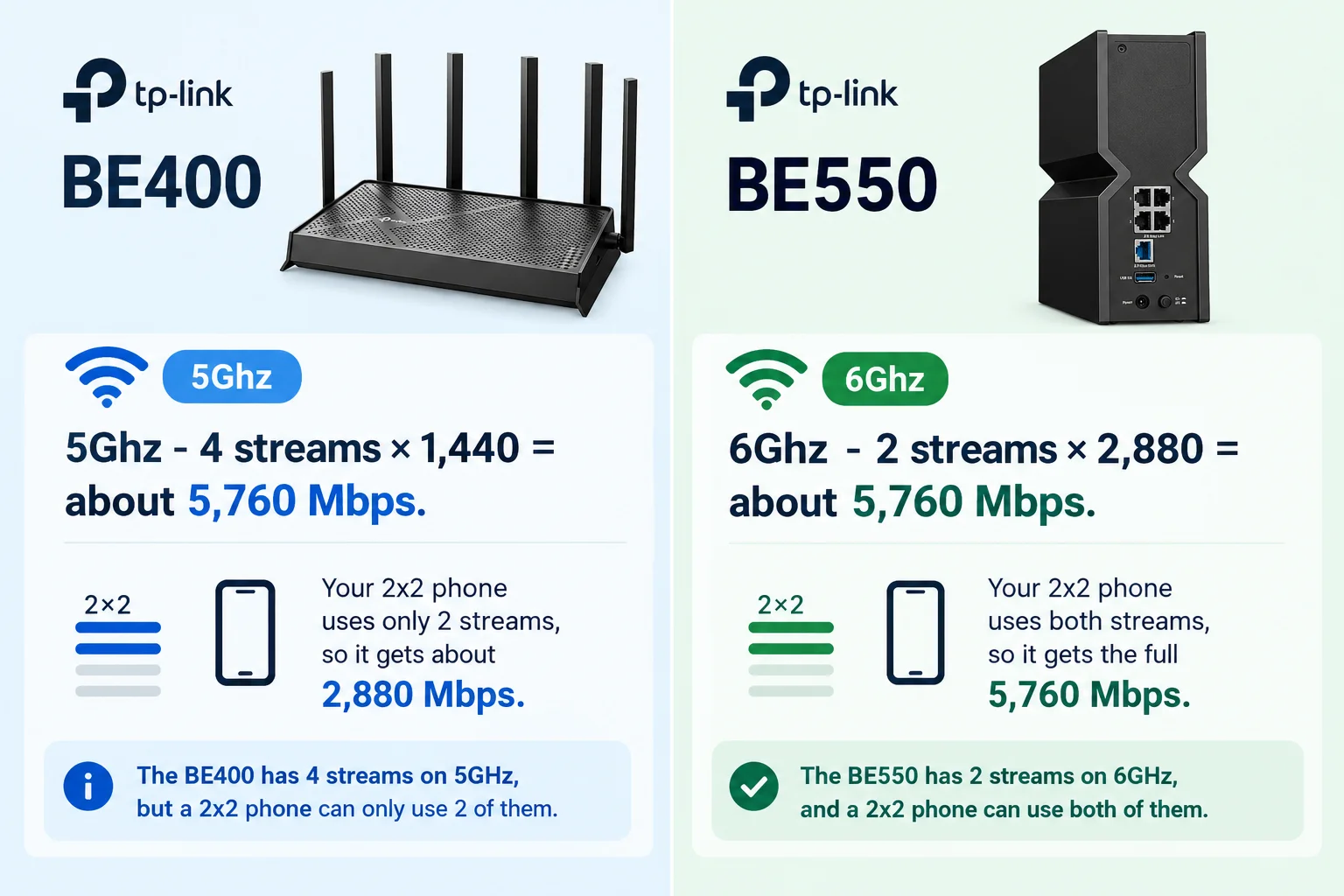
Streams (2x2 vs 4x4) - A "2x2" device has two antennas for sending and receiving data at once. A "4x4" device has four. For a router and a device to use all four streams, both need four antennas. If the router has 4x4 and your phone is 2x2, the connection runs on two streams only.
Channel width (160 MHz vs 320 MHz) - Wider channels carry more data. Wi-Fi 7 allows 320 MHz channels, but only on the 6 GHz band. The 5 GHz band tops out at 160 MHz. So, on Wi-Fi 7, each stream gives about 1,440 Mbps at 160 MHz and about 2,880 Mbps at 320 MHz.
There are also no older devices on 6 GHz, so this is where Wi-Fi 7's speed advantage comes in. One India-specific point is that the Department of Telecommunications de-licensed only the lower 6 GHz band (5925-6425 MHz) in January 2026. That is 500 MHz, enough for a single 320 MHz channel, not the three you get in the US. 6 GHz is clean, but it is not unlimited.
How do the two routers perform on range?
6 GHz weakens faster with distance and through walls. Expert Reviews found the BE400 outpaced the BE550 in far rooms, and Blacktubi saw the same in its long-distance testing. If your router sits in the hall and the bedrooms are two walls away, the BE400's 5 GHz will often give you the better connection there. The BE550's 6 GHz works best for devices in the same room or one wall away, like a work desk or a TV. Beyond that, the BE550 drops back to 5 GHz, which is rated at 2,880 Mbps.
Do you need the BE550’s extra 2.5G ports?
Yes, if you plan to wire more than one fast device. The BE400 has one 2.5G WAN, one 2.5G LAN and three Gigabit LAN ports. The BE550 has one 2.5G WAN and four 2.5G LAN ports.
That matters if you connect a NAS, a gaming PC and an access point over cable. On the BE550, all three can run at multi-gig speeds. On the BE400, only one gets the 2.5G port and the rest are capped at 1 Gbps. If you wire just one fast device, the BE400 is enough.
Both routers share TP-Link's firmware, Tether app, EasyMesh, HomeShield, VPN support and one USB 3.0 port. Both also support Multi-Link Operation (MLO), but they pair different bands. The BE400 combines 2.4 and 5 GHz, while the BE550 combines 5 and 6 GHz. MLO only helps with Wi-Fi 7 devices.
Check the hardware version before you buy
Both routers come in several hardware revisions, and TP-Link runs separate firmware for each. You can find the version on the label under the router. The BE550 has V1/V1.6 and V2/V2.6. The BE400 has V1.0, V1.6 and V1.20. Some V1 owners have complained on TP-Link's community forums that V2 units get updates first.
Firmware has had a few bumps too. Owners reported that BE400 firmware 1.2.3 could break Wi-Fi if only one band was enabled, and TP-Link released a beta fix. On the BE550 V2, upload speeds dropped on some networks after 1.3.1 and were fixed in 1.3.3.
Once you update past 1.1.1 on the BE400 or the BE550 V2, you cannot go back to 1.0.x. So best not to update on day one without reading the release notes. Since both routers are still getting updates, buying the newer model does not automatically mean better support.
Best For / Not for
Best For
The BE550:
- Ideal for Wi-Fi 6E/7 users because it is a Tri-Band router (includes the 6 GHz band), whereas the BE400 is only Dual-Band.
- It is the only option if you have multiple multi-gig wired devices (e.g., a fast PC and a NAS), as it has four 2.5 Gbps LAN ports, compared to just one on the BE400.
The BE400:
- Better for larger homes and Wi-Fi 6 devices because its 4x4 5 GHz radio and external antennas offer superior beamforming and long-distance signal stability compared to the BE550's 2x2 5 GHz setup.
- It delivers the core non-6 GHz benefits of Wi-Fi 7 (like MLO between 2.4/5GHz and 4K-QAM) at a significantly lower price.
Not For
The BE400:
- Do not buy if you want 6 GHz (Wi-Fi 6E/7 exclusive band), as this router physically lacks the hardware for it.
- Do not buy if you need to wire in multiple high-speed devices; it only has one 2.5 Gbps LAN port (the others are 1 Gbps).
The BE550:
If your devices are mostly Wi-Fi 6 and the router is far away, the BE550 is a poor choice. You are paying extra for a 6 GHz band you can't use, and its 5 GHz performance (where your devices will actually connect) is technically weaker (2x2 streams) than the cheaper BE400's (4x4 streams).