
 HD Cameras and Webcam
 Projectors and Speakers
 VOIP Phones and Gateway
 Access Control
 LTE and 5G Devices
 Smart Sensors And Automation
 Fiber and SFP Modules
 Firewall & Cloud Controllers
 Network Adapters and Accessories
 Network Switches
 PoE Switches
 Point To Point Wireless Radio
 Routers
 Wireless Access Points
 IP Cameras
 Memory Cards
 NVR
NVR Smart WiFi Cameras
 Storage Devices
 Desktop & Laptop RAMs
 Internal and External Hard Drives
 Storage Accessories and Enclosures
 SSD and NVMe Drives
 USB Flash Drives


SSD Buying Guide: How to verify what’s really inside

By Fgtech Store
Tech Tomorrow
for you, with you
March 1, 2026 • Issue #6 • 5 min read
📌
From our Desk
The label on the box still doesn't tell you what you need to know.
Last issue , we showed you how the SSD supply chain actually works, that most SSD brands don't manufacture their own chips - they're assemblers.
We left you with three questions. Today, we answer them.
Quick note: In the last issue, we asked about the length of the newsletter. 77% said it's just right, 11% said too long, and 12% wanted more depth. This issue is ~900 words with more visuals. Let us know at the end if this works better.
— Shailendra Jain, Founder - FGTech Store
In this issue
- How to verify what's inside before you buy
- When SSD prices will stabilize (and whether you should wait)
- Check our complete guide on which HDD to buy for NAS
🔍 Verification Guide


How to verify components before you buy
In the last issue, we covered how NAND chips are the core of every SSD - the actual storage medium. What we didn't cover is that not all NAND is equal at the cell level.
We also compared NAND manufacturers to steel mills, and here's the next layer: just like steel mills produce different grades - mild steel, high-tensile, industrial - NAND fabs engineer different cell types for different durability standards.
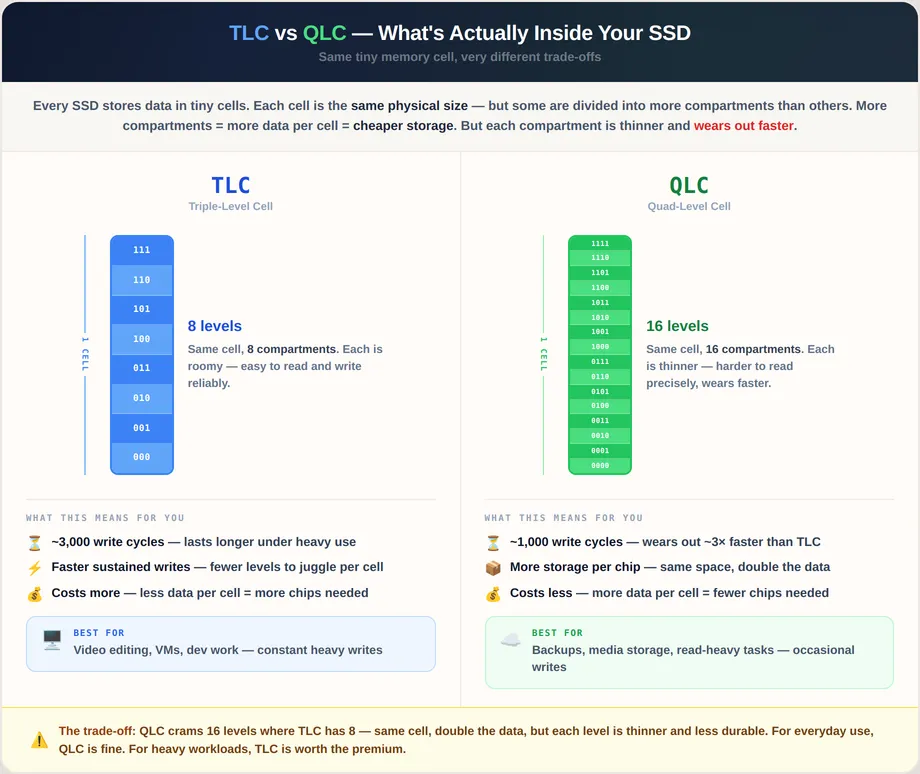
TLC and QLC are exactly that. They are two durability tiers engineered from the same NAND fab, like mild steel versus high-tensile steel from the same mill. The difference: how many bits each cell stores, and how that affects lifespan.
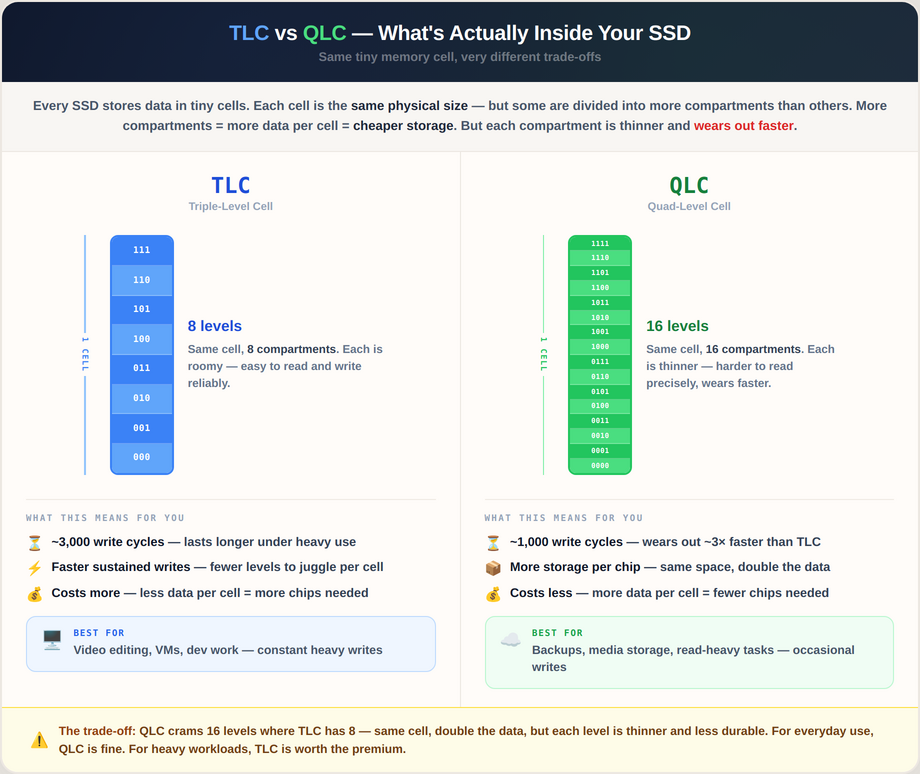
TLC vs QLC comparison: bits per cell, write cycles, and ideal use cases
The problem: Brands swap NAND mid-production without changing model names. A Kingston NV2 from early 2024 might have Samsung TLC; late 2025 could have YMTC QLC. Same box, different internals, potentially different lifespan.
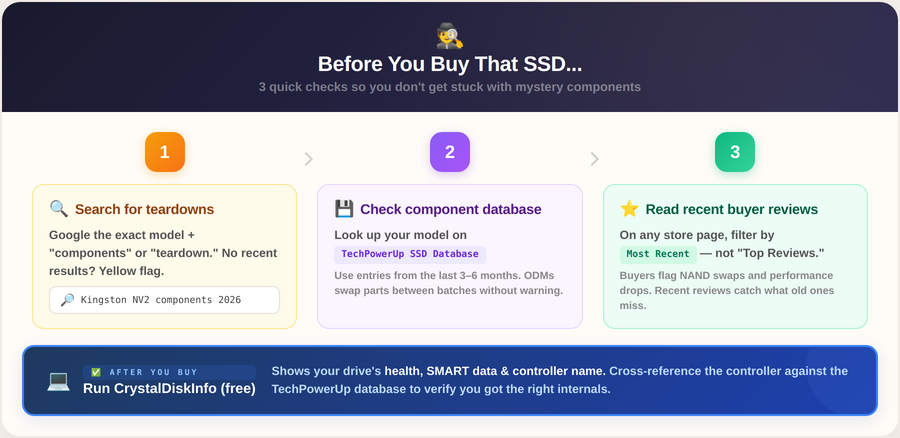
3-step SSD verification flow: teardowns, databases, reviews, and CrystalDiskInfo
Sources: TechPowerUp SSD database
📈 Market Outlook

When will SSD prices stabilize?
Practical answer: Not this year.
NAND prices rose 33-38% in Q1 2026, and the causes are structural, not cyclical:
What's pushing prices up:
- AI infrastructure is consuming enterprise NAND at an unprecedented scale
- Micron's Crucial shutdown (Feb 2026) removes a major price-competitive consumer supply option from the global market
- Manufacturers prioritize high-margin data center SSDs over consumer drives - consumer NAND allocation has sharply declined as manufacturers prioritize data center SSDs
- Most 2026 capacity is already pre-sold to enterprise clients under take-or-pay contracts
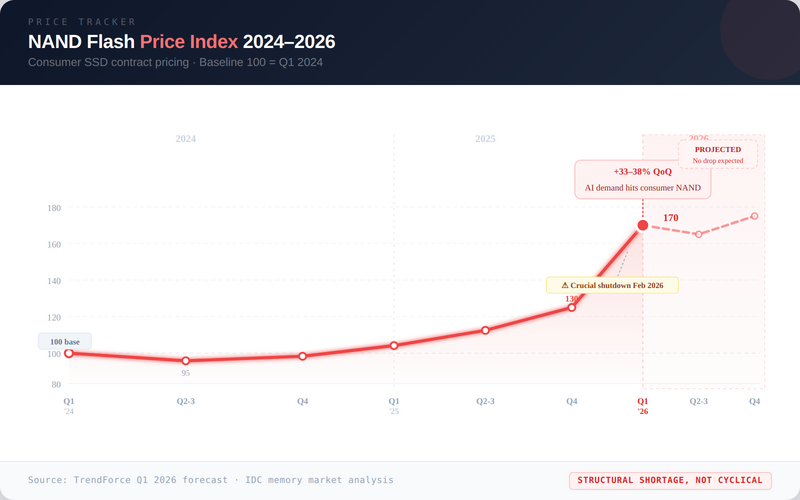
NAND price trend: 2024-2026 (AI-driven surge)
🤔 The Big Question

If Samsung makes the chips, why not just buy Samsung?
What actually separates OEM from ODM?
The short answer: for everyday use, you'd be overpaying 20–30% for identical performance if you buy a Samsung. But for heavy workloads, that premium delivers real, measurable value.
But the NAND manufacturer alone shouldn't drive this decision. A Kingston using Samsung NAND and a Samsung 990 Pro can share the same chip generation and still behave very differently under sustained load. Five things separate them:
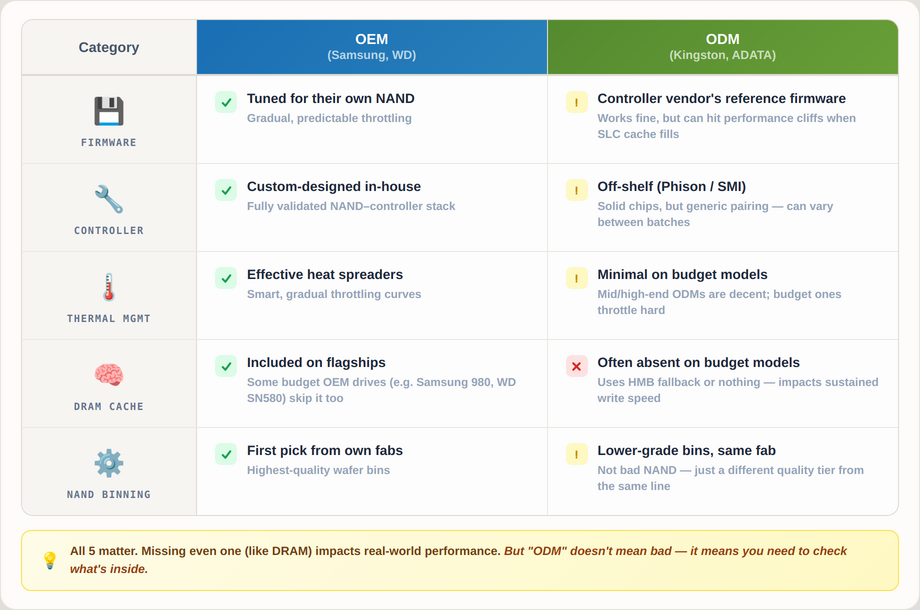
Five key SSD differentiators: firmware, controller, thermals, DRAM cache, NAND binning
1. Firmware — Firmware controls data placement, wear distribution, and cache behavior. Well-tuned OEM drives handle cache exhaustion gracefully - gradual slowdown, predictable recovery. Budget ODM drives often hit a performance cliff—speeds crater and stay low. Benchmarks won't show this; exporting an 80GB video will.
2. Controller pairing — The controller runs the firmware and manages every read, write, error correction, and garbage collection operation. Phison and SMI make solid controllers. But a budget ODM can pair a Phison E21 with YMTC NAND and ship generic firmware, untuned for that specific chip. The spec sheet looks reassuring; the behavior under load doesn't match. Samsung and WD design the controller and firmware together, validated as a single stack against their own NAND. That's the real advantage - not any one component, but the integration.
3. Thermal management — Under sustained load, well-implemented throttling reduces speed gradually and recovers quickly. Poorly implemented throttling cuts hard and holds there. Many budget drives also lack effective heat spreaders, making them more susceptible in tight laptop enclosures or dense builds.
4. DRAM cache — Drives with DRAM cache keep data location maps in fast memory; without it, every operation adds latency. Invisible for everyday use (apps, browsing). Noticeable for VMs, databases, editing. Most budget ODM drives under ₹4,500 are DRAM-less. We made a video to explain how DRAM affects SSD.
5. NAND quality binning — Samsung sorts its NAND wafers and reserves higher-quality bins for its own branded drives. Lower-grade wafers from the same fab get sold to ODM brands. Same manufacturer on the label, different quality tier inside.
The Decision Table
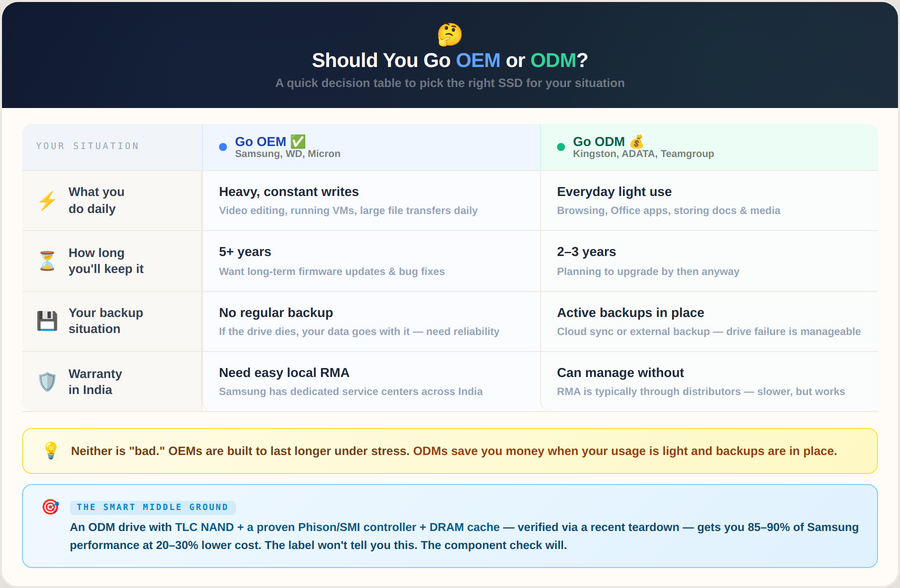
OEM vs ODM SSD decision table by workload, lifespan, backup, and India warranty
⚠️ One rule for Indian buyers: Always confirm India warranty support before buying. A ₹500 saving upfront can cost ₹3,000 in courier fees and months of hassle if the drive fails under warranty.
What we learned from your questions
After Issue #5, we got a few messages. Not just "Which storage (SSD or HDD) to buy", but genuine confusion about component swaps, warranty claims gone wrong, and drives failing months after purchase.
Three patterns kept showing up:
1. "I bought a Purple drive for my NAS. It's slow."
Purple is designed for surveillance DVRs; always-on, sequential writes. NAS needs random I/O performance. That's a Red or IronWolf. Each series is built for specific workloads. We just published a complete guide on this.
2. "My drive failed under warranty. Seller wants me to visit the brand service centre and coordinate there. But I don't have a service centre in my town."
This is why we only stock drives with India warranty support. In case of a failure, all you have to do is send it to us at FGTech, and we will take care of it for you.
3. "I saved ₹800 buying from a marketplace. Drive arrived with dents."
HDDs are mechanical; shock during shipping kills them slowly. We use double-boxed foam packaging as standard, and exactly why we automatically upgrade to air shipping for HDDs, bubble wrap in a box isn't enough when couriers treat packages like basketballs.
Every product we add solves a specific problem we heard from you. If you're stuck choosing between drive series or need help sizing storage, just ask.
Before You Go...
Hit reply and tell us:
- What SSD are you currently running?
- Did you know whether it's TLC or QLC?
Give us your honest feedback
This issue was ~900 words with more infographics (vs our usual 1,000+ words with fewer visuals).
Did this shorter, more visual format work better for you?
Unit no 104, A Wing, Sagar Tech Plaza, Sakinaka, Andheri (E), Mumbai
Maharashtra, India - 400072
Maharashtra, India - 400072


Curated by Geet Gera