
 HD Cameras and Webcam
 Projectors and Speakers
 VOIP Phones and Gateway
 Access Control
 LTE and 5G Devices
 Smart Sensors And Automation
 Fiber and SFP Modules
 Firewall & Cloud Controllers
 Network Adapters and Accessories
 Network Switches
 PoE Switches
 Point To Point Wireless Radio
 Routers
 Wireless Access Points
 IP Cameras
 Memory Cards
 NVR
NVR Smart WiFi Cameras
 Storage Devices
 Desktop & Laptop RAMs
 Internal and External Hard Drives
 NAS Storage & Enclosures
 SSD and NVMe Drives
 USB Flash Drives


Best Hard Disk for CCTV in India 2026: WD Purple, SkyHawk & Toshiba S300


TL;DR - Quick Takeaways
- The best HDD for CCTV in India is the WD Purple (starts at ₹5,900 for 1TB). It is built for 24/7 recording and supports up to 64 cameras.
- The best budget option is the Toshiba S300 (starts at ~₹5,000 for 1TB). Solid reliability at a lower price.
- Never use a desktop HDD (like WD Blue or Seagate Barracuda) in a CCTV system. It will fail within months.
- Always choose CMR over SMR technology for CCTV. SMR drives slow down during continuous recording.
What is the Best HDD for CCTV in India? (2026 quick answer)
The best Hard disk for CCTV camera in India is the WD Purple because it is designed for 24/7 surveillance recording, supports up to 64 cameras, uses CMR technology, and has a 180TB/year workload rating.
Choosing the best HDD for CCTV is one of the most important decisions in any surveillance setup. The wrong hard disk can cause dropped frames, recording gaps, and early failure. But finding the right one is confusing because manufacturers make drives for very different purposes: surveillance, NAS, desktop, and enterprise servers.
This guide cuts through the confusion. We explain exactly which hard disk works for which purpose, compare every major brand sold in India with current INR prices, and give you a simple storage
calculator to figure out exactly what size you need. Whether you are setting up a 4-camera shop, a 32-camera warehouse, or a home NAS, this guide has you covered.
You can explore the full range of Surveillance Hard Disks available at FGTech Store to see current options and pricing.
What is a Surveillance Hard Disk and why can’t you use a regular one?
A surveillance hard disk is a hard drive specially designed for CCTV systems. It is built to handle continuous video recording from multiple cameras, 24 hours a day, 7 days a week. A regular desktop HDD (like the WD Blue or Seagate Barracuda) is built for only 8–10 hours of daily use. If you put a desktop drive in a DVR or NVR, it will overheat, drop video frames, and likely fail within 3–6 months.
Here is why surveillance HDDs are different from desktop drives.
Continuous write optimisation: Surveillance drives are tuned for writing large video files non-stop. Desktop drives are tuned for a mix of small reads and writes.
24/7 rated: Surveillance HDDs are tested to run without breaks. Desktop HDDs need downtime to cool and recover.
Multi-camera support: A WD Purple can handle data streams from up to 64 cameras at once. A desktop drive struggles with more than one or two.
Vibration resistance: Surveillance and NAS drives have built-in vibration sensors. In a rack with multiple drives, vibration from neighbouring disks can cause errors. Surveillance drives compensate for this automatically.
Special firmware: WD Purple uses AllFrame technology and Seagate SkyHawk uses ImagePerfect firmware. Both prioritise video integrity over raw speed, so you get smooth footage instead of dropped frames.
Bottom Line: Never put a desktop HDD in a CCTV system. Always use a surveillance-rated drive like WD Purple, Seagate SkyHawk, or Toshiba S300.
Not sure which camera setup to pair with your surveillance drive? Read our guide to how to choose the right CCTV camera in India to match your storage needs to your system.
Types of Hard Disks explained: Surveillance vs NAS vs Desktop vs Enterprise
| Feature | Surveillance | NAS | Desktop | Enterprise |
|---|---|---|---|---|
| Built For | CCTV recording | Shared storage | Personal PC | Servers / Data centres |
| 24/7 Rated? | Yes | Yes | No (8–10 hrs) | Yes |
| Multi-cam / User Support | Up to 64 cameras | Multi-user RAID | Single user | Heavy multi-user |
| Vibration Sensors | Yes | Yes | No | Yes |
| Typical RPM | 5,400 RPM | 5,400–7,200 RPM | 5,400–7,200 RPM | 7,200+ RPM |
| Warranty | 3 Years | 3 Years | 2 Years | 5 Years |
| Price (4TB) | ₹10,200–12,500 | ₹9,000–12,000 | ₹7,000–9,000 | ₹15,000–20,000+ |
| Popular Models | WD Purple, SkyHawk, Toshiba S300 | IronWolf, WD Red | Barracuda, WD Blue | Seagate Exos, WD Ultrastar |
Quick rule: Use surveillance HDDs for CCTV, NAS HDDs for network storage and file sharing, and enterprise HDDs for servers and data centres. Desktop HDDs are only for personal computers.
CMR vs SMR explained: Which is better for CCTV?
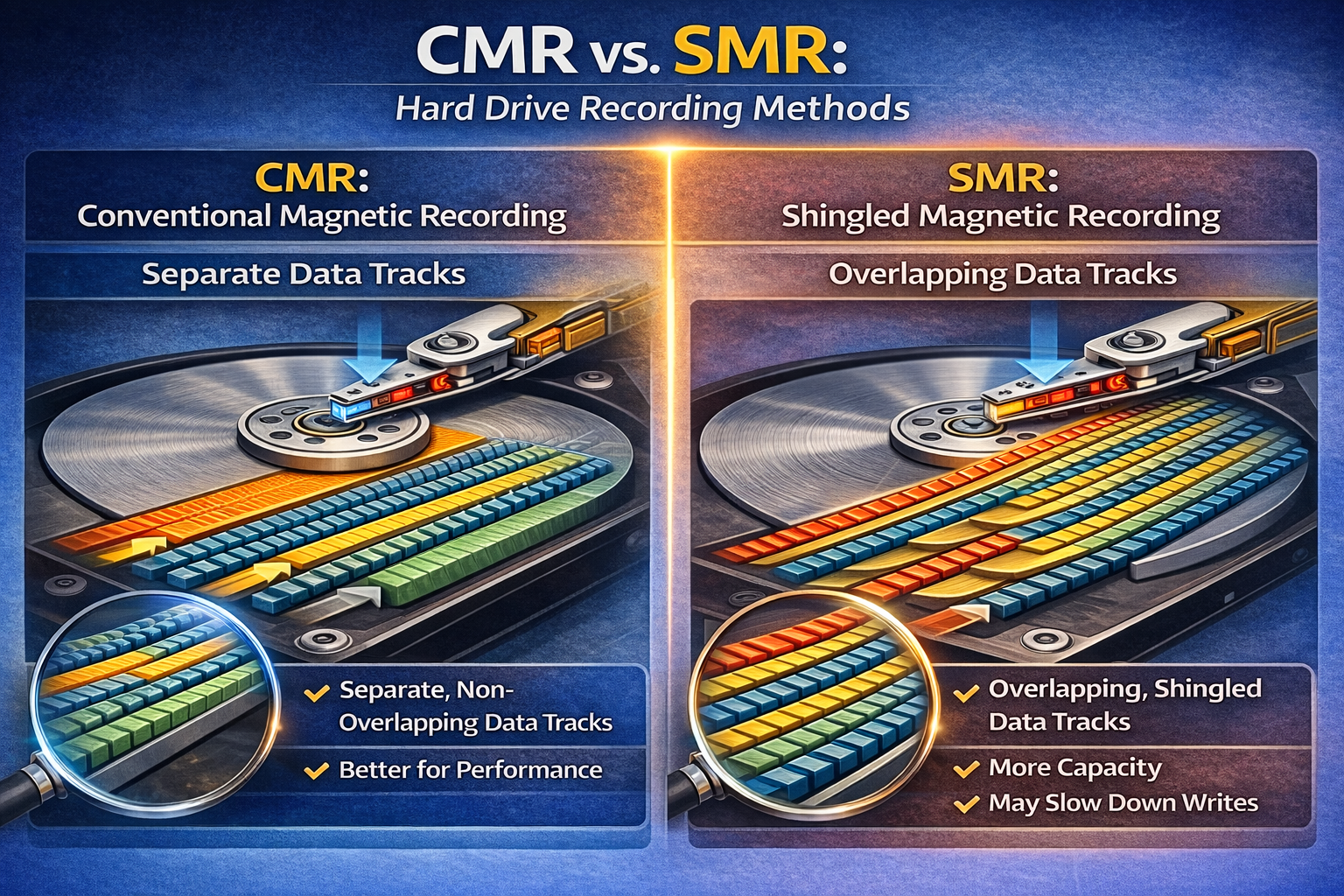
CMR (Conventional Magnetic Recording) and SMR (Shingled Magnetic Recording) are two different ways a hard disk writes data. This is a hidden spec that most buyers never check, but it directly affects how well your drive performs in a CCTV or NAS system.
CMR writes data tracks side by side without overlap. This means the drive can overwrite old recordings quickly and smoothly. It handles continuous 24/7 writing without slowing down. Every surveillance and NAS hard disk should use CMR.
SMR overlaps data tracks like roof tiles to fit more data. This makes drives cheaper and higher capacity, but rewriting data is much slower because the drive has to rewrite entire groups of overlapping tracks. SMR drives are fine for backup and archival storage, but terrible for CCTV because they can’t keep up with continuous recording.
Bottom Line: Always check for CMR before buying. Every HDD recommended in this guide uses CMR technology. Avoid SMR drives for any 24/7 workload.
Which specifications should you check before buying a CCTV hard disk?
When choosing the best HDD for CCTV, these five specs matter most. Understanding them takes 2 minutes and can save you thousands in replacement costs.
Workload Rating (TB/year): This tells you how much data the drive can handle annually. The WD Purple is rated at 180 TB/year and the SkyHawk at 180 TB/year. For a 16-camera system recording in 1080p, you will generate roughly 80–120 TB/year. Always pick a drive with a workload rating above your actual usage.
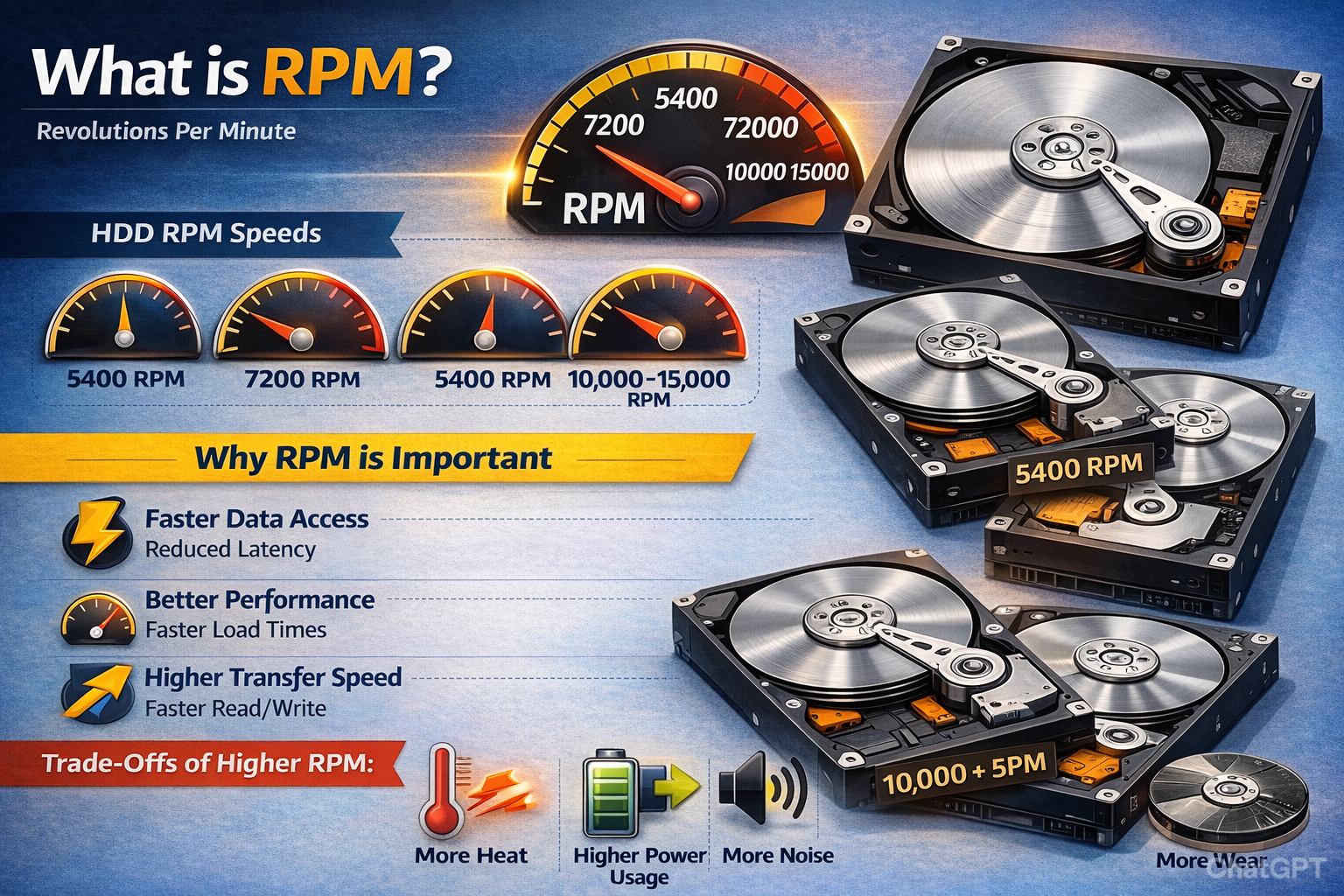
RPM (Revolutions Per Minute): RPM measures how fast the disk spins. 5,400 RPM is standard for surveillance drives and is perfectly adequate for recording video. 7,200 RPM is faster and used in enterprise and some NAS drives, but generates more heat. For CCTV, 5,400 RPM is recommended. For NAS or servers, 7,200 RPM gives better read speed for multiple users.
Cache Size: Cache is a small amount of fast memory on the drive that buffers data during read and write. Larger cache (128MB–256MB) means smoother performance when recording from many cameras simultaneously.
MTBF (Mean Time Between Failures): MTBF is the average hours a drive is expected to run before failing. A good surveillance drive has an MTBF of 1,000,000 hours or more. Higher is better.
TLER (Time-Limited Error Recovery): This is important if your NVR uses RAID. TLER limits how long a drive spends trying to fix a bad sector. Without TLER, a drive can hang for minutes, causing the RAID array to drop it. Surveillance and NAS drives have TLER. Desktop drives do not.
What is the best HDD for CCTV in India? (Top 3 picks for 2026)
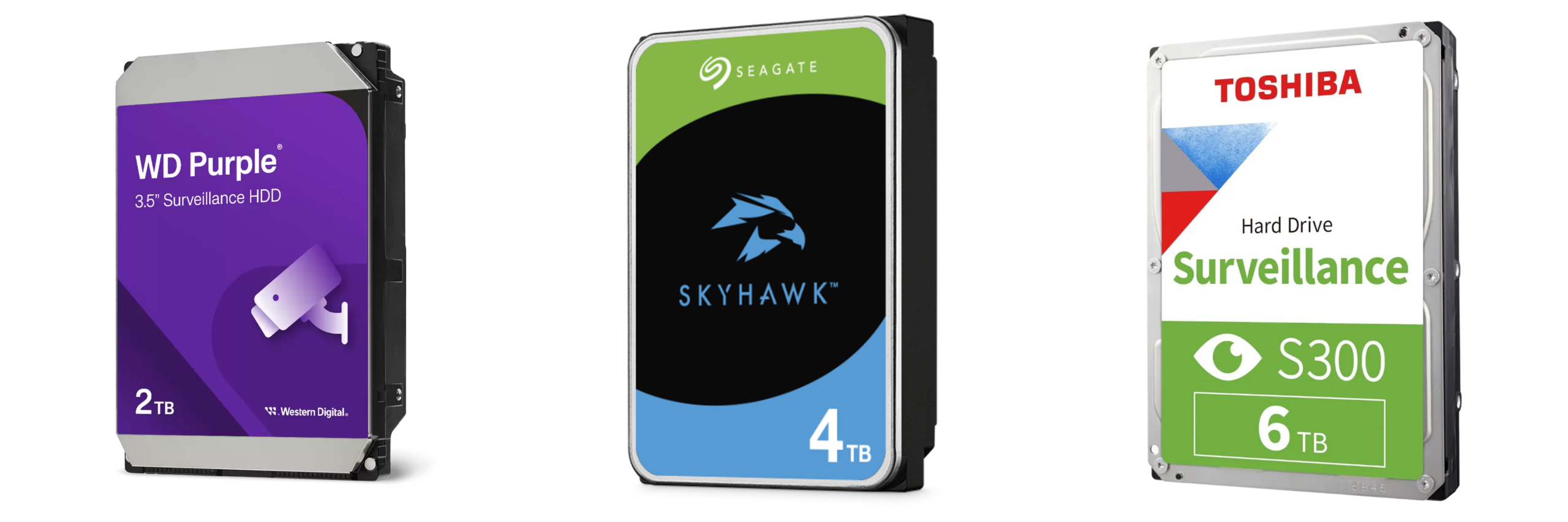
These are three best surveillance hard disks available in India right now. Each pick is tested for 24/7 recording, uses CMR technology, and is compatible with all major Indian DVR/NVR brands, including Hikvision, CP Plus, Dahua, and TP-Link.
Best overall: WD Purple
The WD Purple is the most trusted surveillance hard disk in India. It supports up to 64 cameras, uses AllFrame technology to reduce frame drops, and comes in sizes from 1TB to 22TB. It is the go-to choice for most CCTV installers and system integrators.
Key specs: 5,400 RPM | 64MB–256MB cache | 180 TB/year workload | CMR | 3-year warranty
Price in India: ~₹7,900 (1TB) | ~₹9,599 (2TB) | ~₹12,299 (4TB) | ~₹17,199 (6TB) | ~₹24,999 (8TB)
Best for: 8–64 camera professional CCTV systems, commercial setups, and any project where reliability is the top priority.
Best value: Seagate SkyHawk
The Seagate SkyHawk is the closest competitor to WD Purple. It uses ImagePerfect firmware for
smooth video capture and supports up to 64 cameras. Pricing is often slightly lower than WD Purple
at higher capacities, making it an excellent value.
Key specs: 5,900 RPM | 256MB cache | 180 TB/year workload | CMR | 3-year warranty
Price in India: ~₹7,900 (1TB) | ~₹9,600 (2TB) | ~₹12,099 (4TB) | ~₹17,499 (6TB) | ~₹24,999 (8TB)
Best for: Budget-conscious buyers who want reliable surveillance storage without paying a premium. Great for 4–32 camera setups.
Best budget: Toshiba S300
The Toshiba S300 is a solid surveillance HDD that costs less than both WD Purple and Seagate SkyHawk. It is built for 24/7 operation, uses CMR technology, and handles up to 64 cameras. It is less well-known in India than WD or Seagate, but the hardware quality is excellent.
Key specs: 5,400 RPM | 128MB–256MB cache | 180 TB/year workload | CMR | 3-year warranty
Price in India: ~₹6,500 (1TB) | ~₹8,999 (2TB) | ~₹11,799 (4TB)
Best for: Small to medium CCTV setups where budget matters. Ideal for 4–16 camera home or shop installations.
WD Purple vs Seagate SkyHawk: Which should you buy in India?
This is the most common comparison Indian CCTV buyers face. Both the WD Purple and Seagate SkyHawk are excellent surveillance hard disks. Here is how they compare side by side:
Specifaction | WD PURPLE | Seagate Skyhawk |
|---|---|---|
RPM | 5400RPM | 5900RPM |
Workload Rating | 180TB/Year | 180TB/Year |
Cache (4TB+) | 256MB | 256MB |
Max Cameras | Upto 64 Cameras | Upto 64 Cameras |
Recording Technology | CMR | CMR |
Special Firmware | AllFrame | Image Perfect |
Warranty | 3 Years | 3 Years |
4TB Price (India) | INR 12,299 | INR 12,099 |
8TB Price (India) | INR 24,999 | INR 24,999 |
Final verdict: WD Purple vs Seagate SkyHawk for CCTV in India
For most Indian CCTV installations, WD Purple is the safer choice due to its wider availability, strong distributor network, and proven AllFrame firmware for 24/7 surveillance recording.
Seagate SkyHawk offers slightly higher RPM (5900 vs 5400) and may deliver marginally faster sequential performance, but in real-world DVR/NVR setups, the difference is negligible.
If pricing is similar, choose WD Purple. If SkyHawk is significantly cheaper in your region, it remains a reliable alternative.
Can you use a surveillance HDD in a NAS?
Technically yes, but it is not ideal. Surveillance drives prioritise write speed over read speed. NAS drives balance both because multiple users need to read files simultaneously. For best results, use NAS drives in NAS systems and surveillance drives in DVR/NVR systems.
When do you need Server and Enterprise Hard Disks?
Enterprise HDDs are built for servers, data centres, and cloud storage. They handle both heavy read and write workloads, run at 7,200 RPM or faster, and come with 5-year warranties. The two main options in India are the Seagate Exos and WD Ultrastar/WD Gold.
Enterprise drives cost significantly more (a Seagate Exos 10TB starts at ₹34000) and are overkill for CCTV or basic NAS. Only consider them if you are running a business server with databases, virtualisation, or heavy multi-user workloads.
Bottom Line: For CCTV, use surveillance drives. For NAS/file sharing, use NAS drives. Only buy enterprise drives for actual server environments.
What is the price of CCTV Hard Disks in India? (2026 price list)
Here is the complete CCTV hard disk price list in India for February 2026. All prices are in INR and include GST.
CAPACITY | WD PURPLE | SEAGATE SKYHAWK | TOSHIBA S300 |
|---|---|---|---|
1TB | INR 7,999 | INR 7,999 | INR 6,999 |
2TB | INR 9,499 | INR 9,599 | INR 8,999 |
4TB | INR 12,299 | INR 12,099 | INR 11,799 |
Prices as of February 2026. Check FGTech Store for the most current pricing and availability.
How much storage do you need? (Simple CCTV storage calculator)
The storage you need depends on three things: the number of cameras, the recording resolution, and how many days of footage you want to keep. Here is a simple formula.
Storage Formula
Storage (GB) = Number of Cameras × Bitrate (Mbps) × Recording Hours per Day × Days of Retention × 0.045
Example:
16 cameras × 4 Mbps (1080p H.265) × 24 hours × 30 days × 0.045 = 3,110 GB ≈ 4TB HDD needed
Here is a quick-reference table so you don’t have to calculate manually.
Cameras | Resolution | Codec | 7 Days storage | 30 Days Storage |
|---|---|---|---|---|
4 | 1080p | H.265 | 500Gb (1TB) | 2TB |
8 | 1080p | H.265 | 1TB | 4TB |
16 | 1080p | H.265 | 2TB | 4-6TB |
16 | 4K | H.265 | 4TB | 10-12TB |
32 | 1080p | H.265 | 4TB | 8-10TB |
32 | 4K | H.265 | 8TB | 20-24TB |
Tip: H.265 (HEVC) compression uses about 50% less storage than H.264 at the same quality. If your DVR/NVR supports H.265, use it. Most modern Hikvision, CP Plus, and Dahua recorders do.
Which DVR and NVR brands are compatible with these Hard Disks?
All the surveillance hard disks recommended in this guide are compatible with every major DVR and NVR brand sold in India. This includes Hikvision, CP Plus, Dahua, Secureye, TP-Link VIGI, and Uniview. They use the standard 3.5-inch SATA interface, which is universal across recorders.
Important: Check the maximum HDD capacity your specific DVR/NVR model supports. Entry-level 4-channel DVRs often support only one HDD up to 6TB or 8TB. Higher-end 16 or 32-channel NVRs may support two or more HDDs up to 10TB each. Check your recorder’s datasheet before buying.
What are the 5 most common mistakes to avoid as a buyer?
After helping hundreds of customers choose CCTV storage at FGTech Store, these are the five most common and costly mistakes we see.
1. Using a desktop HDD in a DVR.
Desktop drives (WD Blue, Seagate Barracuda) are not rated for 24/7 operation. They fail within months in a CCTV setup. Always use a surveillance-rated drive.
2. Ignoring CMR vs SMR.
Some budget drives use SMR technology, which causes recording lag during continuous
writes. Always verify CMR before buying.
3. Buying too little storage.
Customers often buy a 1TB drive for a 16-camera system, then wonder why they only get 2–3 days of footage. Use the storage calculator above to size correctly.
4. Choosing SSD for video storage.
SSDs are fast but have limited write endurance and cost 3–4x more per TB than HDDs. For continuous video recording, HDDs are the smarter choice.
5. Skipping UPS protection.
Power fluctuations damage hard disks. In India, where voltage fluctuations are common, always connect your DVR/NVR to a UPS.
How do you protect your CCTV Hard Disk in Indian climate conditions?
India’s climate is tough on electronics. Heat, humidity, dust, and power fluctuations are the four main enemies of hard disk health. Here is how to deal with each one.
Heat: Keep your DVR/NVR in a ventilated area. Do not put it inside a sealed cabinet without airflow. Operating temperature for most surveillance HDDs is 0–65°C, but sustained temperatures above 45°C shorten lifespan.
Dust: Clean the ventilation grilles of your DVR/NVR every 3 months. Dust buildup blocks airflow and causes overheating.
Humidity: In coastal cities (Mumbai, Chennai, Kolkata), humidity can cause condensation. Keep recorders in air-conditioned server rooms wherever possible.
Power: Use a UPS with at least 30 minutes of backup. This protects against voltage spikes during monsoon storms and prevents sudden shutdowns that can corrupt the HDD.
Replacement cycle: Plan to replace your surveillance HDD every 3–4 years even if it hasn’t failed. After this period, the risk of failure increases significantly.
Conclusion: How to pick the right HDD in 30 seconds
Here is the decision made simple.
For CCTV:
- If you want maximum reliability → WD Purple
- If you want value for money → Seagate SkyHawk
- If budget is tight → Toshiba S300.
For NAS:
- Seagate IronWolf
For servers:
- Seagate Exos
For a personal PC:
- WD Blue or Seagate Barracuda.
Need help choosing the right hard disk for your specific setup? Drop us a message on WhatsApp (+91 84549 88088) or browse our full range of surveillance, NAS, and enterprise hard disks at FGTech Store.
Frequently asked questions: CCTV, NAS & Server HDDs in India
Which hard disk is best for CCTV cameras in India?
The WD Purple is the best HDD for CCTV cameras in India. It is built for 24/7 surveillance recording, supports up to 64 cameras, uses CMR technology, and starts at ₹5,900 for 1TB. The Seagate SkyHawk and Toshiba S300 are also excellent alternatives.
Can I use a normal desktop hard disk in my DVR?
No. Desktop hard disks like the WD Blue or Seagate Barracuda are not designed for continuous 24/7 recording. They will overheat and fail within 3–6 months in a DVR. Always use a surveillance- rated HDD like WD Purple, Seagate SkyHawk, or Toshiba S300.
What is the difference between a surveillance HDD and a normal HDD?
A surveillance HDD is built for continuous recording from multiple cameras, 24/7. It has vibration sensors, specialised firmware (like AllFrame or ImagePerfect), and higher write endurance. A normal desktop HDD is designed for 8–10 hours of daily use with mixed read/write tasks.
Which is better: WD Purple or Seagate SkyHawk?
Both are excellent surveillance hard disks with similar specs (CMR, 180 TB/year workload, 64- camera support). WD Purple has wider brand availability in India. Seagate SkyHawk has a slightly higher RPM (5,900 vs 5,400). For most buyers, the choice comes down to price and availability.
What does CMR vs SMR mean?
CMR (Conventional Magnetic Recording) writes data tracks without overlapping, which allows fast rewrites. SMR (Shingled Magnetic Recording) overlaps tracks to increase capacity but slows down rewrites. For CCTV and NAS, always choose CMR. SMR drives cause recording lag in 24/7 systems.
How much storage do I need for 16 cameras recording for 30 days?
For 16 cameras recording in 1080p with H.265 compression for 30 days, you need approximately 4–6TB of storage. For 4K cameras, you need 10–12TB. Use the storage formula in this guide for exact calculations based on your setup.
Is 5400 RPM enough for CCTV recording?
Yes. 5,400 RPM is the standard speed for surveillance hard disks and is more than sufficient for recording video from multiple cameras. It also generates less heat than 7,200 RPM drives, which is an advantage in 24/7 enclosed DVR/NVR setups.
What is the price of a 4TB CCTV hard disk in India?
A 4TB surveillance hard disk costs approximately ₹10,200 for WD Purple, ₹10,300 for Seagate SkyHawk, and ~₹9,500 for Toshiba S300 as of February 2026. Prices vary by seller and may change.
Is SSD or HDD better for CCTV recording?"
HDD is better than SSD for CCTV recording. SSDs have limited write endurance and cost 3–4x more per TB than HDDs. Continuous 24/7 video recording wears out SSDs significantly faster. Surveillance HDDs like WD Purple and Seagate SkyHawk are specifically engineered for this workload and offer far better value for money.
Is the Toshiba S300 good for CCTV?
Yes. The Toshiba S300 is a reliable surveillance HDD that uses CMR technology, supports up to 64 cameras, and is rated for 180 TB/year workload. It is typically 10–15% cheaper than WD Purple and Seagate SkyHawk, making it an excellent budget choice.
Do I need to format a new HDD before installing it in my DVR?
Most DVRs and NVRs will automatically format a new hard disk when you install it and power on the system. Simply connect the SATA data and power cables, mount the drive, close the case, and let the recorder initialise it. No computer formatting is needed.
What is AllFrame technology in WD Purple?
AllFrame in WD Purple is WD’s firmware technology designed specifically for surveillance video. It reduces frame loss and improves playback reliability by managing how data is written to the drive during simultaneous multi-camera recording.
Is WD Purple compatible with Hikvision, CP Plus, and Dahua?
Yes. WD Purple uses the standard 3.5-inch SATA interface and is compatible with all major DVR and NVR brands in India, including Hikvision, CP Plus, Dahua, Godrej, Secureye, TP-Link VIGI, and Uniview.
How long does a CCTV hard disk last?
A quality surveillance HDD like WD Purple or Seagate SkyHawk typically lasts 3–5 years under normal 24/7 operation. In hot Indian climates without proper ventilation, lifespan may reduce to 2–3 years. Using a UPS and keeping the DVR cool extends HDD life significantly.
What size HDD do I need for CCTV?
For a 4-camera 1080p system recording 24/7 with H.265, a 2TB HDD covers approximately 30 days of footage. An 8-camera system needs 4TB for 30 days. A 16-camera system needs 4–6TB for 30 days. For 4K cameras, double these figures. Use the storage calculator above for your exact setup.
Is 4TB enough for an NVR?
4TB is enough for most home and small business NVR setups. A 4TB drive covers approximately 30 days of footage from 8 cameras recording in 1080p H.265. For 16 cameras or 4K resolution, 4TB gives you around 10–15 days of retention. If you need 30 days at higher capacity, go to 8TB or use two drives if your NVR supports it.