
 HD Cameras and Webcam
 Projectors and Speakers
 VOIP Phones and Gateway
 Access Control
 5G routers and 4G LTE Devices
 Smart Sensors And Automation
 Fiber and SFP Modules
 Firewall & Cloud Controllers
 Network Adapters and Accessories
 Network Switches
 PoE Switches
 Point To Point Wireless Radio
 Routers
 Wireless Access Points
 IP Cameras
 Memory Cards
 NVR
NVR Smart WiFi Cameras
 Storage Devices
 Desktop & Laptop RAMs
 Internal and External Hard Drives
 Storage Accessories and Enclosures
 SSD and NVMe Drives
 USB Flash Drives


How to diagnose and fix office WiFi performance issues? A networking case study


Your office wifi keeps dropping and nobody can tell you why. This networking case study is about a 200-person office in Mumbai that spent months and several lakhs trying to fix a wifi problem that turned out to be misdiagnosed from the start
Pilgrim was founded in 2019, backed by Vertex Ventures and Fireside Ventures, with products now in over 10,000 retail stores across India. Their Mumbai office runs a dense operation: customer support on calls throughout the day, marketing uploading large campaign files, tech teams pushing code, and leadership on back-to-back meetings.
The symptoms were inconsistent speeds, dropped video calls, and dead zones in meeting rooms. It looked like an internet problem. And that's how everyone treated it.
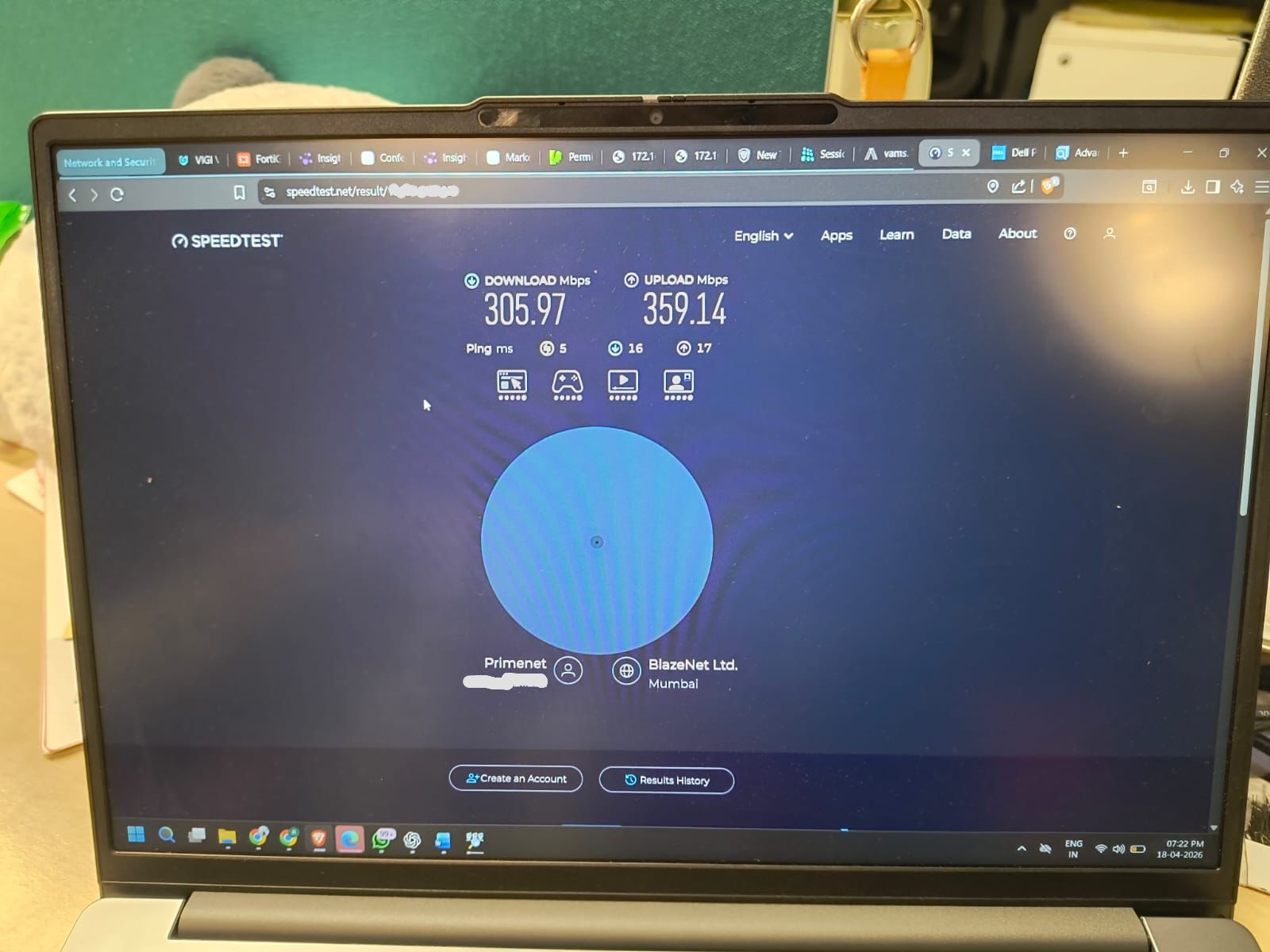
The ISP was called first, which is what most companies do. An engineer came in, ran a test on the leaseline, showed it was delivering 400 Mbps as promised, and left. From his side, the job was done. The connection was working. It's the networking equivalent of 'the operation was successful but the patient died’. The connection was technically healthy. The office was still unusable.
The networking hardware vendor, when contacted, pointed the other way and said the bandwidth probably wasn't enough for a 200 person office. This is a pattern that plays out in offices everywhere. The ISP says it's the hardware. The hardware vendor says it's the ISP. The company in the middle doesn't have the technical depth to know who's right, so they either upgrade everything or keep going in circles.
They were also sold a firewall with a multi-year subscription that ran into a few lakhs. A firewall is a security layer. It controls what traffic is allowed in and out of a network. It's a legitimate piece of infrastructure. But it doesn't fix the bandwidth. The wifi problem continued exactly as before, because the firewall was solving a different problem entirely.
By this point, Pilgrim was seriously considering upgrading their leased line from 400 Mbps to 1 Gbps, which would have required a recurring expense of ₹12-15 lakh per year. A third vendor had also quoted ₹7-8 lakh to replace all the networking hardware, without specifying what brand they'd use or explaining what exactly was wrong with the current setup.
To put that in perspective: 1 Gbps is data center grade capacity. A 200-person office running video calls, uploading files, and browsing the web doesn't come close to saturating a 400 Mbps dedicated leased line. Just because you have the budget to upgrade doesn't mean the upgrade is what you need.
The turning point was when someone finally asked the right question: is this actually a bandwidth problem?
Pilgrim had also tried a few other things during this phase. They gave wired LAN connections to the customer support team, which worked. LAN doesn't have the same concurrency limitations as wifi. But that only helped the people who sat at fixed desks. Anyone who moved around the office, took calls in common areas, or worked from meeting rooms was still on wifi and still facing drops. The fact that LAN worked fine while wifi didn't was itself a clue that the internet connection wasn't the problem.
400 Mbps on a dedicated leaseline is more than sufficient for a 200 person office. The problem isn't that you don't have enough internet. It's that your wifi can't distribute what you already have. That was a fundamentally different diagnosis from everything Pilgrim had heard so far. Every other conversation had been about adding more bandwidth. This one was about fixing the delivery mechanism.
The first useful step was looking at the wireless infrastructure separately from the internet connection. The LAN was fine. Customer support, already on wired connections, had no issues. The problems were concentrated wherever people relied on wifi. Meeting rooms, open-floor desks, common areas. The pattern pointed clearly at wifi capacity, not internet bandwidth.
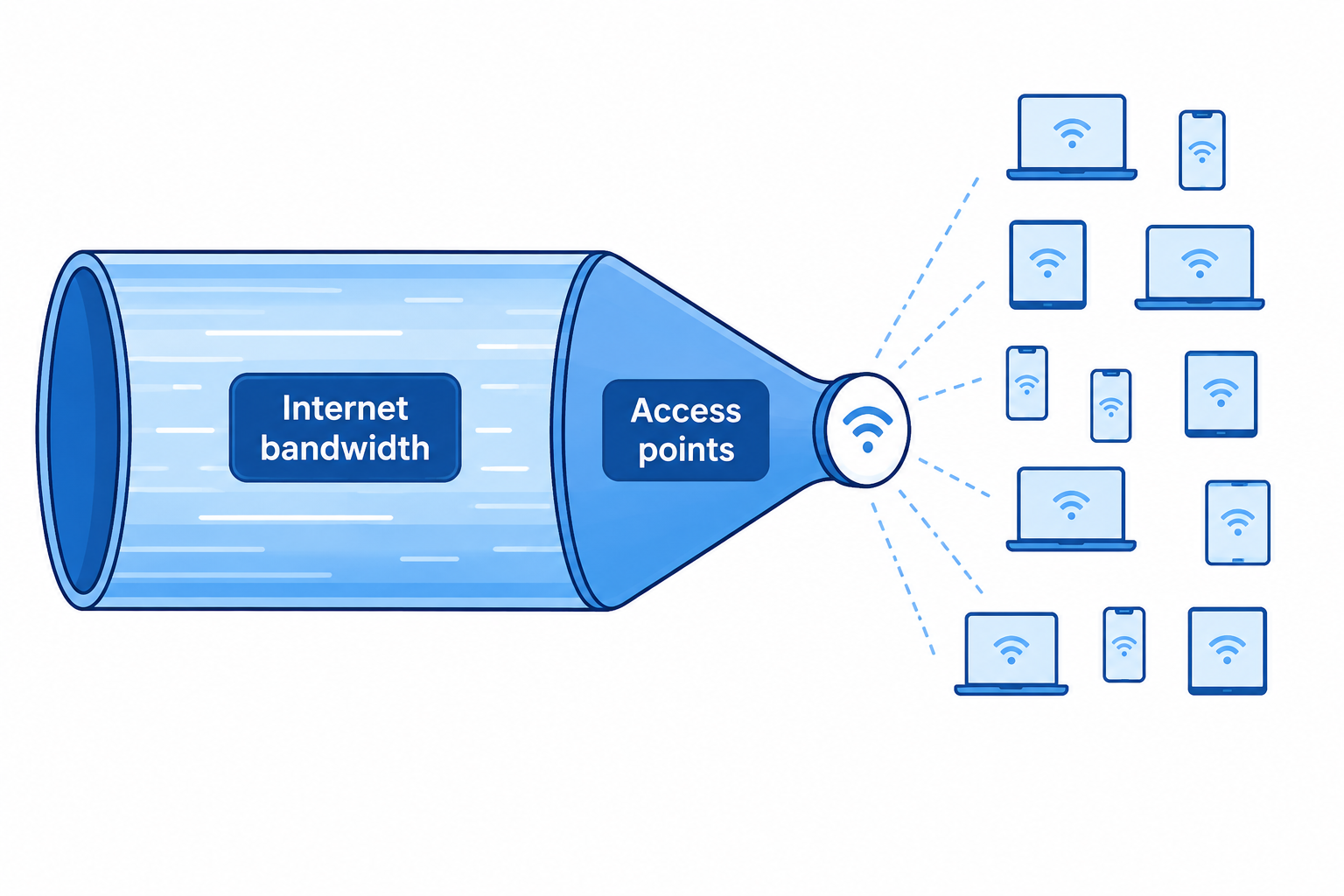
The office had 5 wireless access points. Each one was rated for roughly 25-30 concurrent connections. At 212 employees with two devices each, some of those access points were handling 45-50 devices, well past what they were designed for. The access points had never been reconfigured or repositioned since the office was at 85 people. Nobody had revisited the wireless setup as headcount grew.
A wifi heat map study of the office confirmed the suspicion. A heat map is a visual survey that maps signal strength across a physical space. It shows where coverage is strong, where it drops, and where access points need to be added or repositioned based on actual usage density. The study showed that the office needed 7 access points for its current size and device load. Five were already installed, but they were handling more than they were built for and weren't positioned optimally for the floor layout. Two new access points were needed immediately in the highest-density zones.
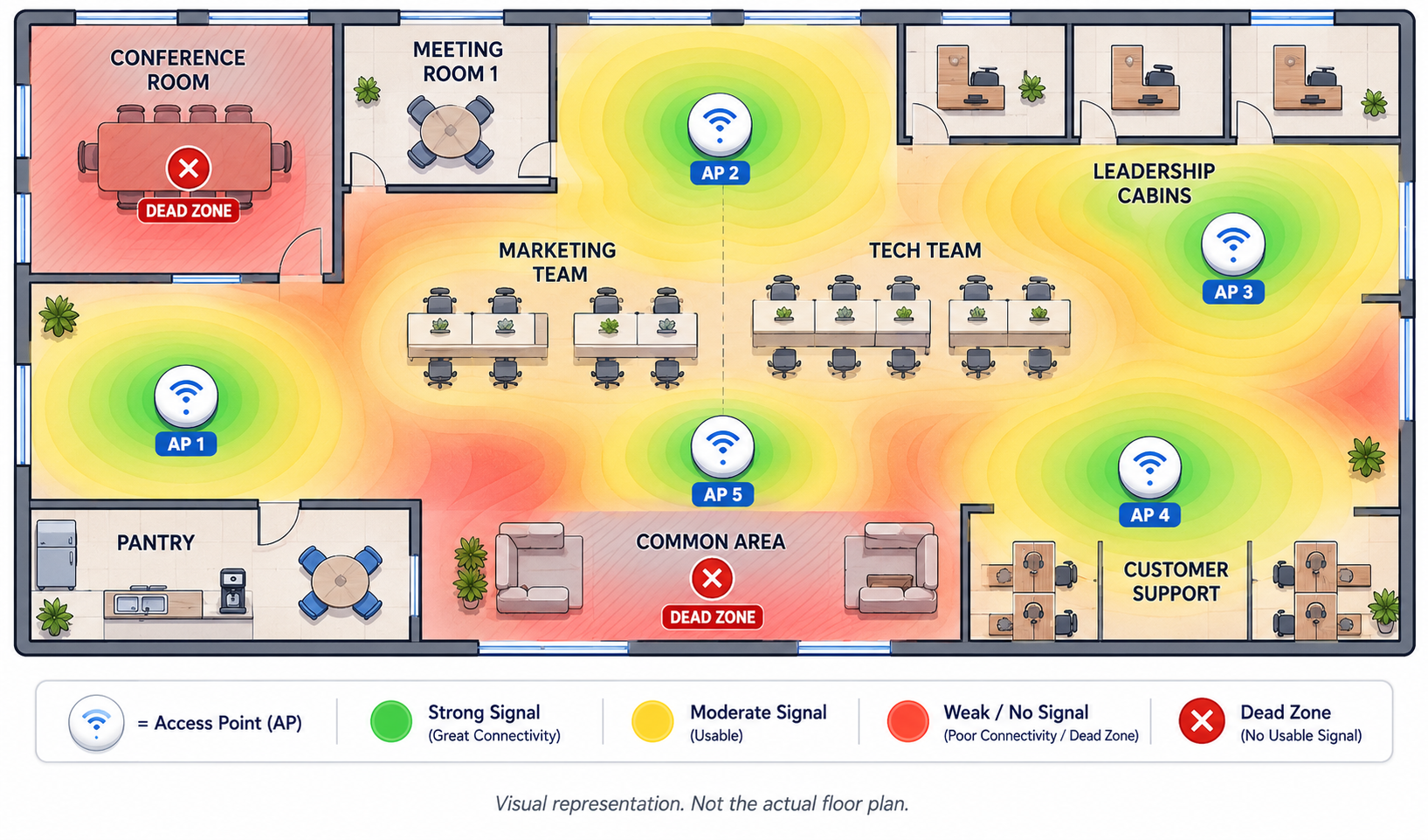
Pro tip: if your office has grown by more than 50% since your wifi was last set up, you probably need a fresh heat map study. Access points that worked for 80 people won't automatically work for 200
Pilgrim had already spent money on fixes that didn't work. There was understandable skepticism about spending more. So instead of proposing a full replacement upfront, The fix started with just 2 new access points, placed in the exact locations the heat map identified as critical gaps. Pilgrim was asked to run the setup for a week and see if things improved.
They did. The team noticed the difference almost immediately in the areas those two APs covered. After a week of testing, Pilgrim gave the go ahead to replace the remaining 5. The final setup: 7 Netgear access points, each positioned based on the heat map data, each rated for the actual device density of the zone it covered. The conference room got its own dedicated AP rated for 25+ concurrent devices, something it never had before.
To put the cost picture in perspective, here's what Pilgrim was being pushed toward versus what actually solved the problem:
| What was recommended | Estimated cost | Did it fix the wifi? |
|---|---|---|
| Leased line upgrade (400 Mbps to 1 Gbps) | ₹12-15 lakh/year, recurring | No. Bandwidth was never the bottleneck. |
| Firewall with multi-year subscription | A few lakhs, upfront | No. Firewalls control traffic security, not wifi distribution. |
| Full hardware replacement (third vendor) | ₹7-8 lakh, one-time | Unknown. No diagnosis was done, no brand was specified. |
| Solution: heat map study, 7 Netgear APs, network segregation, QoS | ₹3 lakh, one-time | Yes. 90-95% of team reported zero complaints post-deployment. |
This is a pattern worth paying attention to. When office wifi breaks, the instinct is to throw bandwidth or expensive licenses at it. Higher internet plans feel like the obvious fix. Paid firewall subscriptions feel like due diligence. But if the actual bottleneck is at the access point level, none of that spend reaches the problem. The leased line was already delivering 400 Mbps. The firewall was already doing its job. The wifi was still dropping because 5 access points were serving 400+ devices.
But the access points were only part of what changed. The network itself was also restructured.
Three separate networks were created. One for Pilgrim's internal team. One for guest wifi, set up with OTP-based authentication through FreeG WiFi, so visitors could get online without touching internal resources. And one dedicated entirely to CCTV. Before this, everything ran on the same network. That meant a guest's phone, an employee's laptop, and a security camera were all competing for the same bandwidth on the same access point. Segregation fixed that.
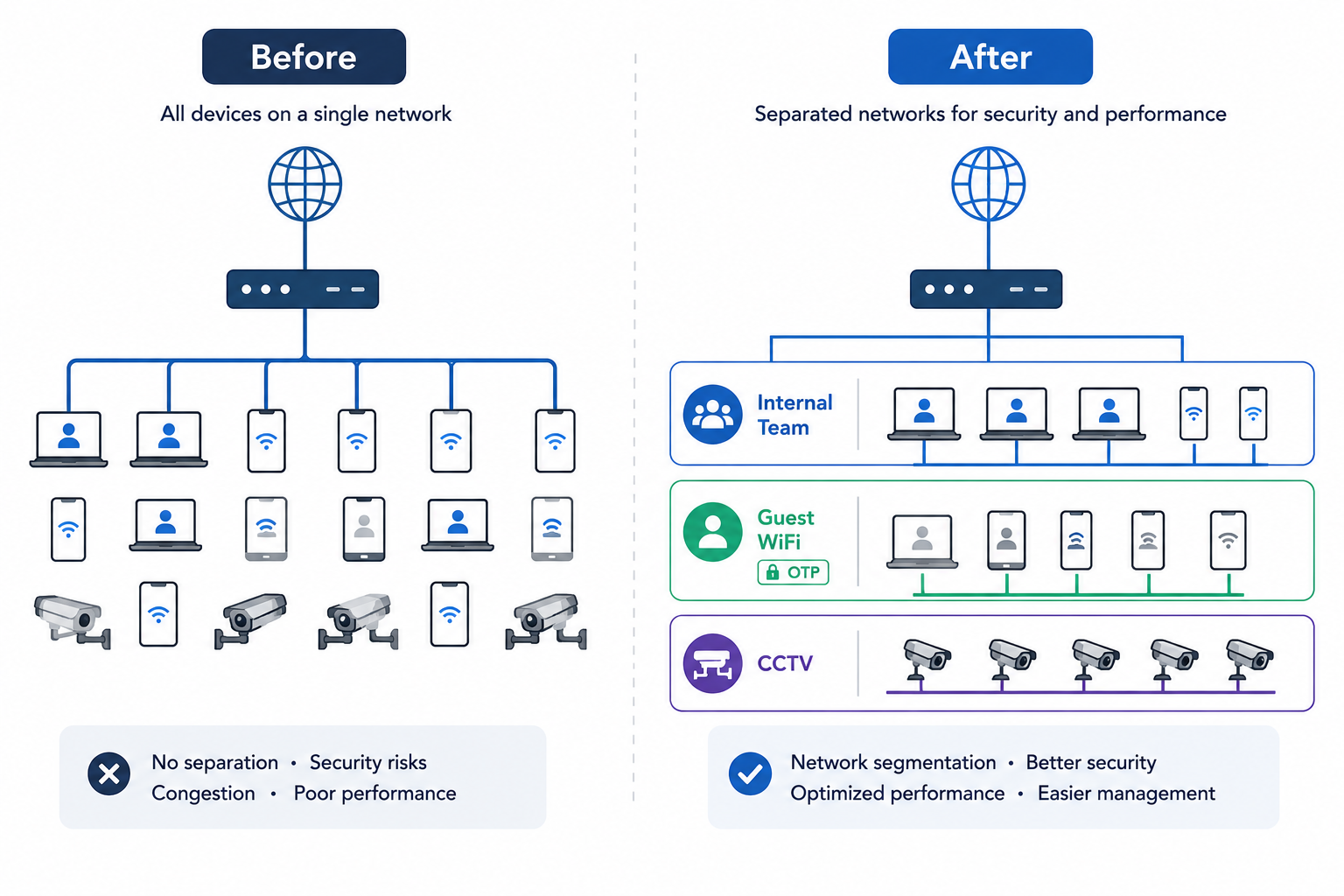
Pro tip: if your office guests, employees, and security cameras are all on the same network, you're one heavy Zoom call away from your CCTV feed lagging. Segregation isn't a luxury. It's basic hygiene for any office running more than 50 devices.
Traffic prioritization was configured through the router using VLAN and QoS settings. VLANs (Virtual Local Area Networks) let you split one physical network into separate logical networks, so different teams can have their own traffic rules without needing separate hardware. QoS (Quality of Service) controls which traffic gets priority when bandwidth is being shared. Marketing, which regularly uploads large campaign assets like product shoot files and social media videos, was given higher upload bandwidth. The tech team needed specific ports open for their development environments. Customer support stayed on LAN for call stability. Different teams, different usage patterns, different network treatment.
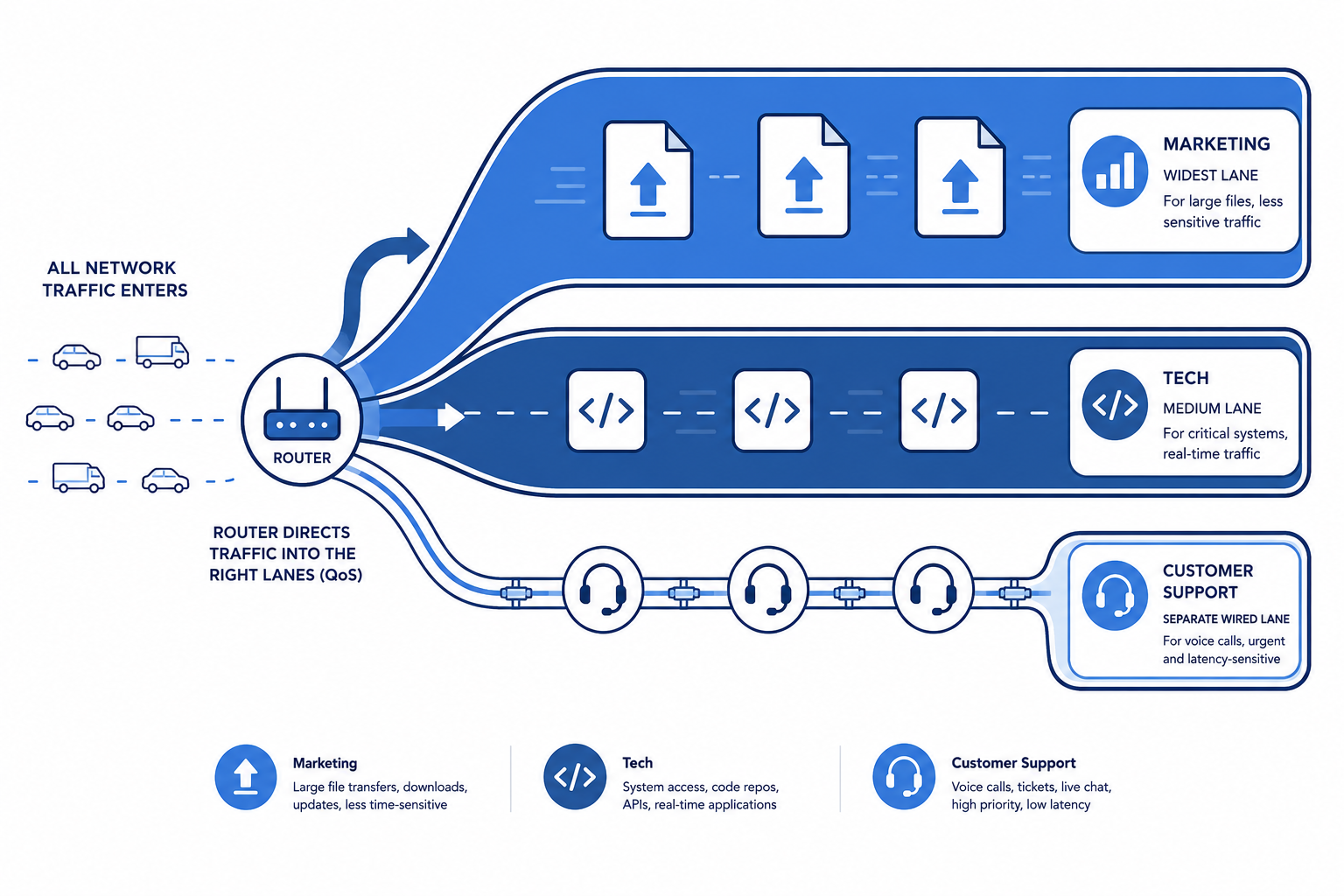
Pro tip: most enterprise routers support VLAN and QoS configuration out of the box. If your IT team hasn't set up traffic rules for different departments, you're letting a marketing team's 2 GB upload compete equally with a support agent's live call. It takes an hour to configure and the difference is immediate.
After the full rollout, Pilgrim ran an internal check. Every employee was asked to test speeds from their own devices and report any issues. The result: 90-95% of the team reported zero complaints. The daily drops that had been a constant for months just stopped. Nobody was talking about the wifi anymore, which, in networking, is exactly what success looks like.
The few drops that still occur happen during scheduled firewall firmware updates, a maintenance activity, not a capacity issue.
There's also a forward looking dimension to this. Pilgrim is scaling. The headcount is expected to grow past 350 seats in the near term. The network design accounts for that. The 7 AP setup, the segregation architecture, and the traffic rules are all built to absorb growth without requiring a redesign. One reason Netgear was chosen specifically is that they maintain a dedicated India team for support and warranty, which matters when something breaks and you need someone who can quickly send help.
Gagan Makker, Co-founder, Pilgrim:
"When we started facing network issues, it became the usual blame game. ISP blamed the hardware, hardware blamed the ISP, while our calls dropped and meetings suffered. We were even considering upgrading to a 1 Gbps leaseline and had already spent on firewall subscriptions that didn't solve the issue. FGTech took a different approach. Instead of selling upgrades, they diagnosed the problem and found that our 400 Mbps leaseline was already sufficient. The real issue was WiFi capacity. Our office had grown from 85 to 200+ employees, each with multiple devices, but the network design hadn't evolved. Their team conducted a heat map study, identified coverage gaps, and recommended a phased approach. They first deployed two Netgear access points, let us validate performance for a week, and only then expanded the rollout. The result has been seamless. Since deployment, the Netgear setup has delivered stable performance with no complaints, downtime, or troubleshooting. As we scale toward 350 seats, we needed a partner that solves problems without unnecessary spend and builds for growth. FGTech and Netgear delivered exactly that."